Spring naar de inhoud
WordPress.org

Nederlands (België)

  • Thema’s
  • Plugins
  • Nieuws
  • Over
  • Meetups
  • Vertaling
  • Contact
  • Download WordPress
Download WordPress
WordPress.org

Plugin Directory

Webknit Site Toolkit

  • Dien een plugin in
  • Mijn favorieten
  • Login
  • Dien een plugin in
  • Mijn favorieten
  • Login

Webknit Site Toolkit

Door Webknit Digital
Download
  • Details
  • Beoordelingen
  • Installatie
  • Ontwikkeling
Ondersteuning

Beschrijving

Webknit Site Toolkit lets a site administrator:

  • Recolor the wp-admin sidebar, links, buttons, and form inputs, entered as hex codes or picked visually.
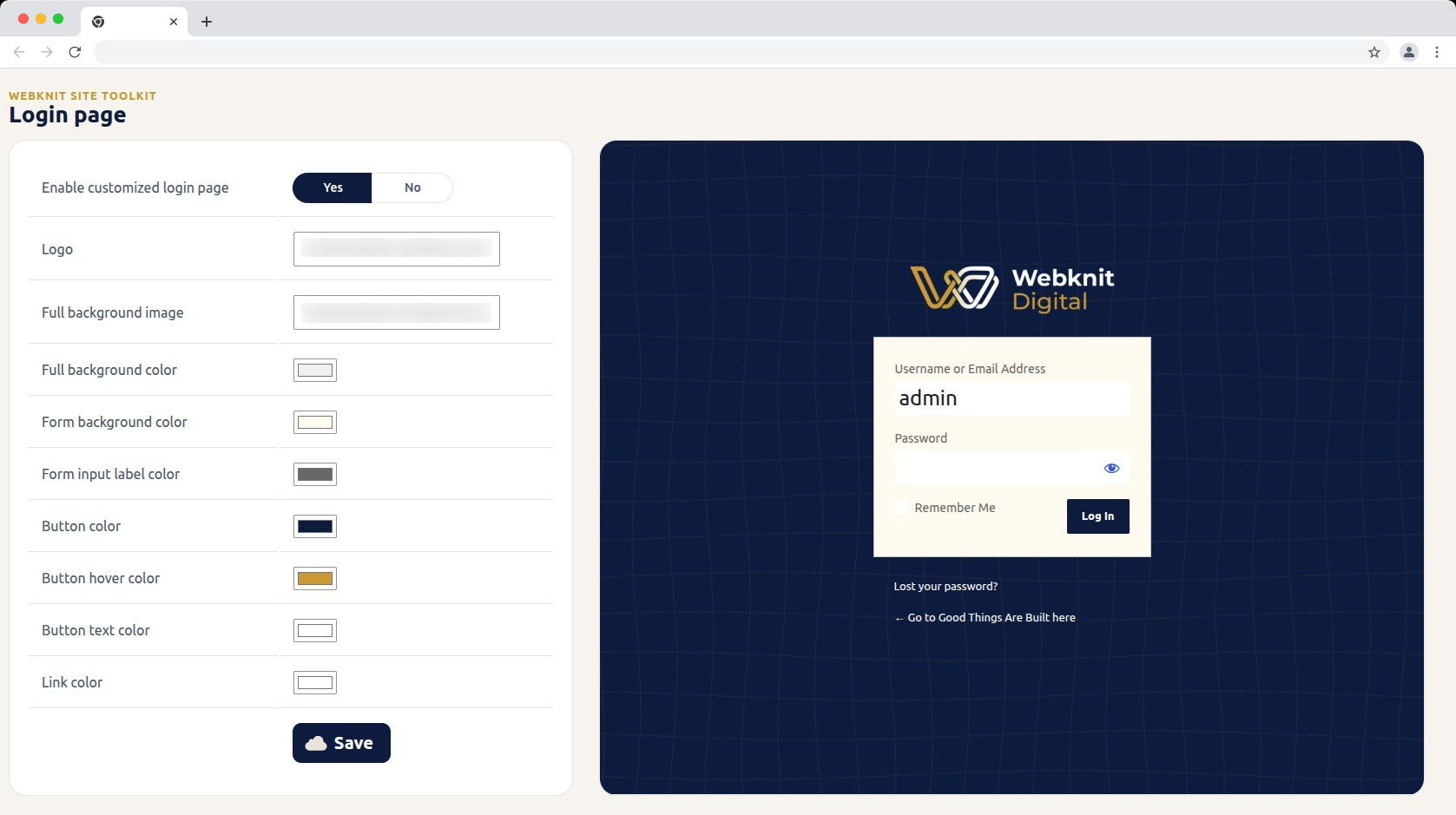
  • Customize the login screen: logo, full-page background image/color, form background/label colors, and button colors/text.
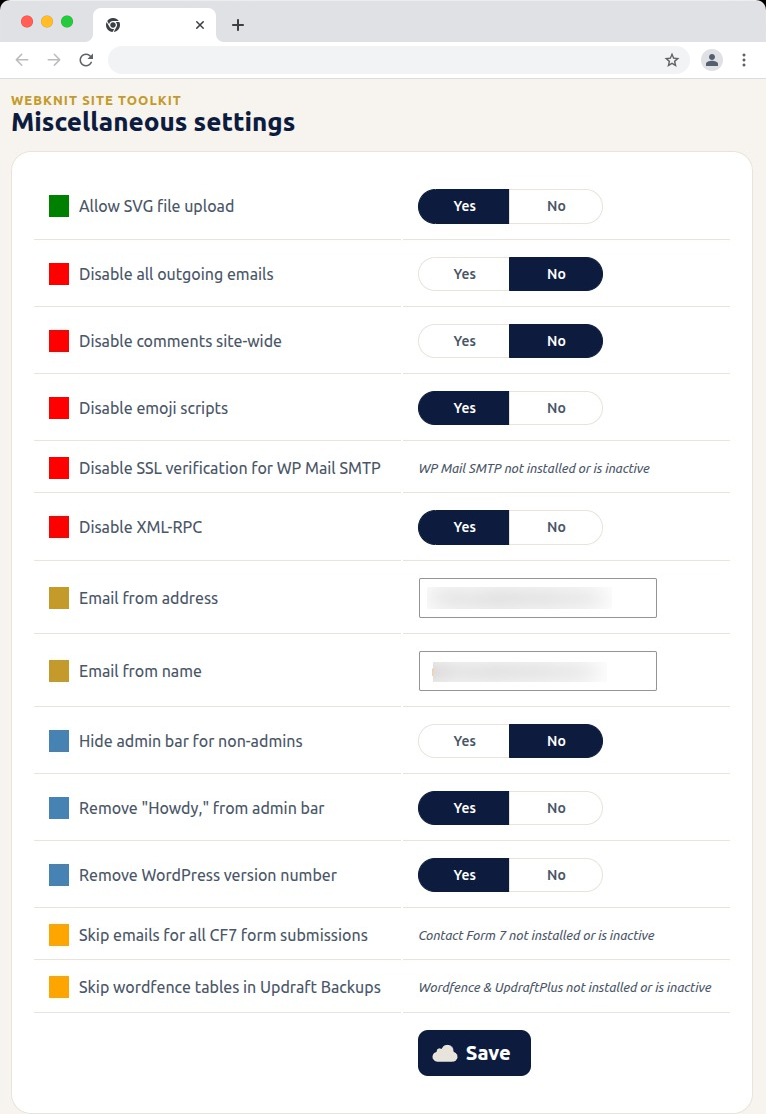
  • Toggle a set of miscellaneous settings: allow SVG uploads, disable SSL verification for WP Mail SMTP, disable outgoing emails, skip Wordfence tables during UpdraftPlus backups, skip Contact Form 7 submission emails, disable XML-RPC, remove the WordPress version number, disable emojis, hide the admin bar for non-admins, disable comments sitewide, remove “Howdy,” from the admin bar, and override the outgoing mail “from” name/address.

Schermafbeeldingen
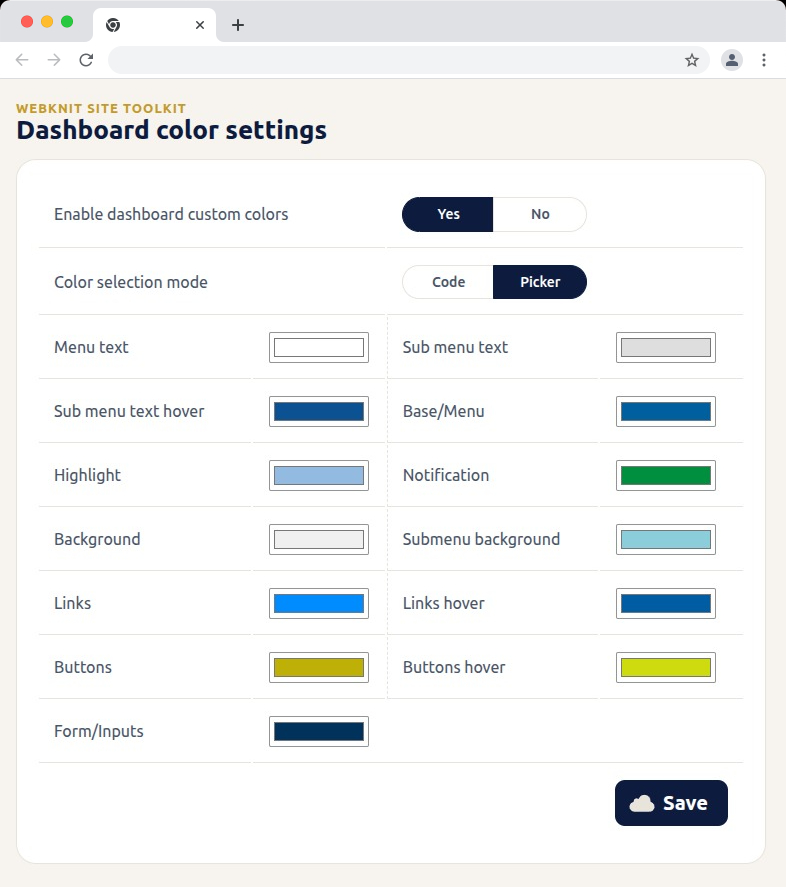
Dashboard color settings — recolor the wp-admin sidebar, links, buttons, and form inputs with hex codes or a visual picker.
Login page — customize the logo, background, form colors, and button styling, with a live preview alongside the settings.
Miscellaneous settings — toggle SVG uploads, outgoing email, comments, XML-RPC, and more; toggles for a plugin that isn't installed or active show a status message instead of a Yes/No choice.
Miscellaneous settings — toggle SVG uploads, outgoing email, comments, XML-RPC, and more; toggles for a plugin that isn’t installed or active show a status message instead of a Yes/No choice.

Installatie

  1. Upload the plugin files to /wp-content/plugins/webknit-site-toolkit, or install through the WordPress plugins screen directly.
  2. Activate the plugin through the “Plugins” screen in WordPress.
  3. Use the “Site Toolkit” menu in wp-admin to configure dashboard colors, the login page, and miscellaneous settings.

FAQ

Why does one of the Misc. settings toggles show a message instead of Yes/No?

That setting acts on another plugin (WP Mail SMTP, Contact Form 7, or Wordfence + UpdraftPlus) that isn’t currently installed or active, so the toggle would have no effect. The message replaces the toggle until that plugin is active; your previously saved choice is kept and reappears once it is.

I don’t see the “Site Toolkit” menu in wp-admin.

Access requires the manage_options capability, which by default only Administrators have.

I changed a color or setting and saved, but the site still looks the same.

Generated CSS is served with a cache-busting version, but browsers can still hold an old copy. Hard-refresh the page (Ctrl+Shift+R / Cmd+Shift+R) and confirm the save actually completed.

Where are the generated CSS files stored?

In wp-content/uploads/webknit-site-toolkit/. That directory must be writable by the web server, or dashboard/login color changes won’t apply.

Beoordelingen

Er zijn geen beoordelingen voor deze plugin.

Bijdragers & ontwikkelaars

“Webknit Site Toolkit” is open source software. De volgende personen hebben bijgedragen aan deze plugin.

Bijdragers
  • Webknit Digital

Vertaal “Webknit Site Toolkit” naar jouw taal.

Interesse in de ontwikkeling?

Bekijk de code, haal de SVN repository op, of abonneer je op het ontwikkellog via RSS.

Changelog

1.0.0

  • Initial release.

Meta

  • Versie 1.0.0
  • Laatst bijgewerkt: 11 uren geleden
  • Actieve installaties: Minder dan 10
  • WordPress versie 6.0 of nieuwer
  • Getest t/m 7.0.4
  • PHP versie 7.4 of nieuwer
  • Taal
    English (US)
  • Tags
    admincolorsdashboardloginsettings
  • Geavanceerde weergave

Beoordelingen

Er zijn nog geen beoordelingen ingediend.

Je beoordeling

Bekijk alle beoordelingen

Bijdragers

  • Webknit Digital

Ondersteuning

Iets te melden? Hulp nodig?

Het supportforum bekijken

  • Over
  • Nieuws
  • Hosting
  • Privacy
  • Showcase
  • Thema's
  • Plugins
  • Patronen
  • Leren
  • Ondersteuning
  • Ontwikkelaars
  • WordPress.tv ↗
  • Raak betrokken
  • Events
  • Doneer ↗
  • Swag ↗
  • WordPress.com ↗
  • Matt ↗
  • bbPress ↗
  • BuddyPress ↗
WordPress.org
WordPress.org

Nederlands (België)

  • Bezoek ons X (voorheen Twitter) account
  • Bezoek onze Bluesky account
  • Bezoek ons Mastodon account
  • Bezoek onze Threads account
  • Onze Facebookpagina bezoeken
  • Bezoek onze Instagram account
  • Bezoek onze LinkedIn account
  • Bezoek onze TikTok account
  • Bezoek ons YouTube kanaal
  • Bezoek onze Tumblr account
Code is Poetry.
The WordPress® trademark is the intellectual property of the WordPress Foundation.