
Beschrijving
Security Check Report looks at 62 aspects of a WordPress installation and turns the findings into a graded report. It changes no setting, no file and no account. It stores its own results in the database, and it writes one temporary file in the uploads folder that is deleted again in the same request.
The report opens with the five things worth doing first, not with a table of 62 rows. Every finding says what was found, why it matters and what to do about it.
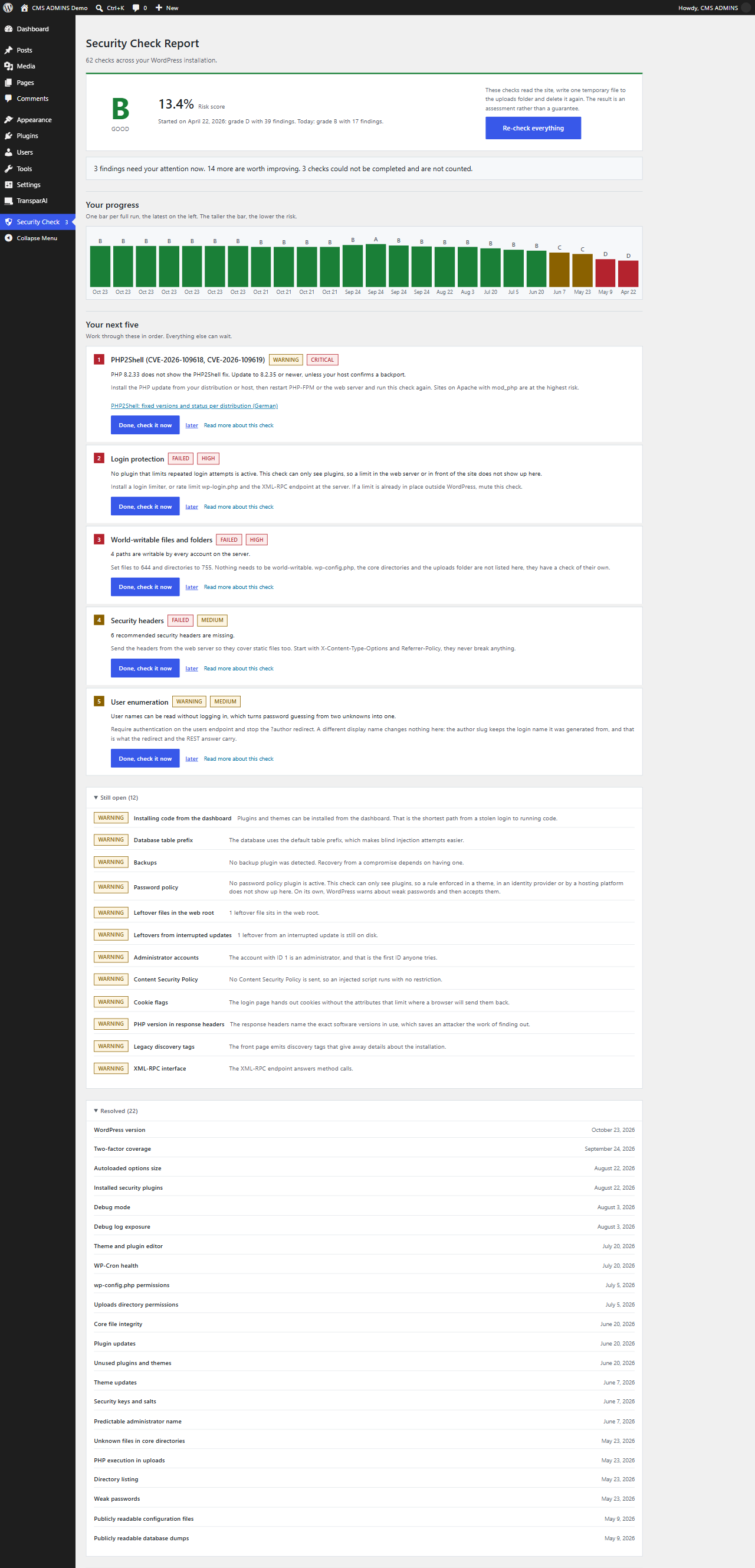
From the second run onwards the page no longer opens on the start button but on an overview: the grade, a line saying where the site stood on the first run and where it stands today, one bar per recorded run, five tasks to work through, what is still open, and what has been resolved and when.
Elke taak heeft een knop die die ene controle opnieuw uitvoert en binnen enkele seconden antwoord geeft. Zo is een oplossing bevestigd terwijl je nog op het scherm bent, en niet pas bij de volgende volledige ronde. Een losse hercontrole schrijft geen punt in de geschiedenis, en de pagina zegt dat ook, want een cijfer dat uit meerdere rondes is samengesteld, is geen cijfer dat in één keer is gemeten.
PHP2Shell check (CVE-2026-109618, CVE-2026-109619)
PHP2Shell is the name for two critical flaws in the PHP core that let an attacker run code on the server with a single request and no login. The PHP team released the fixes on 21 October 2026, and attacks started the same day. No WordPress plugin can patch PHP itself, but this one tells you within seconds whether your server still needs the update.
The PHP2Shell check reads the PHP version your site actually runs on and answers in plain words:
- Green: PHP 8.5.12, 8.4.27, 8.3.36, 8.2.35 or newer, or an Ubuntu package that carries the backport. The fix is in place.
- Orange: the fix cannot be read from the version number. Update PHP, or have your host confirm the backport. Red Hat, Plesk and cPanel often keep the old number after patching, so orange is a question to your host, not a verdict.
Start a run on the Security Check screen or with wp security-check run. The check sends nothing anywhere and only looks at the running PHP.
Wat je krijgt
- Een gewogen cijfer van A tot F, waarbij één mislukte kritieke controle niet kan worden verstopt achter vijftig geslaagde kleine
- Een checklist van telkens vijf taken, afgeleid van urgentie en score in plaats van giswerk; is er één klaar, dan schuift de volgende op
- Een knop per taak die die ene controle opnieuw uitvoert, zodat je het resultaat van een oplossing binnen seconden ziet
- Een geschiedenis van de laatste 24 scans, waarbij de allereerste voorgoed bewaard blijft, zodat het beginpunt zichtbaar blijft
- Een vergelijking met de vorige controle, direct onder het cijfer: hoeveel bevindingen nieuw zijn en hoeveel zijn opgelost
- Dempen dat onthoudt wat een bevinding zei, zodat een geaccepteerde bevinding terugkomt zodra die echt verandert
- “Niet bepaald” als echte uitkomst, zodat een geblokkeerd verzoek nooit als probleem wordt gemeld en het cijfer nooit verschuift
- A count on the menu entry, a widget on the dashboard home, the grade in Tools, Site Health, and a reminder once the last run is more than 30 days old
- Export als platte tekst, JSON en CSV
- A WP-CLI command that produces the same grade as the screen
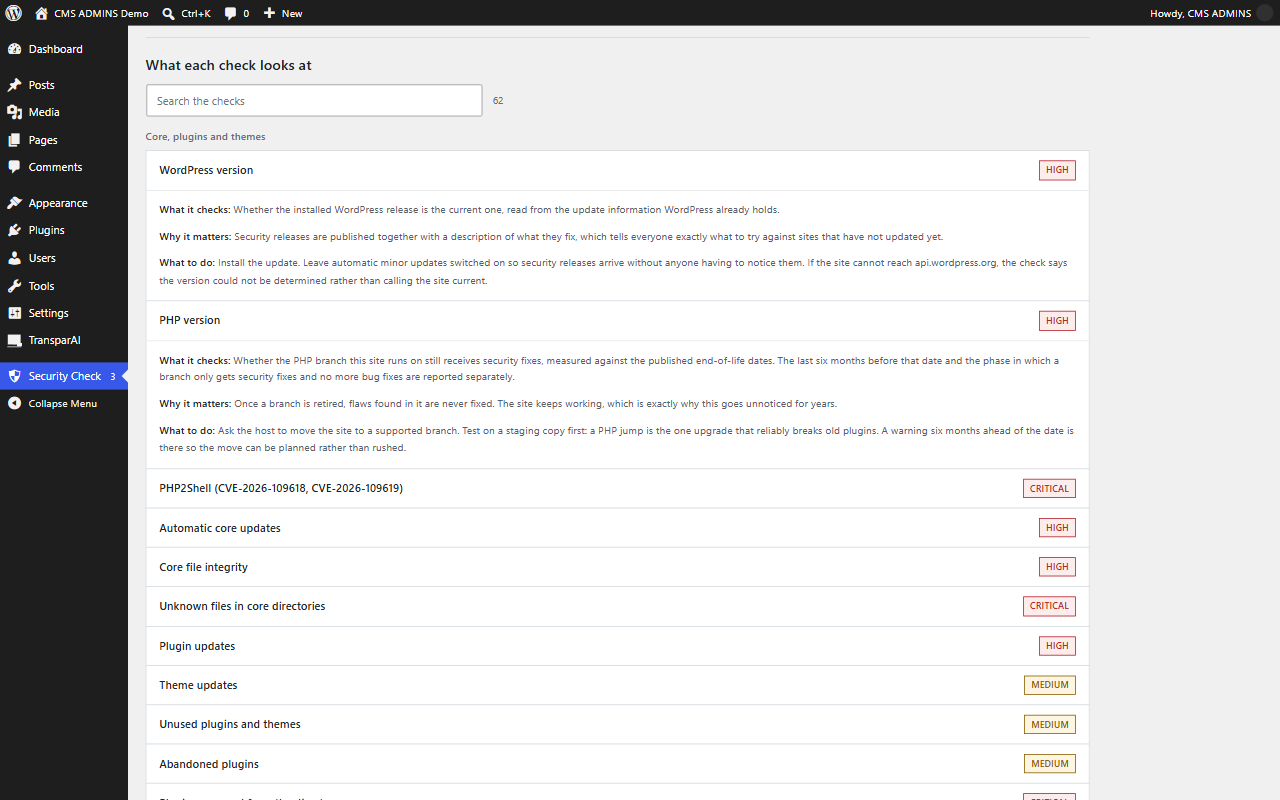
- Een uitleg bij elke controle, doorzoekbaar, direct op de pagina
Wat het controleert
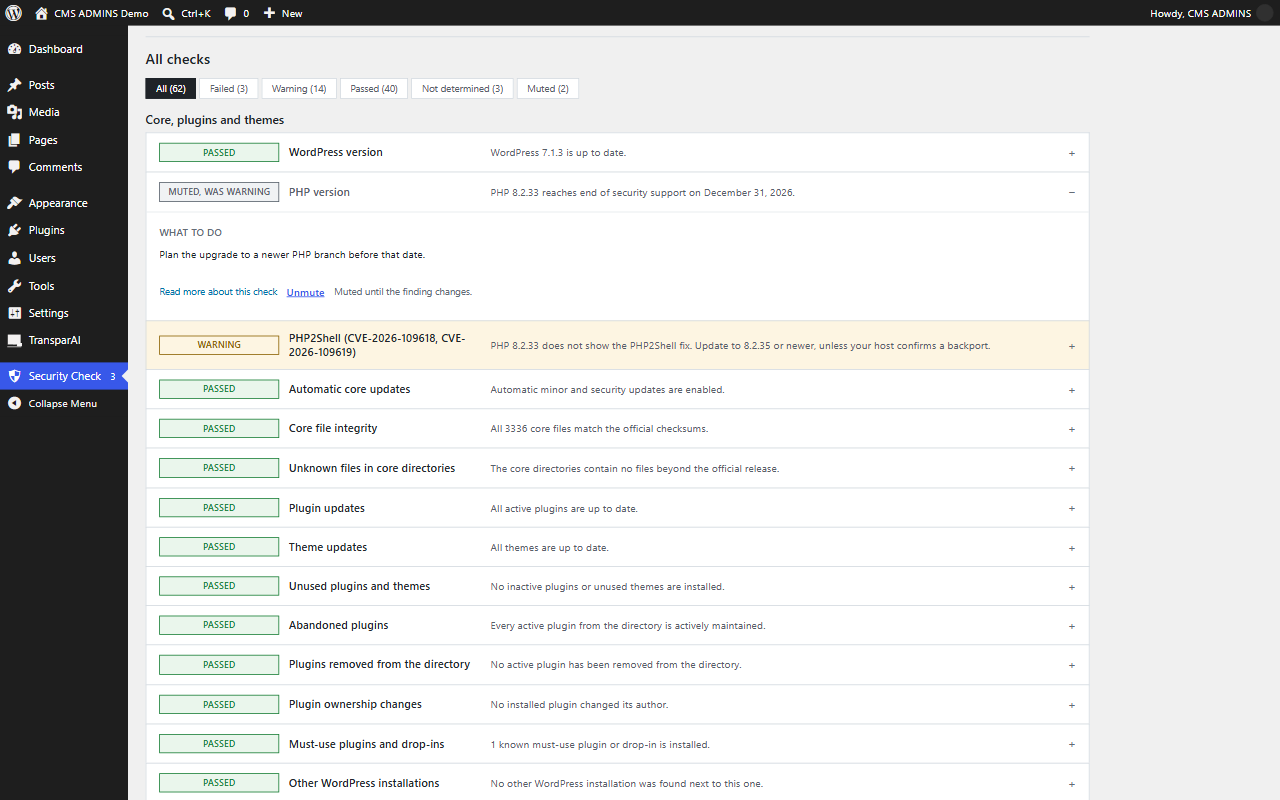
Core, plugins and themes. WordPress version, PHP version against the published end-of-life dates, whether PHP carries the fix for PHP2Shell (CVE-2026-109618 and CVE-2026-109619), automatic core updates, core file integrity against the official checksums, files in the core directories that are not part of WordPress, pending plugin and theme updates, unused plugins and themes, plugins that look abandoned, plugins whose listing was closed, plugins whose author changed, must-use plugins and drop-ins, other WordPress installations sitting next to this one.
Configuration. Debug mode, debug log exposure, the theme and plugin editor, installing code from the dashboard, authentication keys and salts, table prefix, database user privileges, whether the scheduler actually runs, autoloaded options size, injected content in the options table, backups, login protection, password policy.
Files and permissions. Permissions on wp-config.php, the uploads folder and the core directories, world-writable paths, executable files among the media, whether the server runs PHP from the uploads folder, configuration and backup files that the server hands out, readable .git, .svn and .hg folders, database dumps in the web root, leftovers from interrupted updates, directory listing.
Accounts en toegang. Te raden wachtwoorden, voorspelbare beheerdersnamen, hoeveel accounts beheerdersrechten hebben en welke slapend zijn, rollen onder beheerder met bevoegdheden die ze niet zouden mogen hebben, open registratie en de rol die daarbij wordt toegekend, tweestapsverificatie per beheerder, het overzicht van applicatiewachtwoorden inclusief wanneer en vanwaar elk voor het laatst is gebruikt.
Network and transport. HTTPS and the redirect from http, TLS certificate expiry and negotiated protocol, the security headers and their quality rather than their mere presence, cookie attributes, CORS, exposed software versions, legacy discovery tags, XML-RPC, user enumeration, REST routes that accept writes without checking permissions, and whether the client address can be faked through forwarded headers.
Transparency and disclosure. Whether AI-generated content carries a machine-readable label and whether visitors are told when they are talking to an AI system, which Article 50 of the EU AI Act has asked for since 2 August 2026. The disclosure plugins in the directory are recognised by their folder and by the settings they write, so a plugin that was installed and never set up is not mistaken for an answer. A site that publishes no AI output has nothing to label, so this one only ever warns and barely moves the grade.
Wat het niet is
- Geen firewall. Het blokkeert niets en onderschept geen verzoeken.
- Not a malware scanner. It compares core files against the official checksums and looks for injected content in the options table, but it does not hunt for signatures in plugin or theme code, and it removes nothing.
- Not a vulnerability database. It reports that a plugin is outdated, abandoned or delisted; it does not look up individual CVEs. The one exception is PHP2Shell, because it hits every PHP site at once.
- Geen automatische reparateur. Elke bevinding komt met instructies, en die voer jij uit.
- Geen monitor. Er draait niets op de achtergrond, er wordt niets ingepland en er gaat geen e-mail uit. Een controle draait wanneer jij die start.
Gegevens en verbindingen
The plugin talks to api.wordpress.org and to your own site. Nothing else, and there is no telemetry. See the questions below for exactly which endpoints and what is stored locally.
Wie het bouwt
CMS ADMINS maintains, hosts and secures WordPress and Drupal sites from Munich. This plugin is the checklist we run ourselves, packaged up. It is free, it stays free, and it works the same whether or not you ever talk to us.
Schermafbeeldingen
Installatie
- Install the plugin from the WordPress plugin directory, or upload the folder to
/wp-content/plugins/security-check-report. - Activeer de plugin in het scherm “Plugins”.
- Open “Security Check” in het beheermenu en start een scan.
The plugin needs PHP 7.4 or newer and WordPress 7.0 or newer. Running the checks requires the manage_options capability, so on a normal site that means an administrator.
FAQ
-
Is mijn server getroffen door PHP2Shell (CVE-2026-109618, CVE-2026-109619)?
-
PHP2Shell is the name for two critical flaws in the PHP core, rated CVSS 9.2. A single request without a login can run code on the server, on PHP-FPM, mod_php, php-cgi, FrankenPHP and LiteSpeed alike. The PHP team published the fixes on 21 October 2026: you need PHP 8.5.12, 8.4.27, 8.3.36 or 8.2.35 or newer. PHP 8.1 and older get no official release, only backports from some distributions and vendors.
The PHP2Shell check reads the PHP version the site actually runs on and says one of two things:
- Green: the fix is proven. That is the case for PHP 8.5.12, 8.4.27, 8.3.36 and 8.2.35 or newer within each branch, for PHP 8.6 or newer, and for the Ubuntu package revisions that carry the backport.
- Orange: the fix cannot be proven from the version number. Red Hat, Plesk, cPanel and self-built packages often keep the old number after a backport, so an orange result means “update, or have your host confirm the backport”, not “you have been hacked”.
The check never shows red, because a version number alone cannot prove that a server is vulnerable. After an update, restart PHP-FPM or the web server and run the check again. Fixed versions and the status per distribution: PHP2Shell: critical PHP flaws CVE-2026-109618/109619 (German).
-
Does the plugin change anything on my site?
-
Nee. Elke controle leest de toestand en rapporteert erover.
There is one exception, and it is deliberate. To find out whether your server would execute a PHP file dropped into the uploads folder, the plugin has to try. It writes one file with a random name, requests it once over HTTP and deletes it in the same request. A shutdown handler removes the file even if PHP dies in between, and anything left behind by an earlier interrupted run is cleaned up before the next one starts.
-
Stuurt het ergens gegevens naartoe?
-
Alleen naar
api.wordpress.org, naar dezelfde endpoints die WordPress zelf gebruikt voor zijn updatecontroles:https://api.wordpress.org/core/version-check/1.7/, read from the update information WordPress already holds, to learn the current WordPress version. The plugin never asks this endpoint itself.https://api.wordpress.org/plugins/update-check/1.1/enhttps://api.wordpress.org/themes/update-check/1.1/voor openstaande updates, eveneens gelezen uit wat WordPress al heefthttps://api.wordpress.org/plugins/info/1.2/om te zien of een pluginvermelding nog open is en wanneer de laatste release was. Dit is het enige endpoint dat de plugin rechtstreeks aanroept in plaats van viaplugins_api(), omdat een gesloten vermelding als HTTP 404 wordt geleverd enplugins_api()daar een fout van maakt, waardoor juist de vlag verloren gaat die de controle nodig heeft. Het antwoord wordt twaalf uur in de cache bewaard.https://api.wordpress.org/core/checksums/1.0/for the official core file hashes
WordPress.org privacybeleid en gebruiksvoorwaarden.
The remaining requests go to your own site, because several checks can only be answered from the outside: whether a file is served, whether a header is sent, whether a directory is listed. There is no telemetry and no reporting back to the plugin author.
One of those requests to your own site does not use the WordPress HTTP API. The certificate check opens a plain TLS connection to your own host name on port 443 to read the expiry date, because the HTTP API does not hand the certificate back. The target is still your own site and nothing leaves it, but
WP_HTTP_BLOCK_EXTERNALand thepre_http_requestandhttp_request_argsfilters do not apply to that one connection. -
Wat slaat de plugin op?
-
Een handvol opties in je database, die allemaal worden verwijderd als je de plugin verwijdert:
- de laatste scan en de scan daarvoor, zodat het rapport kan tonen wat er is veranderd
- de geschiedenis van de laatste 24 scans, elk met de datum, het cijfer, de risicoscore en één teken per controle; dat is wat de voortgangsweergave leest
- welke bevindingen je hebt gedempt, samen met een vingerafdruk van wat ze meldden
- een basislijn die bij de eerste scan wordt vastgelegd, met pluginauteurs, roldefinities en de lijst met must-use plugins en drop-ins, zodat latere scans wijzigingen kunnen opmerken
- het aantal mislukte controles uit de laatste scan, zodat het getal bij het menu-item niet op elke beheerpagina een hele scan hoeft te laden
- het moment waarop je met de scan instemde, zodat je dat niet bij elk bezoek opnieuw wordt gevraagd
Two entries go into user meta. One is a login timestamp per account, because WordPress keeps no login history of its own and the administrator check would otherwise have nothing to say about dormant accounts. The other records that somebody switched off the reminder notice, which is a decision per person rather than per site. Both are deleted on uninstall.
-
Is dit een malwarescanner of een firewall?
-
Neither. It finds configuration weaknesses and exposure, which is what most WordPress sites are actually taken over through. It does not block traffic and it does not clean an infected site.
It will notice several things that point at a compromise: core files that differ from the official release, executable files in the uploads folder, must-use plugins or drop-ins that appeared out of nowhere, roles that gained administrator capabilities, injected scripts in the options table. If any of those turn up, treat it as a starting point for an investigation, not as a verdict.
-
Wat betekenen de cijfers?
-
- A, uitstekend: niets wezenlijks meer open
- B, goed: kleine verbeteringen mogelijk
- C, matig: meerdere punten die aandacht verdienen
- D, slecht: aanzienlijke zwakke plekken, binnenkort ingrijpen
- F, kritiek: nu ingrijpen
-
Hoe wordt het cijfer berekend?
-
Elke controle heeft een urgentie, en die urgentie bepaalt hoe zwaar een bevinding weegt:
- Kritiek, gewicht 3.0: authenticatie, uitvoering van code, gelekte geheimen
- Hoog, gewicht 2.0: updates, transportbeveiliging, belangrijke configuratie
- Gemiddeld, gewicht 1.5: headers, rechten, beleid
- Laag, gewicht 1.0: fingerprinting en goede praktijk
De score is het gewogen risico als percentage van de slechtst mogelijke uitkomst. Controles die niet bepaald konden worden, tellen aan beide kanten van die berekening niet mee, zodat een geblokkeerd uitgaand verzoek het cijfer nooit in een van beide richtingen verschuift. Een mislukte kritieke controle trekt het resultaat omlaag tot minstens een D; zo kan één ernstig probleem niet worden weggemiddeld. Een paar controles zijn informatief en wegen helemaal niet mee.
-
Waarom staat er bij een controle “Niet bepaald”?
-
Because it could not get an answer, usually a blocked outbound request or a file it is not allowed to read. That is deliberately not treated as a finding. An unreachable endpoint says nothing about your site, and reporting it as a problem would teach you to ignore the report.
-
Een bevinding is niet van toepassing op mijn situatie. Wat nu?
-
Demp de bevinding. De plugin verbergt haar en bewaart een vingerafdruk van wat er werd gemeld. Zodra de inhoud verandert, bijvoorbeeld één getroffen bestand meer, komt ze vanzelf terug.
Dat is het verschil tussen een bekende situatie accepteren en er blind voor worden, en daarom wordt dempen aangeboden in plaats van standaard een permanente afwijzing.
-
Hoe vaak moet ik het uitvoeren?
-
Monthly is a reasonable baseline, plus a run after any larger change: a migration, a new plugin, a server move. Once the last full run is more than 30 days old, a notice in the dashboard says so. You can switch that notice off for good, and it is the only reminder the plugin sends anywhere.
-
Wat gebeurt er als ik één taak opnieuw controleer?
-
That one check runs again, its result replaces the old one in the stored run, and the grade is recalculated from what is then stored. It takes a few seconds, so you can fix something and see the result without sitting through 62 checks.
De geschiedenis blijft ongemoeid, want één controle is geen scan. Zolang de opgeslagen scan resultaten uit meer dan één ronde bevat, vermeldt de pagina hoeveel controles los opnieuw zijn uitgevoerd en wanneer de laatste volledige ronde was. Zo wordt het cijfer nooit voorgesteld als iets wat het niet is.
-
Hoeveel geschiedenis wordt er bewaard?
-
The last 24 runs. When a 25th arrives, the second oldest point is dropped instead of the oldest, so the first run stays and the line about where the site started remains true. One point holds the date, the grade, the risk score and one character per check, which comes to a few kilobytes for the whole history.
Als je al een eerdere versie gebruikte, worden de twee scans die daarin waren opgeslagen de eerste twee punten, zodat de weergave na de update niet leeg is.
-
Kan ik het via de opdrachtregel uitvoeren?
-
Ja, en het levert hetzelfde cijfer op als het scherm, omdat de beoordeling in beide gevallen in PHP gebeurt.
wp security-check run for a table, `wp security-check run --format=json` for the full result, `wp security-check run --failed-only` for just what needs attention. Add `--fail-below=B` and the command exits with status 1 when the grade is worse than B, which is what a deployment pipeline or a monitoring job needs.Een controle via de opdrachtregel wordt opgeslagen zoals een controle vanaf het scherm, dus de geschiedenis, de checklist en de teller in het menu nemen hem mee.
-
Werkt het op multisite?
-
Yes. It runs per site: anyone with
manage_optionson a site can run it there and sees that site’s accounts, plugins, themes and options.Several things work differently on a network, and the checks account for it. Registration is a network setting, so the sign-up check reads that instead of the per-site option. Network administrators hold every capability regardless of their role on the current site, so the account, password and two-factor checks include them. The table prefix check looks at the base prefix rather than the per-site one.
The checks that look at files, permissions and server configuration necessarily report the same thing on every site in the network, because they describe one installation. There is no network-wide overview screen.
The history, the checklist and the reminder belong to a single site as well. Every site in the network keeps its own.
-
Kan ik eigen controles toevoegen?
-
Yes.
cascr_registryfilters the list of checks, so you can add, remove or reweight one.cascr_test_resultfilters an individual result before it is scored. A check is a callable that returns one of the four outcomes built byCASCR_Result. -
Which WordPress and PHP versions are supported?
-
WordPress 7.0 and newer, PHP 7.4 through 8.5. Every release is tested against WordPress 7.0 and the current version, on single site and on multisite, and linted on all seven PHP branches in between.
-
Wie zit er achter deze plugin, en waar meld ik een probleem?
-
It is built and maintained by CMS ADMINS, a Munich agency that has been looking after WordPress and Drupal installations since 2012.
- Bugs and feature requests: GitHub issues
- Vragen over een bevinding: het supportforum op WordPress.org
- Background reading: our documentation and what we do about WordPress security
If a check reports something you believe is wrong, a GitHub issue with the finding text is the fastest way to get it fixed. False positives are treated as bugs.
Beoordelingen


Bijdragers & ontwikkelaars
“CMS ADMINS Security Check Report” is open source software. De volgende personen hebben bijgedragen aan deze plugin.
Bijdragers
“CMS ADMINS Security Check Report” is vertaald in 2 talen. Dank voor de vertalers voor hun bijdragen.
Vertaal “CMS ADMINS Security Check Report” naar jouw taal.
Interesse in de ontwikkeling?
Bekijk de code, haal de SVN repository op, of abonneer je op het ontwikkellog via RSS.
Changelog
Releases vóór 2.2.0 staan in changelog.txt.
2.5.0
Added
* The grade appears in Tools, Site Health: good for A and B, recommended for C or a run older than a month, critical for D and F. It reads the stored run and never starts a scan.
* A line under the grade says what changed since the run before: how many findings are new and how many were resolved.
* wp security-check run --fail-below=<grade> exits with status 1 when the grade is worse, for pipelines and monitoring.
Gewijzigd
* De vijf taken worden eerst op ernst gesorteerd. Een kritieke waarschuwing zoals PHP2Shell staat niet meer achter een middelzware fout.
* Elke taak toont haar status naast de ernst, zodat een kritieke controle die alleen een waarschuwing is ook zo leest.
* Gedempte bevindingen zeggen dat in hun label (“Gedempt (Mislukt)”) in plaats van de oude status in grijs te tonen.
* De voortgang per categorie telt gedempte controles mee, dus elke categorie toont haar volledige aantal controles.
* De voortgangsgrafiek toont het cijfer boven en de datum onder elke balk, de nieuwste controle eerst.
* Sectiekoppen vallen meer op, en de lijst met alle controles houdt status, naam en samenvatting in uitgelijnde kolommen.
* Schermlezers: de voortgangsbalk wordt als zodanig aangekondigd, na een controle gaat de focus naar het cijfer en elke knop bij taken en resultaten noemt de controle waar hij bij hoort. Lichte tekst voldoet nu aan het WCAG AA-contrast.
Fixed
* “WordPress 7.1.3 is outdated, 7.1.3 is available”: an update offer for the installed version no longer counts as an update.
* The readme said a command line run stores nothing. It does, and now the readme says so.
2.4.1
Added
* PHP2Shell check for CVE-2026-109618 and CVE-2026-109619: green when the running PHP is 8.5.12, 8.4.27, 8.3.36, 8.2.35 or newer, or an Ubuntu package with the backport, orange when the fix cannot be read from the version number
2.4.0
Toegevoegd
- A checklist instead of a one-off verdict. From the second run onwards the page opens on an overview: the grade, where the site started and where it stands today, a bar for every run, the five things to work through, what is still open, and what has been resolved and when. The guided three-step walkthrough stays for the first run.
- Elke taak heeft een knop die die ene controle opnieuw uitvoert en binnen enkele seconden antwoord geeft. Een oplossing is bevestigd terwijl je nog op het scherm bent, en de volgende taak schuift op, zonder te wachten op de volgende volledige ronde.
- A history of the last 24 runs. The very first one is kept for good, so the opening line can always name where the site started. An installation upgrading from an earlier version finds its two stored runs as the first two points.
- Progress per category, so it is visible which part of the site has been dealt with and which has not.
- A sixth area, transparency and disclosure, with one check in it: whether AI-generated content on the site is labelled. Article 50 of the EU AI Act has asked for a machine-readable label and a notice for AI chatbots since 2 August 2026. The disclosure plugins from the directory are recognised by their folder and by the settings they write, and the check only ever warns, because a site with no AI content has nothing to label.
- Een getal bij het menu-item, een widget op het dashboard en een herinnering zodra de laatste volledige scan ouder is dan dertig dagen. De herinnering kan per gebruiker voorgoed worden uitgeschakeld.
Gewijzigd
- Het rapport wordt nu op de server opgebouwd. Vroeger werd het in de browser samengesteld, waardoor het overzicht niet kon bestaan voordat een scan klaar was en dezelfde opmaak twee keer geschreven had moeten worden.
- Een losse hercontrole schrijft nooit een punt in de geschiedenis, en de pagina zegt duidelijk dat het cijfer dan deels op oudere metingen rust. Een gedeeltelijke ronde is geen scan.
- Een scan bewaart wat elke controle meldde, zodat het rapport opnieuw kan worden opgebouwd zonder alles opnieuw uit te voeren.
Opgelost
Every check was read against the sources it cites: php.net, the WordPress handbook, core source, MDN, and the packages of the plugins it recognises. That turned up findings that fire on correct configurations, one that could not fire at all, and claims that stopped being true years ago.
- Sites with two-factor protection were reported as having none. The user meta key stored for iThemes, Solid and Kadence Security is not the one those plugins write, and the one for Defender does not exist in it at all. Google Authenticator stores the string “disabled”, which counted as a second factor because it is not empty, so the one case the check exists for went unnoticed.
- The check for plugins removed from the directory could not fire. The API answers 404 for a closed listing, and the WordPress function turns that into an error before the “closed” flag is ever read, so the check reported all clear in exactly the case it was written for. It now asks the endpoint itself and tells a closed listing, a plugin that was never listed and an unreachable one apart.
- WordPress installed in its own directory was reported as an injected option value, at critical severity. Comparing the site and home addresses cannot tell that apart from a takeover, and in a real takeover both are changed together, so the comparison is gone.
- A site behind Cloudflare was reported as having a spoofable client address. The check now looks for a proxy that identifies itself and says the result is undetermined when it cannot tell, rather than warning.
- De WooCommerce Store API werd gemeld als onbeveiligde schrijfroute. Een route als openbaar registreren is precies de schrijfwijze die het handboek voorschrijft, dus een route zonder enige permission callback en een route die bewust openbaar is, worden nu van elkaar onderscheiden.
- The strict Content Security Policy from the published guidance was reported as leaving the hole it closes. Browsers that understand ‘strict-dynamic’ ignore the ‘unsafe-inline’ fallback beside it, and the check now does the same. A host wildcard is no longer mistaken for allowing scripts from anywhere.
- DISALLOW_FILE_MODS sluit de bestandseditor af en stopt achtergrondupdates. Geen van beide controles wist dat, dus wie het advies van deze plugin opvolgde, hield één bevinding over en kreeg bij een andere ten onrechte de melding dat alles in orde was.
- system.multicall has not amplified password guessing since WordPress 4.4, and the XML-RPC check now recognises the filter most security plugins use to switch the interface off.
- The advice to pick a display name different from the login name does nothing, because the author slug keeps the login name it was generated from.
- Application passwords were reported as switched off on every site without HTTPS, which is where WordPress refuses them in the first place.
- A server that hands out the source of a PHP file was reported as running it. Those are different problems with different fixes.
- .user.ini en .htpasswd stonden tussen de bestanden die verwijderd moesten worden. Het zijn actieve configuratiebestanden, en het verwijderen van de tweede sluit mensen buiten.
- Op IIS adviseerde de controle voor .htaccess om de permalinkinstellingen op te slaan, wat daar web.config schrijft en nooit een .htaccess.
- A role that merely appeared since the first run, as a shop or membership plugin does, was reported as a role holding administrator-level power.
- Installatieprogramma’s en shellscripts tussen de uploads worden niet langer behandeld als code die de server uitvoert.
- A run stored by 2.3.2 could raise a PHP warning on the first page view after the update, and the mute state it was saved with is now kept until a run of this version replaces it.
- Scans and lookups that cannot complete now say so instead of reporting all clear: a core file scan that hit its limit, a plugin listing that could not be retrieved, a database dump whose URL did not answer.
Uitleg
- Elk van de eenenzestig items is getoetst aan de methode die het documenteert. Veertien beschreven uitkomsten die de controle niet heeft, of zwegen over de uitkomsten die hij wel heeft.
- The entry on security headers now names the values to enter, which is the one thing it was missing. The permission entries say where to change file permissions without shell access. Roughly a dozen terms are resolved where they first appear rather than assumed.
- The warning about the table prefix named the wrong mechanism, and the reasoning for 640 against 440 on wp-config.php was inverted. Files in the web root were called harmless as a group, although phpinfo.php prints the whole PHP environment.
2.3.2
Opgelost
- The check for executable files in the uploads directory reported the empty index.php that WordPress and most plugins drop into every upload folder to stop directory listing. Those files are the opposite of a finding, and because the check counts as critical, a single one of them pulled an otherwise healthy site down to grade D. Across twenty sites the grade was identical for that reason alone. The check now reads such a file instead of judging it by name: an index.php passes only when it stays small and reads no request data, includes no other file, calls none of the functions a dropped shell needs and prints nothing of its own. Everything else is still reported, index.php included.
- Elk gemeld bestand toont nu zijn grootte en, als een index.php niet slaagde, de reden waarom het werd gemeld. Een beveiligingsbestand is een paar honderd bytes groot, dus het getal alleen maakt meestal al duidelijk wat een bestand is.
- De controle van tweestapsverificatie kon een account dat de instelling nooit had afgerond niet onderscheiden van een account dat ze gewoon niet kon lezen, en noemde beide onbeslist. Elke ondersteunde plugin staat nu vermeld samen met de gebruikersmeta die hij schrijft, zodat een geïnstalleerde plugin die niemand gebruikt wordt gemeld als het risico dat het is, met de accounts zonder tweede factor erbij.
- De herkenning van tweestapsverificatie dekt nu ReportedIP Hive, Solid Security, Kadence Security, WP Defender en Google Authenticator. iThemes Security is twee keer van naam veranderd en wordt onder drie mapnamen geleverd, die allemaal worden herkend.
2.3.1
- Het scherm is nu opgebouwd in drie stappen: de controle starten, het resultaat lezen, de rest doorlopen. Stap twee en drie zeggen al vóór de eerste scan wat ze zullen bevatten, zodat de pagina zichzelf uitlegt.
- De startknop zegt wat hij doet en hoe lang het duurt, en de opmerking over het tijdelijke bestand staat er direct boven.
- Het resultaat begint met een gewone zin, niet alleen met een letter: hoeveel bevindingen nu aandacht nodig hebben, hoeveel het verbeteren waard zijn en hoeveel controles niet konden worden afgerond.
- De pagina scrolt naar het resultaat wanneer een scan klaar is, in plaats van het onder de vouw te laten staan.
- De prioriteitenlijst heet nu wat ze is, een takenlijst, en zegt dat je haar op volgorde moet afwerken.
- A finding can carry a link to further help. The two-factor finding uses it to point at the Two Factor plugin from the WordPress core team and at ReportedIP Hive, which we build ourselves and name as ours.
- Drie interfaceteksten en twee stylesheetregels verwijderd die na de herbouw waren achtergebleven.
2.3.0
Herbouwd
- Eén register is nu de enige bron voor een controle: identificatie, label, groepering, urgentie, gewicht, callback en documentatie stonden vroeger op vier verschillende plekken die niets synchroon hield. Een test dwingt nu af dat ze overeenkomen.
- De beoordeling is uit de browser naar PHP verhuisd, waardoor het resultaat reproduceerbaar, testbaar en ook buiten het dashboard beschikbaar is.
- The admin-ajax endpoint was replaced by REST routes under
cascr/v1, running three checks at a time instead of strictly one after another. - Resultaten worden opgeslagen, zodat het rapport een scan kan vergelijken met de vorige.
Toegevoegd
- Twenty-five checks, among them publicly readable configuration files and repository folders, database dumps in the web root, must-use plugins and drop-ins, role and capability changes, the application password inventory with last use, two-factor coverage per administrator, unauthenticated REST write routes, TLS certificate expiry, HSTS and CSP quality, cookie attributes, client address spoofing and plugin ownership changes.
wp security-check runas a WP-CLI command.- Een prioriteitenlijst met de vijf dingen die je het eerst moet aanpakken, bovenaan het rapport.
- Een vergelijking met de vorige scan: nieuw mislukt, opgelost, gewijzigd.
- Dempen met een vingerafdruk van de inhoud, zodat een geaccepteerde bevinding terugkomt zodra die echt verandert.
- “Niet bepaald” als eigen uitkomst, zodat een geblokkeerd verzoek geen bevinding meer is en het cijfer niet meer beïnvloedt.
- Export als platte tekst, JSON en CSV.
- De filters
cascr_registryencascr_test_result.
Opgelost
- Multisite reported “registration is closed” on a network that let anyone sign up, because the check read the per-site option that multisite ignores. It now reads the network setting.
- Network administrators were missing from the password, administrator, two-factor and application password checks. They hold every capability regardless of their role on a site, so a role query alone did not find them.
- The table prefix check compared the per-site prefix on multisite, so every subsite looked like it had a custom one.
- A stored cross-site scripting path: findings carrying site data such as plugin names or user names were written into the summary with innerHTML.
- Rechtencontroles vergeleken met precies 0755 en meldden daardoor 0750 en de veelgebruikte setgid 2755 als onveilig.
WP_AUTO_UPDATE_COREop true werd als risico gemeld, hoewel het meer updates inschakelt dan de aanbevolen instelling.- “Not modified in six months” was treated as “outdated”, which flagged well maintained plugins. Replaced by release date, tested-up-to version and directory status.
- The malware signature scan searched wp-admin and wp-includes for strings such as
eval(and$_GET[, and needed a hand-maintained list of 180 core files to stay quiet. Replaced by a comparison against the official WordPress file list. - Security headers were all or nothing. They are now scored per header, with the cross-origin isolation headers treated as optional.
- The interface followed the operating system colour scheme and painted dark cards onto the light dashboard. It now follows the WordPress admin.
Gewijzigd
- One request to the homepage per run instead of four, and one update lookup instead of one request per installed plugin.
- Duplicate checks merged (PHP version support, XML-RPC methods, login attempt limiting) and two dropped that could never fail (jQuery version, table storage engine).
- Elke tekst in de interface is vertaalbaar. Het rapport was voorheen hardgecodeerd Engels met een Duitse datumnotatie.
- Aantallen in het rapport gebruiken correcte meervoudsvormen in plaats van altijd uit te gaan van meervoud.
- The JavaScript alert was replaced by an admin notice and a screen reader announcement.
- De testsuite draait nu ook tegen multisite, als blokkerende stap vóór elke release.
2.2.2
- Broadened PHP compatibility: the plugin runs on PHP 7.4 through 8.5
- Vereist WordPress 7.0 of nieuwer
- Added an automated test suite covering every check and the permission and nonce gates
- Continuous integration lints on seven PHP versions and runs the tests against WordPress 7.0 and the current release
- Fixed a PHP warning in the theme and plugin update checks when a path no longer exists
- Ongebruikte verouderde codepaden verwijderd en volledige naleving van de WordPress Coding Standards bereikt
2.2.1
- First release on the WordPress.org plugin directory
- Renamed plugin folder, main file and text domain to security-check-report
- Removed the Spamhaus IP blacklist test, which sent the server address to a third party without asking
- Ongebruikte verouderde code en bestanden verwijderd
- Laden van vertalingen op WordPress 6.7 en nieuwer opgelost
- Enabled certificate verification for the PHP execution test request
2.2.0
- Interface opnieuw ontworpen met een native accordeon op basis van details en summary
- Live zoekfunctie in de documentatie van de controles toegevoegd
- Elke beschrijving van een controle herschreven in een vast formaat: wat het controleert, waarom het ertoe doet, wat je moet doen
- Kleurenschema geharmoniseerd en verschillende opmaakproblemen opgelost