

Beschrijving
WordPress tells you when a plugin has an update. It never tells you who is behind that update.
Plugins get sold. Authors walk away. Maintainers are quietly added to a project. Occasionally a plugin is closed on WordPress.org for a security problem, and the copy on your site keeps running as if nothing happened. In every one of those cases WordPress shows you exactly what it showed you yesterday: nothing.
Upgrade Pilot watches the things WordPress does not.
Update trust: know who is behind your next update
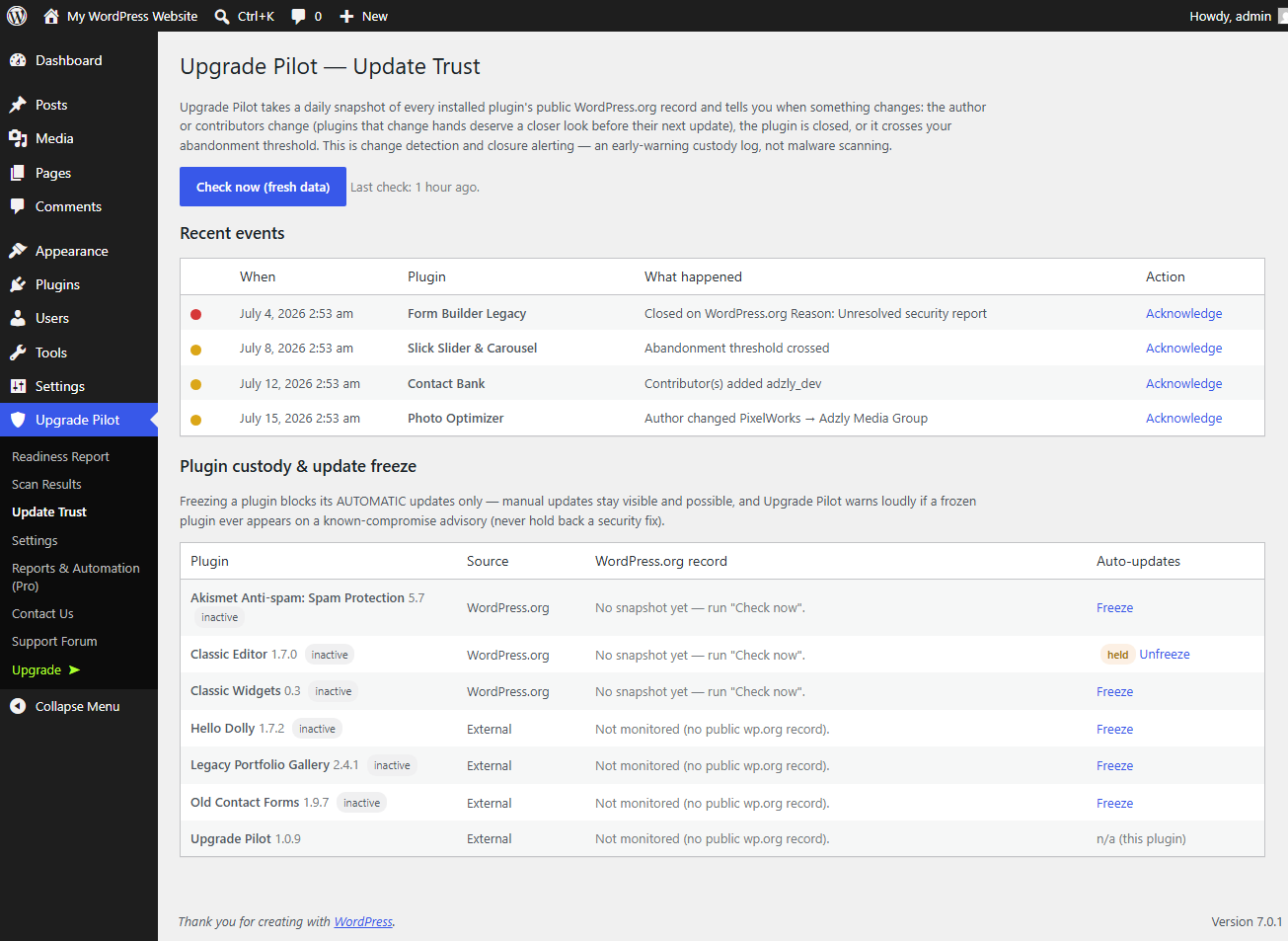
Every day, Upgrade Pilot takes a snapshot of the public WordPress.org record of every plugin you have installed, and compares it to yesterday’s. It tells you when:
- The author changes. A plugin that just changed hands is the single clearest signal to look before you leap. Ownership transfers are how a trusted plugin becomes an untrusted one, without a single line of visible change.
- New contributors appear. Someone new now has commit access to code running on your site.
- A plugin is closed or removed from WordPress.org, along with the reason given. Closed plugins receive no further updates, and if the closure was for a security issue you are running known-vulnerable code.
Plugins and themes that have simply gone quiet – nobody has updated them in longer than a threshold you set – are reported in the readiness report rather than emailed to you as an alert, because abandonment is a slow fact, not an event that happened this morning.
You can then freeze automatic updates for that one plugin, so a bad release cannot install itself overnight while you decide. The freeze is per plugin, opt in, and never touches WordPress core. Manual updates always remain available. It will not help you hide from a security fix.
Upgrade readiness: know the upgrade will not break the site
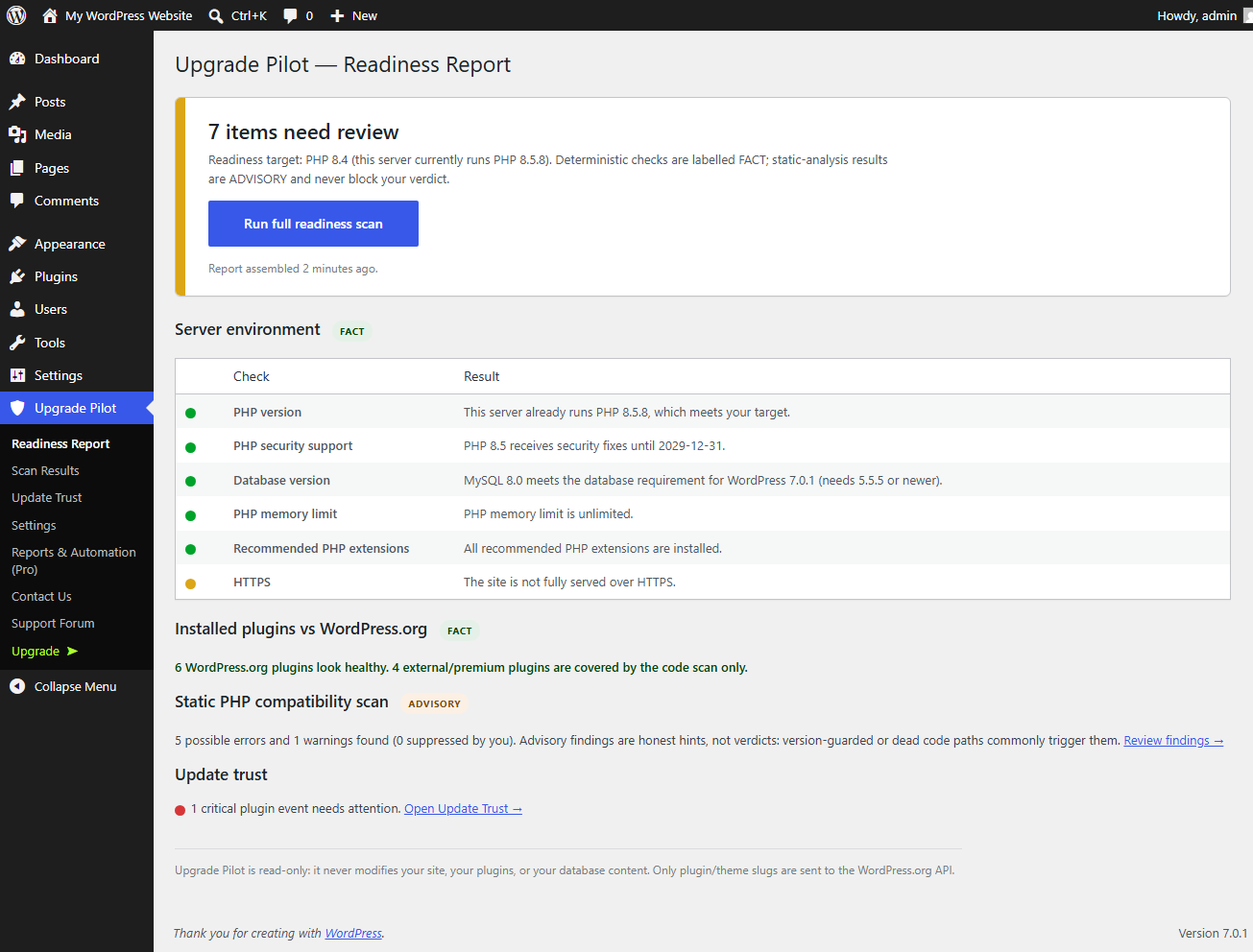
Before you move to a new PHP or WordPress version, Upgrade Pilot answers whether it is safe:
- Server checks. Your PHP version against WordPress’s actual minimum and against the version you plan to move to. Your database version against the requirement of the update WordPress is really being offered, read live from WordPress itself rather than from a number hardcoded by us. Memory limit, extensions, HTTPS.
- PHP security support. How long the PHP branch you are running still receives security fixes.
- Every plugin and theme, cross-referenced against WordPress.org. Which ones declare a PHP requirement higher than your target, which have not been tested against recent WordPress releases, which have not been updated in years, and which have been closed.
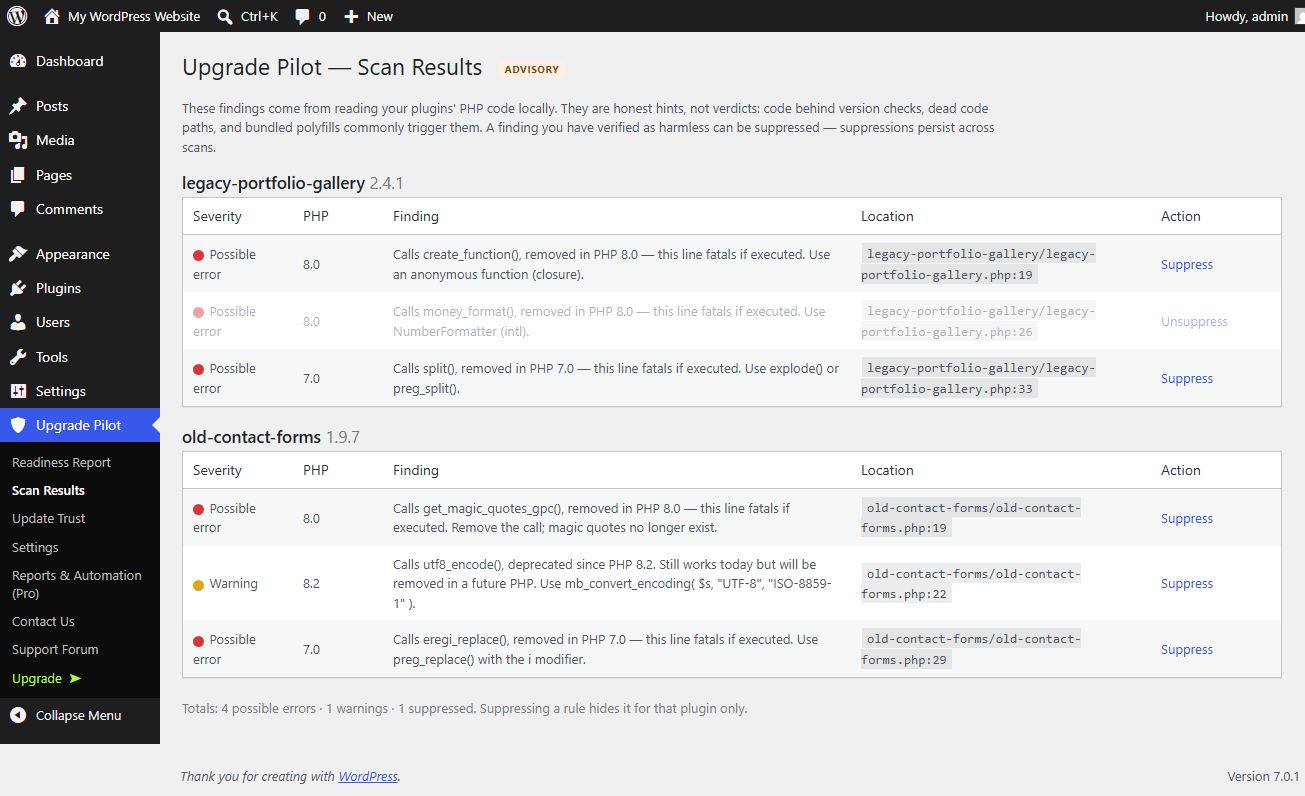
- A local scan of your plugins’ PHP code, flagging what modern PHP removed or deprecated, down to the file and line. It runs in small time-sliced batches, so it does not time out, and a file that has not changed since the last scan is not analysed again.
Findings that are honest about their own certainty
Deterministic results are labelled fact. Static-analysis results are labelled advisory, and never drive the verdict on their own, because version-guarded code and unreachable branches legitimately trigger them. Anything you have inspected and cleared can be suppressed permanently, and the suppression survives future scans.
Read only, always
Upgrade Pilot never updates, deactivates, installs, or rewrites anything. The one thing it can change is a per-plugin automatic-update hold, and only when you click the button yourself.
Also included
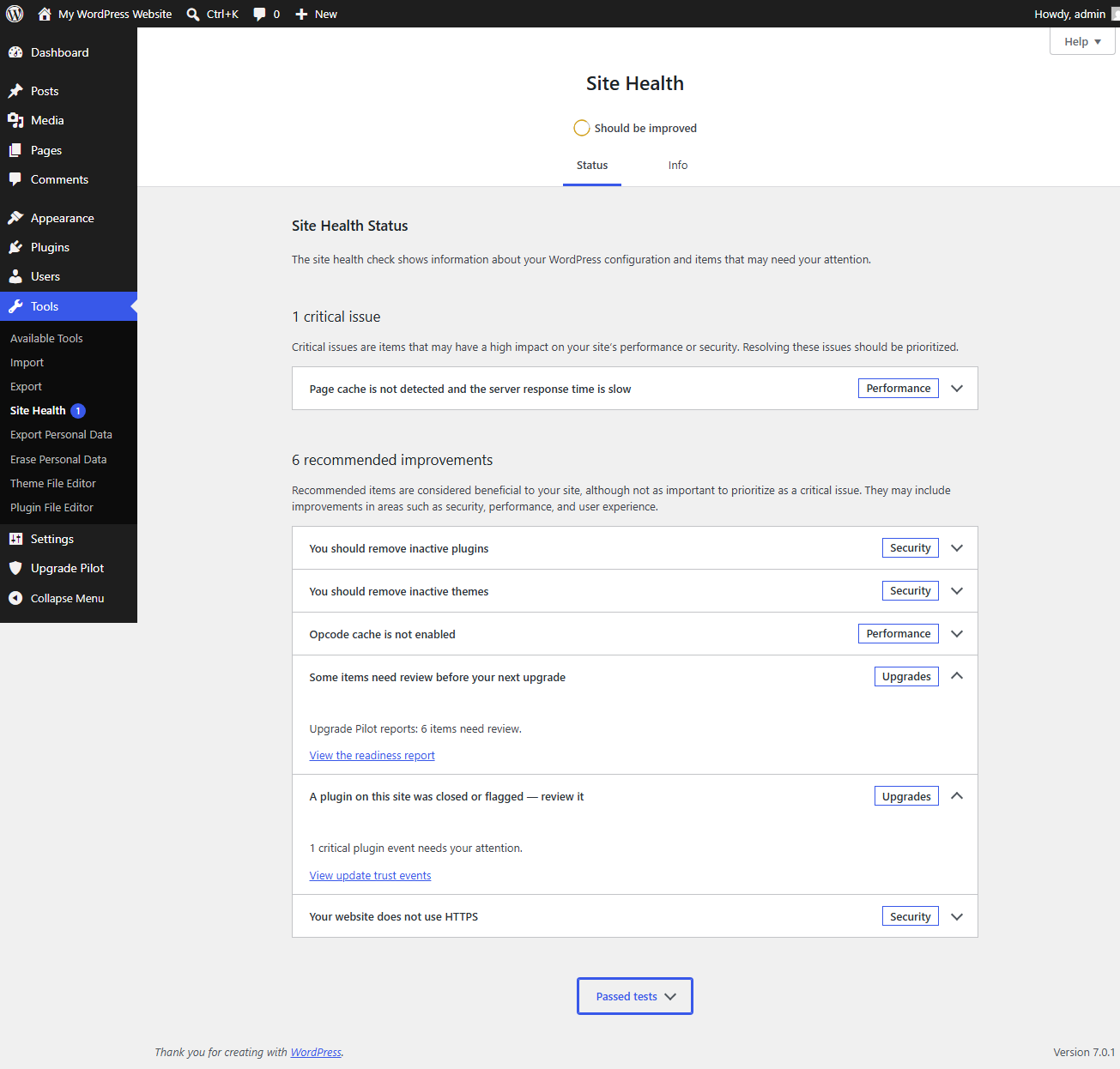
- Site Health integration
- Dashboard summary widget
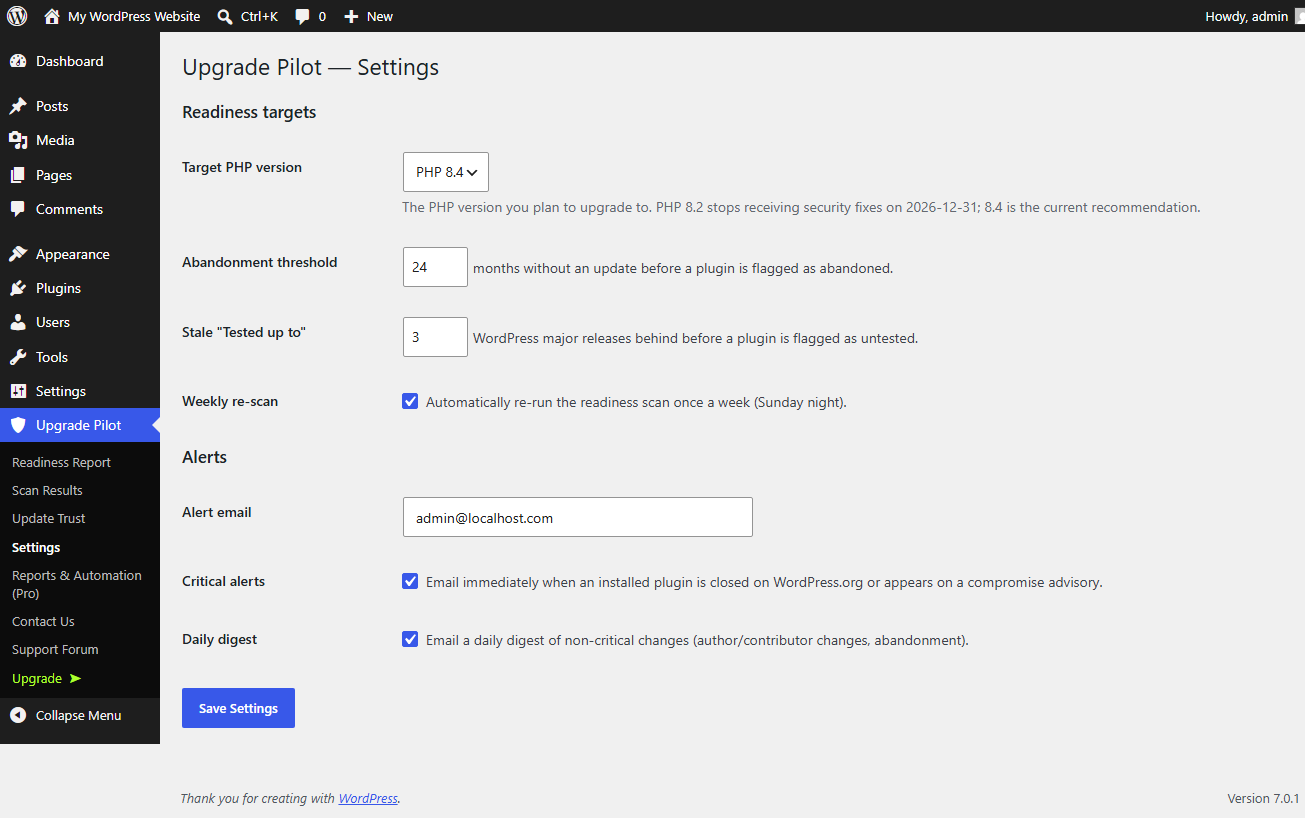
- Email alerts: immediate for critical events, a daily digest for warnings (informational events stay in the UI)
- A weekly scheduled re-scan
- WP-CLI:
wp upgrade-pilot scan,statusandreport - Machine-readable export, ungated:
wp upgrade-pilot scan --format=jsonandwp upgrade-pilot report --format=json - A REST endpoint for dashboards and fleet tooling:
GET /wp-json/upgrade-pilot/v1/report, available to administrators (themanage_optionscapability; super admins on a network)
Works on multisite
On a WordPress network, Upgrade Pilot runs at network level, because that is where the truth is: a network shares one copy of each plugin’s files, so who wrote a plugin, whether it was closed, and whether its updates are held are facts about the whole network, not about one subsite. The free version installs network-wide, stores its data once, and is managed by a super admin from the Network Admin screens. Freezing a plugin’s automatic updates holds it across the network, because there is only one copy of the file to hold.
Upgrade Pilot Pro
Pro adds the things you need when the site belongs to someone else:
- A branded, white-label client report (PDF/print) – your name, your colour, no product footer.
- The readiness summary emailed to your client, on a schedule you choose, to as many addresses as you like – and you are told if it fails to send.
- Slack and webhook alerts for update-trust events.
- Automatic update-hold policies: hold a plugin’s automatic updates for a cooling-off period the moment it changes owner or gains a contributor.
- Daily and twice-daily re-scans.
- On a network, the Network Overview: every subsite’s readiness and update-trust status on one screen, and – the question you actually have when a plugin changes hands – exactly which of your sites are running it.
- A private email channel with the developer.
Four things are free that people usually assume are paid, so they are worth saying plainly.
The machine-readable export is free. WP-CLI --format=json and the REST endpoint are part of the free version and are not gated, metered or licence-checked.
The digest email is free. The free version already emails you, the site administrator, immediately when a plugin is closed or flagged, and a daily digest of everything else. What Pro adds is sending the readiness summary to other people – your client – on a schedule you pick, and telling you when a send fails.
The weekly re-scan is free, and on by default. What Pro adds is running it daily or twice daily.
Multisite is free, in full. Upgrade Pilot installs network-wide, stores its data once, is managed by a super admin from the Network Admin screens, and a freeze holds across the whole network. What Pro adds on a network is the Network Overview screen described above – not multisite itself.
Freezing a plugin by hand is free too. What Pro adds is doing it automatically, on a policy.
Every paid tier includes every feature; tiers differ only by how many sites your licence covers. On a network, each subsite counts as one of those sites, and you activate the licence once from Network Admin to cover them all.
Pro is a separate download, not an in-place upgrade. When you buy or start a trial you download the Pro build and upload it like any other plugin; it installs alongside this free copy, and activating it switches the free copy off for you. Your settings, scan history and freeze list carry over untouched.
External services
Upgrade Pilot uses WordPress.org, always. It uses Freemius – who sell and license the paid version – only when you go looking for the paid version, and only in the four situations listed below.
1. WordPress.org Plugin and Theme API (api.wordpress.org)
This is the plugin’s data source and is always used.
What is sent: the public slug of a plugin or theme installed on your site. Nothing else. No site URL, no user data, no configuration. The requests identify themselves only as “UpgradePilot/” followed by the plugin version.
When: when you run a readiness scan, and once daily as part of the update-trust snapshot that detects author changes, new contributors, closures, and abandonment.
Why: to read the public directory record for that plugin (author, contributors, last updated, tested-up-to, required PHP, and whether it has been closed).
Note: WordPress core already contacts this same API for its own update checks.
How much: plugin lookups are batched – every plugin on the site is asked for in a single request, so a 40-plugin site makes one plugin request, not forty. The theme API has no batch mode, so themes cost one request each. Answers are cached for 24 hours (72 hours for “not in the directory”), and 429 or 5xx responses trigger a backoff that later calls respect. A typical 40-plugin, 3-theme site therefore makes about four or five requests a day in total.
Privacy: https://wordpress.org/about/privacy/
WordPress.org publishes a privacy policy but no separate terms-of-use document for this API. It is the same public API, on the same host, that WordPress core itself queries for update checks.
2. Freemius (freemius.com), who sell and license Upgrade Pilot Pro
Freemius is contacted in four situations. Every one of them is something you click. It is never contacted in the background.
You opt in, start a trial, or activate a licence.
Sent to api.freemius.com: your site URL, your WordPress and PHP versions, and the email address of the account you activate with. This only happens after you explicitly opt in on the activation screen, or when you start a trial or activate a licence.
You open the “Upgrade” page.
The plugin adds an “Upgrade” item to its own menu, and the Reports & Automation screen links to it. Opening that page asks Freemius for the current plan prices so it can show them to you (api.freemius.com), and that request carries your site URL. Nothing else is sent. This happens whoever you are, including if you skipped the opt-in – but only when you open that page. If you never open it, it never runs.
That request is made by your own server, not by your browser: the page talks to your site’s admin-ajax, and your site talks to Freemius. The page itself loads no third-party scripts at all. Everything it renders – the plan table, the icons, the payment-brand badges – is served from this plugin’s own folder. The payment SDK’s bundled pricing script used to inject Google Analytics and a remote checkout script into your dashboard on that page; this build removes both, along with the SDK’s remaining remote references (all four modifications are listed under “Source code” below).
You click “Contact Us”.
That opens Freemius’s hosted support form (wp.freemius.com). The link carries your site URL and your WordPress login URL, so the form knows which site you are writing about.
You click a plan, to buy or to start a trial.
That takes you to Freemius’s checkout page (checkout.freemius.com). It receives your site URL, your site name, your WordPress and PHP versions, and your WordPress administrator email address, which is filled in for you – you do not have to type it, and it is sent whether you complete the purchase or not. Freemius is the merchant of record for the sale.
That checkout page is Freemius’s, not ours, and like any hosted checkout it loads its own third-party scripts. At the time of writing those are: Stripe (js.stripe.com) and PayPal (www.paypal.com, www.paypalobjects.com) to take payment, Google Tag Manager (www.googletagmanager.com) for their analytics, and Freemius’s own scripts and images (js.freemius.com, cdnjs.cloudflare.com, s3-us-west-2.amazonaws.com). We do not control that list and it can change. What happens on that page is governed by Freemius’s privacy policy, linked below. If you never click a plan, none of it loads.
Terms: https://freemius.com/terms/ – Privacy: https://freemius.com/privacy/
What does not happen
The list above is not written from memory. Every outbound request the plugin causes was logged, and these are the results: installing and activating the plugin, the opt-in screen itself, skipping the opt-in, every one of the plugin’s own screens, deactivating the plugin (the payment SDK’s deactivation-feedback dialog is switched off in this build, so deactivation is one click and sends nothing), WordPress’s plugin-update cycle, and every scheduled background task – all of them complete without contacting Freemius at all. No telemetry, no scan data, no site data. Every Freemius contact listed above is the direct result of something you clicked.
The free plugin is fully functional whether you opt in or skip. If you would rather not use Freemius’s support form, the WordPress.org support forum for this plugin is linked from the same menu and sends nothing anywhere.
There is no security feed to call, and no server of ours for this plugin to contact. Anything Upgrade Pilot knows about a plugin’s security standing, it learned from that plugin’s public WordPress.org record – most importantly, whether the directory has closed it, and the reason the directory gave.
Source code
Every line Upgrade Pilot itself runs ships in this plugin, unminified and unobfuscated. Its own CSS and JavaScript (admin/css/upilot-admin.css, admin/js/upilot-admin.js) are the files you read, not build output; there is no build step and no compiled asset.
The one exception is the third-party payment SDK in vendor/freemius/, which ships pre-minified. Those files are the Freemius WordPress SDK, published under the GPL, and their unminified source and build tooling are public:
- Freemius WordPress SDK: https://github.com/Freemius/wordpress-sdk
- The pricing screen bundled at
vendor/freemius/assets/js/pricing/freemius-pricing.js: https://github.com/Freemius/pricing-page
The minified files under vendor/freemius/ are: assets/js/pricing/freemius-pricing.js, assets/js/postmessage.js, assets/js/nojquery.ba-postmessage.js, assets/js/jquery.form.js, and thirteen stylesheets under assets/css/.
Upgrade Pilot ships four deliberate modifications to that SDK, all in assets/js/pricing/freemius-pricing.js, all removing remote references from wp-admin, each marked with an “Upgrade Pilot:” comment at the patch site:
- The
appendScripts()method is emptied. Upstream it injectshttps://www.google-analytics.com/analytics.jsandhttps://checkout.freemius.com/checkout.jsinto wp-admin when the pricing screen renders. Neither belongs in a WordPress dashboard, and the analytics script ran even for people who had declined the opt-in. - The Google Analytics pageview tracker is stubbed out. Upstream it reports pricing-page views to Freemius’s Analytics property whenever a GA object is already present in wp-admin (for example, loaded there by an unrelated plugin), stamping them with the Freemius user id.
- A loading-spinner image served from Freemius’s CDN (
img.freemius.com) is replaced with an inline image. - Testimonial author photos, which upstream loads from Gravatar or a remote URL supplied by the Freemius API, always use the bundled placeholder instead.
The pricing screen and the checkout both work without all four.
Third-party libraries inside that SDK bundle, all GPL-compatible: React 17 (MIT), object-assign (MIT), is-buffer (MIT), and Font Awesome Free 5 (code MIT, icons CC BY 4.0). No library that WordPress itself ships is bundled anywhere in this plugin – jQuery and the other core scripts are used from WordPress’s own copies, by handle.
Schermafbeeldingen
FAQ
Does this plugin block updates?
No, not by default, and never silently.
Upgrade Pilot ships with nothing frozen. It changes no update behaviour at all until you personally decide to hold one specific plugin, which you would typically do right after it tells you that plugin just changed owners or was closed on WordPress.org.
When you do freeze a plugin:
- It holds automatic updates for that one plugin only, using WordPress’s standard per-plugin auto-update filter.
- WordPress core is never affected. Upgrade Pilot registers no core-update filter of any kind, and does not disable the automatic updater. Core updates behave exactly as they would without this plugin installed.
- The update is never hidden. It still appears on your Plugins screen exactly as normal. You simply see a note explaining why it is being held, and you can install it manually at any time.
- It will not hide a security fix from you. If a plugin you have frozen is then closed on WordPress.org for a security issue, Upgrade Pilot says so loudly and tells you to unfreeze and update. Freezing is a pause for thought, not a place to hide.
You can unfreeze any plugin with one click, and uninstalling Upgrade Pilot removes all freeze state.
Why should I care who owns a plugin?
Because ownership changes are invisible in your dashboard, and they change who can push code to your site. A plugin can be sold, or hand a new maintainer commit access, and the next automatic update arrives looking exactly like every previous one. Upgrade Pilot exists to put a name and a date on that moment, so you can decide whether to let the update through.
Is my site ready for the next WordPress or PHP version?
Run the readiness report. It checks your server against the requirements WordPress itself reports, cross-references every plugin and theme against its WordPress.org record, and scans your plugins’ PHP code for anything modern PHP removed.
No. The code scan processes files in small time-sliced batches with hard budgets, driven from your browser while you watch and by WP-Cron in the background. Oversized and vendored files are skipped, and that is disclosed in the results rather than hidden.
Does the scanner send my code anywhere?
No. The code scan runs entirely on your own server. See the External services section above for the complete list of what leaves your site, which is only public plugin slugs.
What does “advisory” mean next to a finding?
It means the finding came from reading your code rather than from a definitive fact, and might be a false positive: code behind a version check, a dead branch, or a bundled polyfill can all trigger one. Advisory findings never turn your verdict red on their own, and you can suppress any that you have checked.
Does it work on a multisite network?
Yes. Network activate it, and it is managed by a super admin from the Network Admin menu. Because a network shares one copy of each plugin’s files, Upgrade Pilot keeps one set of data for the whole network rather than one per subsite, which also means it makes the same small number of requests to WordPress.org whether your network has three sites or three hundred. Freezing a plugin holds its automatic updates across the network, since there is only one copy of the file.
How do I get support?
Free support is the WordPress.org support forum for this plugin. I am one person, and I read every thread.
Licence holders also get a private email channel with me, which is the right place for anything you would rather not post in public: client site details, server configuration, or a scan result that shouldn’t be pasted into a forum. The address is shown inside the plugin once a licence is active.
Beoordelingen

Bijdragers & ontwikkelaars
“Upgrade Pilot” is open source software. De volgende personen hebben bijgedragen aan deze plugin.
Bijdragers

Vertaal “Upgrade Pilot” naar jouw taal.
Interesse in de ontwikkeling?
Bekijk de code, haal de SVN repository op, of abonneer je op het ontwikkellog via RSS.
Changelog
1.0.9
- Deactivating the plugin no longer opens the payment SDK’s feedback dialog. A submitted answer went to Freemius – a fifth contact the External services list did not cover, including from users who had skipped the opt-in. It is switched off at the SDK’s own
show_deactivation_feedback_formfilter; deactivation is one click and sends nothing. The External services list stays at four situations, and now it is exact. - Three more remote references removed from the bundled pricing screen. The SDK’s pricing bundle could still (a) report pageviews to Freemius’s Google Analytics property if an unrelated plugin had loaded GA into wp-admin, (b) fetch a loading-spinner image from Freemius’s CDN, and (c) load testimonial author photos from Gravatar. All three are stubbed out, the same way as the script injection removed in 1.0.6. Everything the pricing screen renders now comes from this plugin’s own folder, unconditionally. All four SDK modifications are listed under “Source code”.
- The menu item for the one Pro screen is now labelled “Reports & Automation (Pro)”, so it says what it is before you click it, not after.
- The per-query annotations that explain this plugin’s use of its own five tables now sit on the exact lines static analysis reads, so a reviewer’s Plugin Check report shows only what genuinely needs eyes. No query changed; the security-sniff rows are deliberately left visible.
- The code scanner re-checks a file’s size at scan time and caps the read, so a file that grew after the queue was built cannot exhaust memory.
- Settings are read with WordPress’s canonical per-field pattern (functionally identical; every field was already validated).
- Readme corrections: the WordPress.org API user-agent is stated version-agnostically (the text had gone stale at “1.0.5”; the code always sent the current version), the REST endpoint’s capability is stated exactly (administrators –
manage_options), the digest wording notes informational events stay in the UI, and the minified-files list gainsassets/js/nojquery.ba-postmessage.js.
1.0.8
- The scan queue’s bulk insert is now written inline inside
$wpdb->prepare()rather than assembled into a variable first. Functionally identical – every value was always bound – but the variable form made Plugin Check report a line that read like an SQL-injection finding, and that is not worth leaving in a security report, however safe it is.
1.0.7
- Every claim made about the paid version is now checked against the free build’s own code, in both directions. Two of them described things the free version already does. Both are corrected.
- The re-scan. The paid version was advertised as adding a choice of re-scan frequencies, and the list of frequencies included the weekly one. The weekly re-scan has always been part of the free version, and it is on by default. What Pro adds is running the scan daily or twice daily, and that is now all it claims.
- Running on a network. The free version has always done this in full: network-wide storage, the Network Admin screens, and a freeze that holds across the whole network. It was nevertheless presented as something you had to pay for, which was not true. What Pro adds on a network is the Network Overview screen – every subsite’s status on one page, and which of your sites run a given plugin – and that is now all it claims.
- The digest email. Narrowed. The free version already emails the site administrator a daily digest of what changed. What Pro adds is sending the readiness summary to other people, on a schedule you choose, with delivery-failure reporting.
- The freeze. Narrowed. Freezing a plugin by hand is free. What Pro adds is doing it automatically, on a policy.
- The “Reports & Automation” screen now shows both lists side by side: what Pro adds, and the complete list of what you already have. A page that lists only what you could buy, and never what you already own, is how a plugin ends up implying you must pay for something that was already given to you.
1.0.6
- No third-party scripts in your dashboard. The payment SDK’s bundled pricing script was injecting two remote scripts into wp-admin whenever the Upgrade screen rendered: Google Analytics (
www.google-analytics.com/analytics.js) and a checkout library (checkout.freemius.com/checkout.js). The analytics one loaded even for people who had explicitly skipped the opt-in, which is exactly the person who has said they do not want to be tracked. Both are gone. Found by loading every one of the plugin’s screens in a real browser and reading the network log, rather than by reading the PHP – the previous audit logged only what the server sent, and a script the browser is told to fetch is invisible to that. Every admin screen this plugin can show now makes zero third-party requests. - No more trial nag. The SDK raised a site-wide notice a day after activation offering a trial, and raised it again every thirty days. It is now switched off at the SDK’s own
show_trialfilter. The only place this plugin mentions Pro is the Reports & Automation screen, which you only see if you click it. - The security notice shown when you have frozen a plugin that turns out to be closed for a security issue is now dismissible, as well as disappearing by itself once you unfreeze or remove the plugin.
- Documented where the SDK’s minified files come from, and listed their source repositories, under a new “Source code” heading.
- Fixed the translation template. It still described a screen that no longer exists – the licence-gated version of Reports & Automation that was removed in 1.0.5 – so several strings the plugin actually shows could not be translated, and several it does not show could be.
- Corrected the WordPress.org entry in External services, which linked to the privacy policy twice and called one of them terms of use. Added the request budget: plugin lookups are batched, so a 40-plugin site makes one plugin request a day, not forty.
1.0.5
- The machine-readable export is now free and ungated.
wp upgrade-pilot scan --format=jsonpreviously refused to emit JSON unless a Pro-only filter switched it on, even though the report had already been assembled locally a few lines earlier. That gate is gone. The report is encoded and returned, for everyone. wp upgrade-pilot reportnow accepts--format=jsontoo. Previously onlyscantook a format, which meant the only way to get JSON was to re-run a full scan.- In JSON mode the progress messages are suppressed, so
wp upgrade-pilot scan --format=json | jq .parses. They previously shared STDOUT with the payload. - The REST endpoint
GET /wp-json/upgrade-pilot/v1/reportis now part of the free version. It returns the same document as the CLI, over one shared schema (upgrade-pilot/report@1). It is protected by the same capability check as the admin screens: any user who can manage plugins can read it, and an anonymous request is refused. - Removed the last licence check from the plugin’s own code. The “Reports & Automation” screen no longer asks the payment SDK anything at all; it describes what Pro adds and links to pricing.
- Completed the External services disclosure for the checkout. Going to checkout sends Freemius your WordPress administrator email address, filled in for you without you typing it – that is now stated plainly. The checkout page also loads PayPal and Google Tag Manager, which the previous text did not mention; it named only Stripe. Found by logging every request and reconciling the log against the readme in both directions.
1.0.4
- Rewrote the External services section from a measured log of every request the plugin actually makes, rather than from memory, including what was verified NOT to happen.
1.0.3
- The plugin’s own page and the author’s page now have separate URLs in the plugin header, as WordPress.org requires.
1.0.2
- External services now discloses that the “Contact Us” menu item opens Freemius’s hosted support form, and that the link carries your site URL and WordPress login URL.
1.0.1
- Clearer instructions for licence and trial holders on how to install the Pro version.
1.0.0
- Initial release: daily update-trust monitoring (author and contributor changes, closures with the reason given), per-plugin automatic-update freeze, upgrade readiness report (server checks plus a WordPress.org cross-reference of every plugin and theme, including abandonment scoring), time-sliced static PHP compatibility scanner with fact and advisory tiering, Site Health tests, dashboard widget, email alerts and digest, weekly re-scan, WP-CLI.