

Beschrijving
Find out which traffic sources and marketing campaigns generate enquiries – not just visits.
CCD Traffic Sources is a WordPress traffic attribution and conversion tracking plugin. It connects form submissions and contact clicks with the source, campaign, referrer and landing page that brought the visitor to your site.
The built-in dashboard answers practical questions:
- Did this enquiry come from Google Ads, organic search, social media, a referral or direct traffic?
- Which UTM campaign generated the form submission or contact click?
- Which landing pages and contact methods lead to conversions?
- What were the visitor’s first and current traffic sources?
No external account is required. Conversion events are stored in your own WordPress database by default.
How traffic attribution works
- A visitor arrives from a search engine, ad, social network, referral or UTM-tagged campaign.
- CCD Traffic Sources records first-touch and current-touch attribution in first-party cookies.
- When the visitor submits a supported form or clicks a tracked contact link, the plugin records a conversion event.
- You can review and filter the result in the WordPress Traffic Sources dashboard.
The plugin records conversion metadata and attribution data. It does not read or store names, email addresses, phone numbers, messages or other form field values.
Conversions it tracks
- Form submissions from regular frontend POST forms
- Successful AJAX submissions where a supported form plugin provides a reliable success event
- Phone link clicks using
tel: - Email link clicks using
mailto: - SMS link clicks using
sms: - WhatsApp, Telegram, Viber and Messenger links
- Google Maps, Apple Maps, Waze and
geo:direction links
Form integrations
The plugin detects common WordPress form systems and uses reliable success events where available:
- Elementor Pro Forms
- Contact Form 7
- WPForms
- Gravity Forms
- Fluent Forms
- Avada Forms / Fusion Forms
- Formidable Forms
- Ninja Forms
- WPBakery-rendered forms
- Standard HTML and custom POST forms
Lead source and campaign data
Conversion attribution can include:
- Traffic channel and origin
- First-touch and current-touch source and medium
- First-touch and current-touch campaign, term and content
- First/current landing page and referrer
- Form metadata, conversion type and timestamp
The tracker recognizes standard UTM parameters: utm_source, utm_medium, utm_campaign, utm_term and utm_content. It also detects advertising click IDs from Google, Microsoft, Meta, TikTok, LinkedIn and Yandex to improve traffic-source classification.
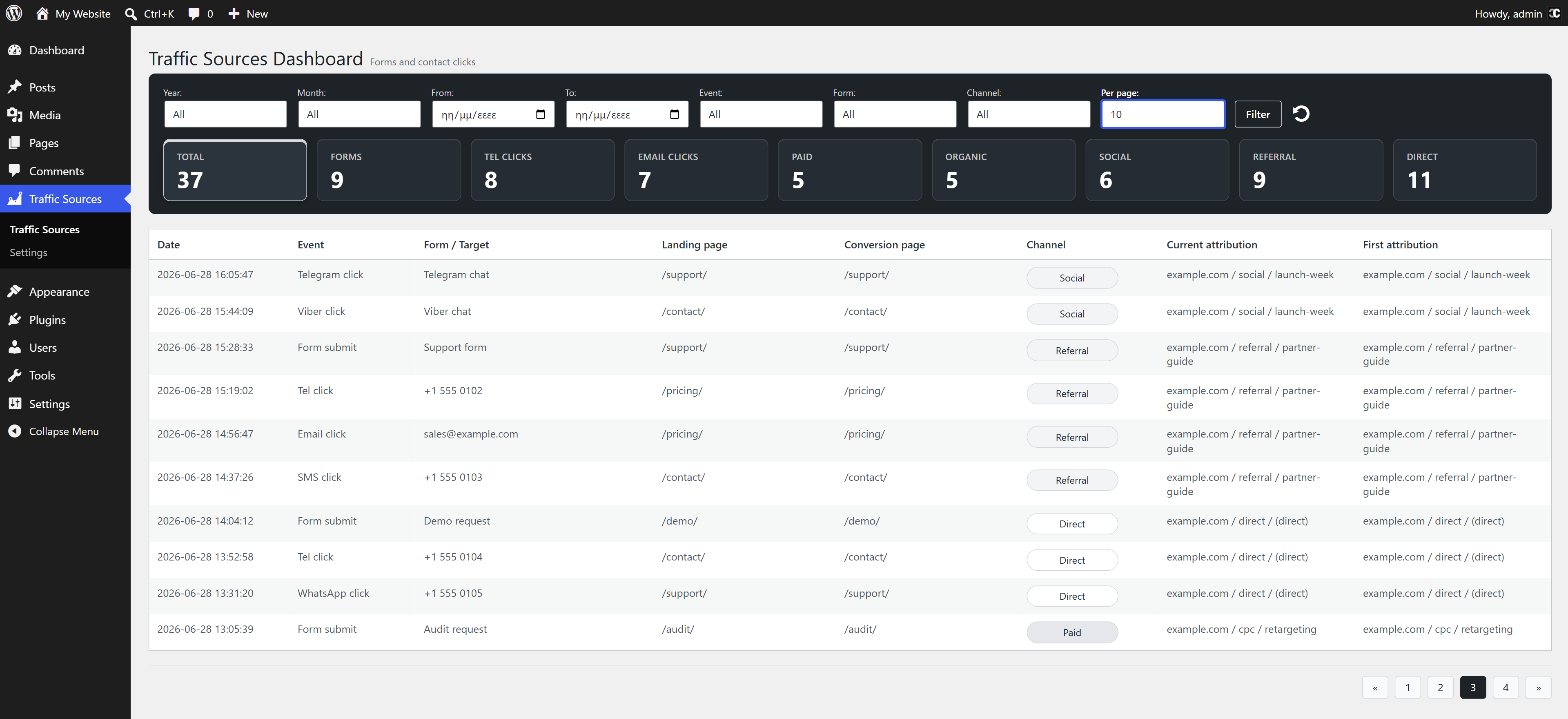
Conversion dashboard
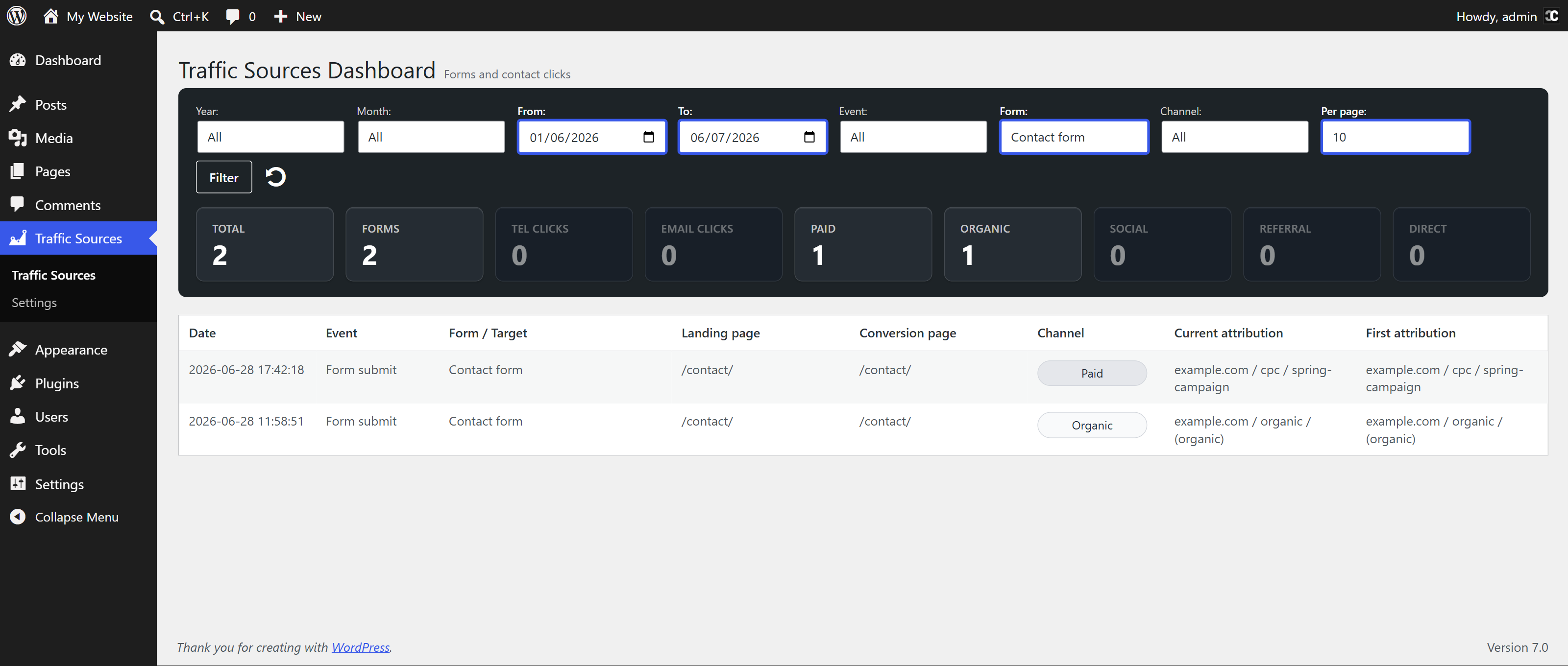
The local WordPress dashboard includes:
- Custom date ranges
- Filters for conversion type, form and traffic channel
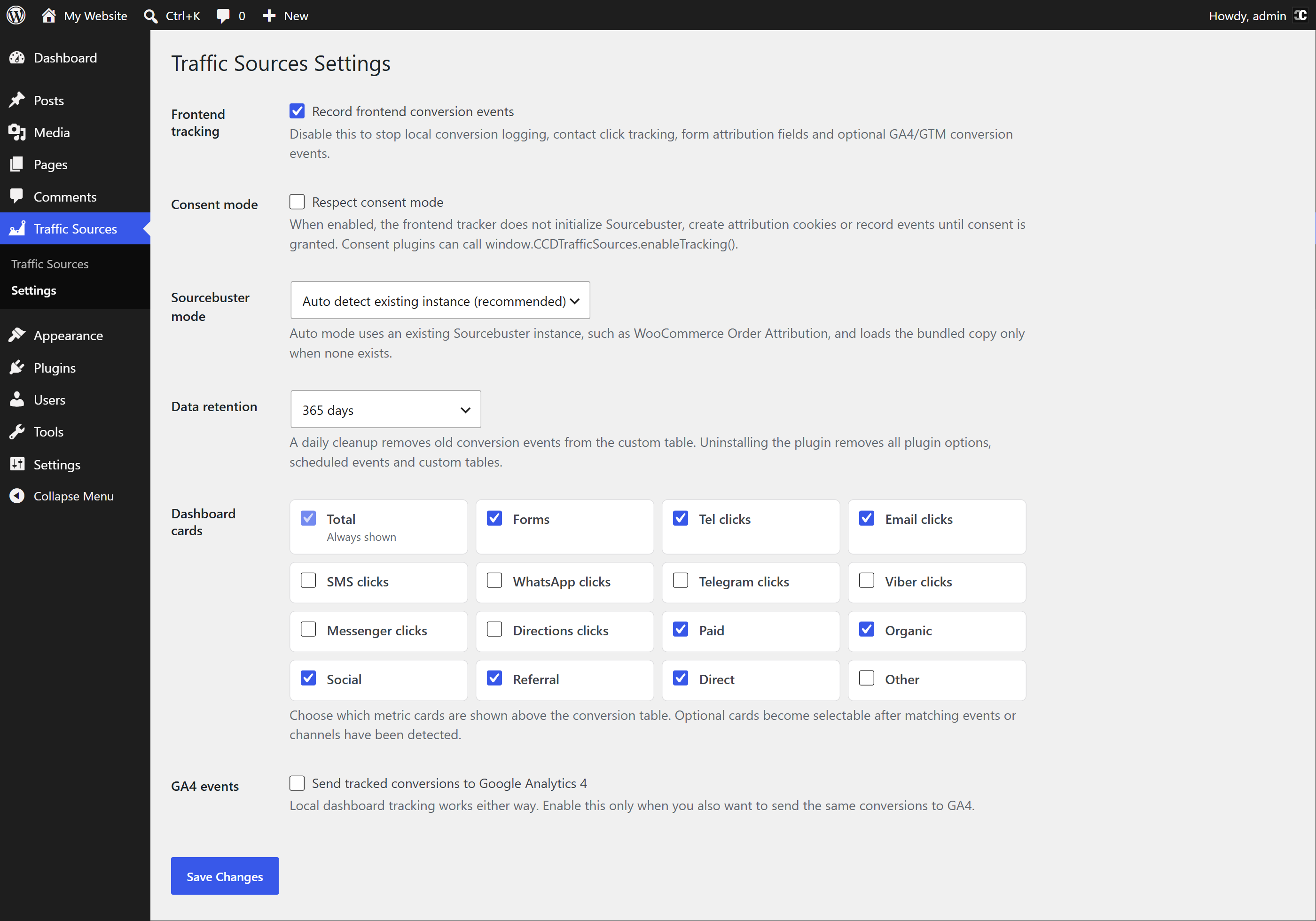
- Configurable metric cards
- First-touch and current-touch attribution
- Campaign, landing-page and referrer reporting
- Configurable data retention for 90, 180 or 365 days, or no automatic deletion
Privacy-focused by default
- Conversion events stay in your WordPress database by default
- No raw IP address or geolocation is stored
- Personal form values are not collected by the event tracker
- Sensitive query parameters are removed before URLs are stored
- Optional Consent Mode can delay tracking until consent is granted
- Suggested text is registered in the WordPress Privacy Policy Guide
- GA4/GTM sending is optional and disabled by default
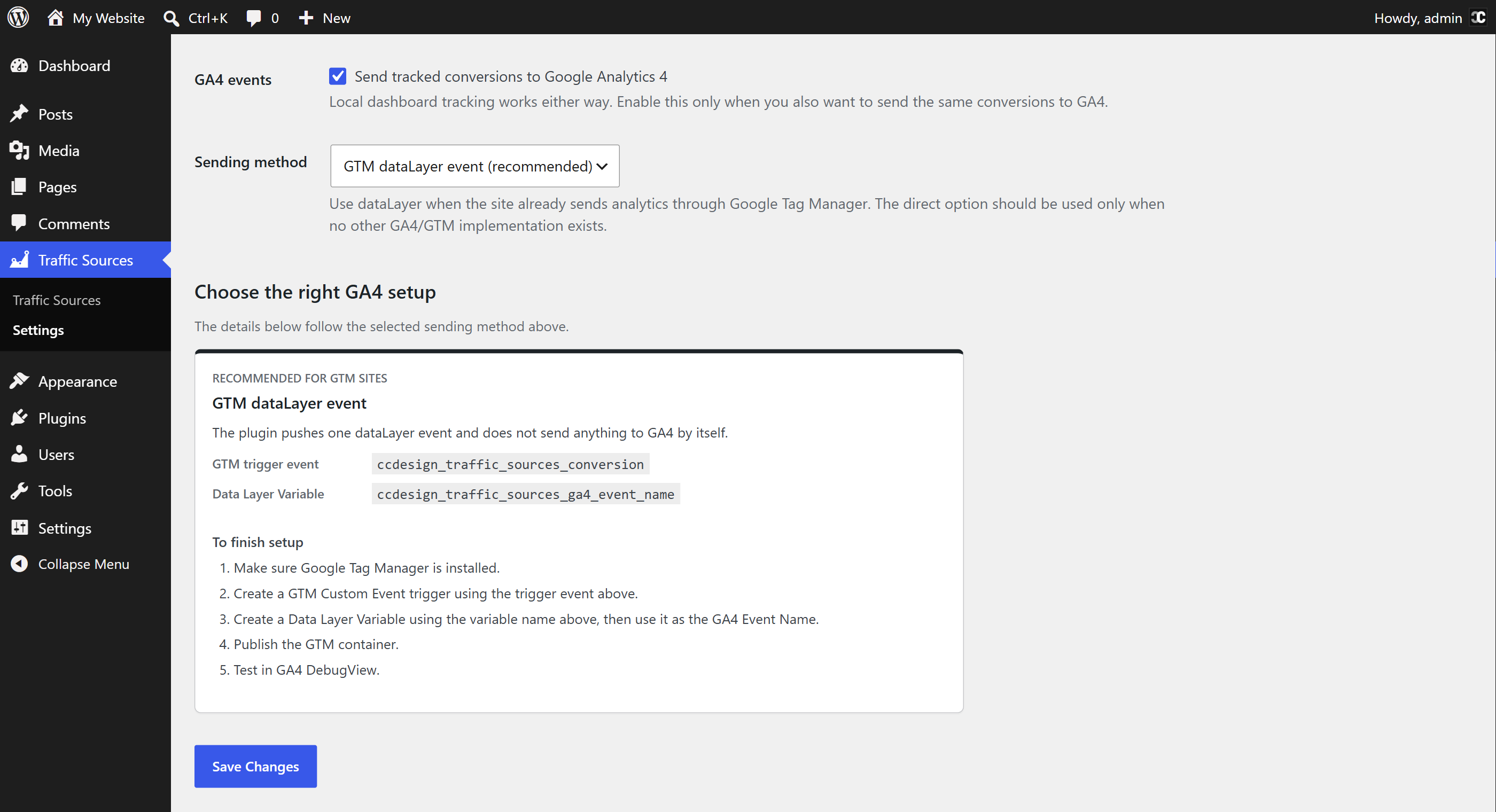
Google Analytics 4 and Google Tag Manager
Optional GA4/GTM conversion events can be enabled in Settings. Available methods include a GTM-friendly dataLayer event, an existing gtag function, or direct loading of gtag.js.
The dataLayer option does not load another Google script. The default installation does not contact Google or another analytics provider.
Frontend REST event endpoint
Logged-out visitors use protected frontend REST endpoints to submit conversion events. The endpoints do not expose dashboard data and apply short-lived tokens, same-site checks, validation, duplicate handling and rate limiting.
External services
No external service is contacted by default.
CCD Traffic Sources can connect to Google Analytics / Google Tag Manager only when the site administrator enables optional GA4/GTM event sending.
Google Analytics / Google Tag Manager is provided by Google LLC and its affiliates. The plugin can send selected conversion events to the site’s own Google Analytics or Google Tag Manager setup.
With GTM dataLayer event, the plugin pushes a local event named ccdesign_traffic_sources_conversion. It does not load a Google script, but the site’s existing Google Tag Manager container may read and send that event according to its configuration.
With Use existing gtag only, the plugin calls window.gtag only when another theme, plugin or custom integration has already loaded it.
With Load gtag.js directly, the plugin loads https://www.googletagmanager.com/gtag/js. The configured GA4 Measurement ID is included in the URL. Google may receive standard request information such as IP address, user agent and referrer.
GA4/GTM conversion data can include the event type, sanitized page path, traffic channel, current and first source/medium/campaign, optional UTM term/content, and form or contact-click metadata. The plugin does not intentionally send raw IP addresses, geolocation, email addresses, phone numbers or message content to Google.
Google service links:
- Google Analytics Terms of Service: https://www.google.com/analytics/terms/
- Google Terms of Service: https://policies.google.com/terms
- Google Privacy Policy: https://policies.google.com/privacy
Development
CCD Traffic Sources bundles Sourcebuster JS as assets/js/sbjs.min.js for first-party attribution cookies.
- Version: 1.0.5
- License: MIT
- Upstream source: https://github.com/alex35mil/sourcebuster-js
- License notices:
third-party-notices.txt
Schermafbeeldingen
Installatie
- Install CCD Traffic Sources from Plugins > Add New, or upload the
ccd-traffic-sourcesfolder to/wp-content/plugins/. - Activate the plugin.
- Visit Traffic Sources > Settings to review tracking, privacy and optional GA4/GTM settings.
- Submit a supported frontend form or click a supported contact link.
- Open Traffic Sources in the WordPress admin to view the conversion and its attribution.
FAQ
-
What is traffic attribution?
-
Traffic attribution connects a conversion with the marketing source that helped generate it. CCD Traffic Sources shows the source, medium, campaign, referrer and landing page associated with a form submission or contact click.
-
Is this only a UTM tracking plugin?
-
No. UTM tracking is included, but the plugin also detects referrers, search, direct visits, paid click IDs and contact conversions. It combines this information in a local conversion attribution dashboard.
-
Does it work without UTM parameters?
-
Yes. UTM parameters provide clearer campaign names, but CCD Traffic Sources can also classify visits from referrer data, search engines, known social platforms, advertising click IDs and direct traffic.
-
Which WordPress forms are supported?
-
The plugin detects Elementor, Contact Form 7, WPForms, Gravity Forms, Fluent Forms, Avada Forms, Formidable Forms, Ninja Forms, WPBakery-rendered forms and standard HTML forms. Reliable AJAX success tracking depends on the success events exposed by each form plugin.
-
Does it track successful submissions or submit attempts?
-
For supported AJAX integrations, the plugin waits for a reliable success event when one is available. For generic forms, a conversion is recorded when the browser reports that the form is valid and its submit event fires; a later server-side rejection may not be visible to the tracker.
-
Does the plugin store form messages or personal details?
-
No. The conversion tracker does not collect form field values such as name, email, phone number or message. It stores attribution and conversion metadata such as form system, form ID, page, campaign and traffic source.
-
Does it track phone calls and WhatsApp messages?
-
It tracks clicks on supported phone, email, SMS, chat and direction links. It does not know whether a phone call was answered or whether a message was ultimately sent.
-
Does it send data to Google Analytics 4?
-
Only if an administrator enables GA4/GTM events. The default method for sites using Google Tag Manager is the local
dataLayerevent, which lets the existing GTM container control what is sent.
Beoordelingen
Er zijn geen beoordelingen voor deze plugin.
Bijdragers & ontwikkelaars
“CCD Traffic Sources” is open source software. De volgende personen hebben bijgedragen aan deze plugin.
Bijdragers
“CCD Traffic Sources” is vertaald in 1 taal. Dank voor de vertalers voor hun bijdragen.
Vertaal “CCD Traffic Sources” naar jouw taal.
Interesse in de ontwikkeling?
Bekijk de code, haal de SVN repository op, of abonneer je op het ontwikkellog via RSS.
Changelog
1.0.2
- Excluded WooCommerce operational forms from generic conversion tracking.
1.0.1
- Added Avada Forms / Fusion Forms support, including successful AJAX submission tracking.
1.0.0
- Initial public release.