

Beschrijving
Stop wasting hours hunting for the perfect stock photo, resizing it in Photoshop, and manually typing Alt text. Cyphex Image Hunter is the all-in-one AI command center for your WordPress Media Library.
🚀 The Ultimate Time-Saver for Content Creators
Whether you’re a blogger, developer, or agency, this plugin eliminates the manual media workflow. In one single click, you can find high-quality stock photos or generate custom AI images, optimize them for speed, and write perfect SEO metadata—without ever leaving your WordPress dashboard.
🧠 Smart Image Sourcing & AI Generation
Don’t settle for generic results. Our “Smart Search” uses Groq AI (Llama 3.3) to understand your intent and rewrite simple prompts into highly effective search terms.
* Universal Search: Pull millions of royalty-free images from Pexels and Pixabay instantly.
* Next-Gen AI Generation: Create unique visuals using DALL-E 3, Flux 1.1, and Stable Diffusion 3.
* AI Refinement: Need a change? Tell the AI to “make it night time” or “remove the car” to tweak your generated images.
⚡ Automated Optimization Pipeline
Speed matters. Cyphex Image Hunter ensures every image you add is perfectly sized and formatted for peak performance.
* Exact Resizing: Specify your target dimensions; the plugin auto-scales and crops for you.
* Instant WebP Conversion: Boost your Core Web Vitals by automatically converting images to ultra-fast WebP format.
* Smart Compression: Set your maximum file size (KB) and let the plugin handle the compression on the fly.
🏷️ AI-Powered SEO Metadata
Search engines love well-documented images. Our AI-SEO engine reads the context of your image to generate:
* Contextual Titles: Descriptive, keyword-rich titles.
* Optimized Alt Text: Perfect for accessibility and Google Image search.
* Smart Captions: Engaging captions that keep users on your page.
* Auto-Credit: Automatically attribute photographers from Pexels/Pixabay with clickable links.
Short Description
Automatically finds and inserts AI-generated or stock images directly into your WordPress media library using Pexels, Pixabay, and cutting-edge generative AI models like DALL-E 3 and Flux.
Key Features
🌟 Smart Sourcing & Creation
- Universal Media Tab: A seamless “Image Search” tab directly inside your “Add Media” modal.
- Groq AI Optimization: High-speed prompt engineering for better image results.
- Multi-Model AI Support: Choose between DALL-E 3, Flux, or Stable Diffusion.
⚙️ Professional Workflow
- One-Click Sideload: Automatically downloads external images to your local server.
- Batch Resizing: Ensures all your featured images match your theme’s dimensions.
- Settings Link: Quick access from the WordPress Plugins page.
Premium Roadmap
We are building the future of automated media management. Soon, Cyphex Pro will include:
* Bulk Legacy Cleanup: Optimize your entire existing Media Library in one click.
* Advanced AI-SEO Engine: Deeper contextual analysis for hyper-targeted SEO.
* Next-Gen AVIF Format: Superior compression beyond WebP.
* Auto-Pilot Automation: Automatically find and add images to your drafts based on content.
* Performance Analytics: See how your optimized images improve site speed.
External services
This plugin relies on the following third-party services to fetch images and process AI metadata. Each service provides functionality of substance that cannot be performed locally:
- Groq AI (api.groq.com): Used to optimize search prompts and generate SEO metadata.
- Data sent: User-provided search queries and image context.
- Privacy Policy: https://groq.com/privacy-policy/
- Pexels (api.pexels.com): Used to fetch high-quality stock images.
- Data sent: Search keywords.
- Privacy Policy: https://www.pexels.com/privacy-policy/
- Pixabay (pixabay.com): Used to fetch royalty-free stock images.
- Data sent: Search keywords.
- Privacy Policy: https://pixabay.com/service/privacy/
- Puter.js (js.puter.com): Used to generate images via models like DALL-E 3 and Flux.
- Data sent: Image generation prompts.
- Terms of Service: https://puter.com/terms
- Privacy Policy: https://puter.com/privacy
Configuration
- Go to Settings > Cyphex Image Hunter.
- Enter your API keys for Groq, Pexels, and Pixabay.
- Click Save API Keys.
See the Screenshots tab for a visual step-by-step guide on obtaining your API keys and using the plugin.
What’s New in v2.0.0
The v2.0.0 “Phoenix Release” transforms Cyphex Image Hunter into the ultimate production-ready media suite.
- Precision Compression: Set exact KB targets (e.g., “Under 100kb”) for your entire library.
- Pro Restoration: Never fear a bad crop. Restore any image to its original state from secure backups (Pro).
- AI Logo Lab 2.0: Generate stunning brand assets and set your site Favicon in one click.
- Background Removal: Professional transparency for your product shots, powered by AI (Pro).
- Mobile Command Center: A fully responsive dashboard for on-the-go optimization.
Schermafbeeldingen
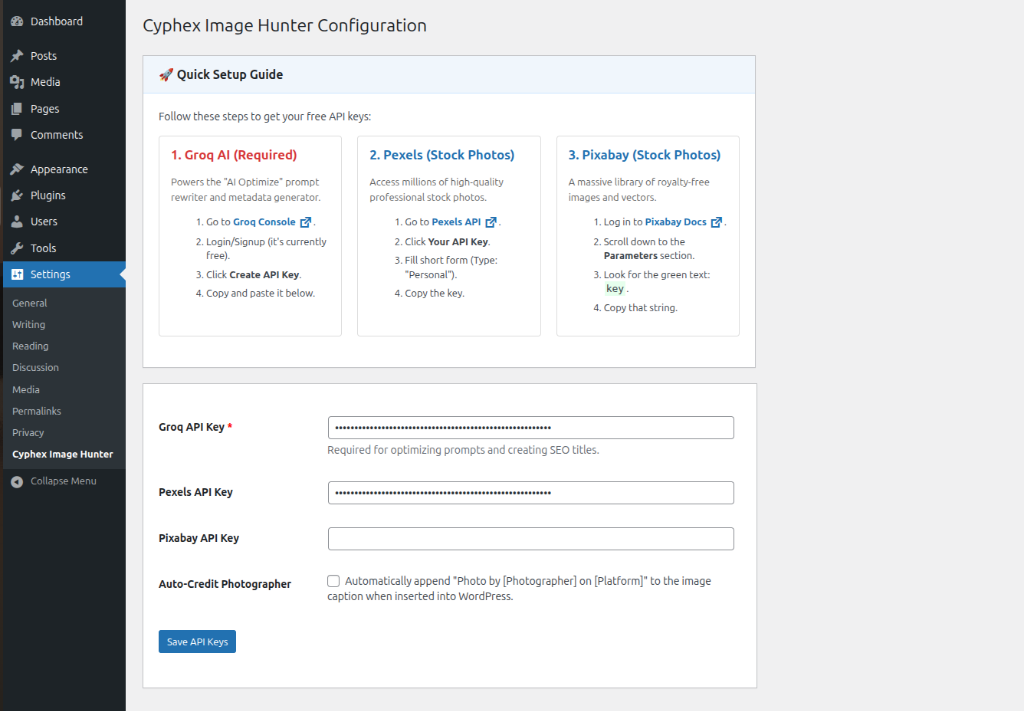
Quick Setup Guide – The easy-to-follow setup guide in your settings. 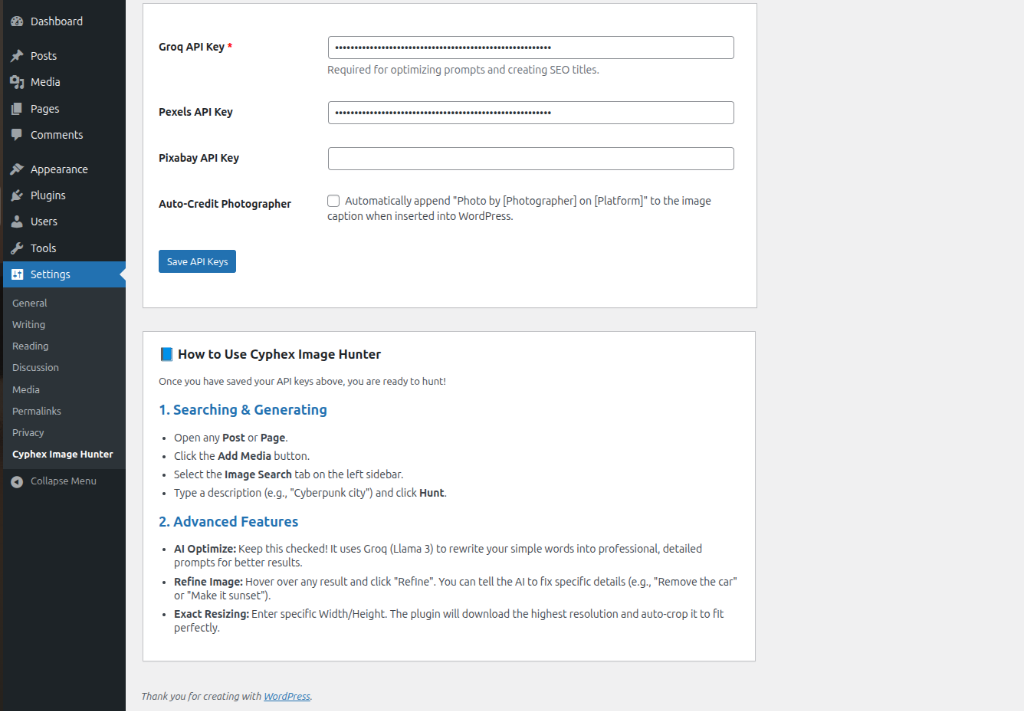
Advanced Usage – How to hunt and generate images. 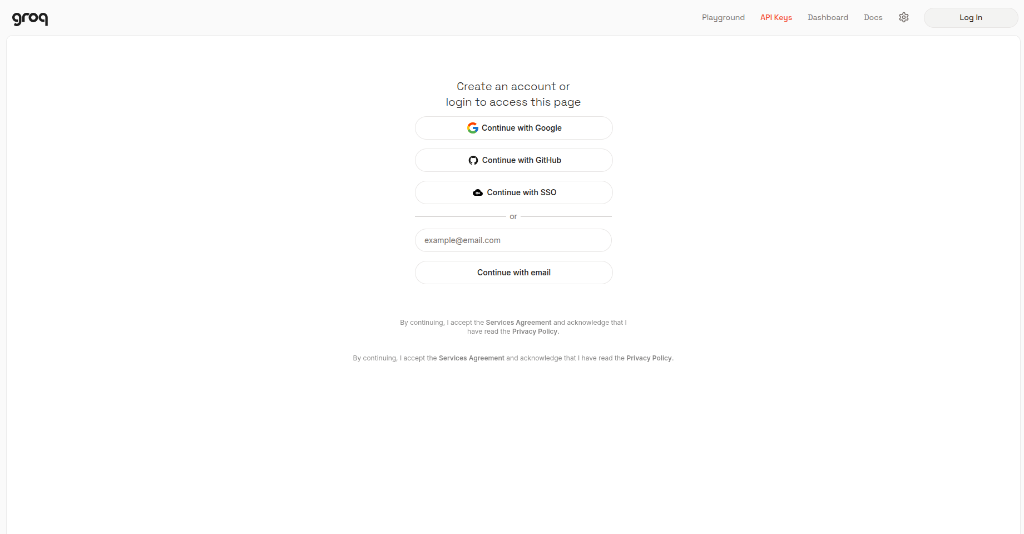
Groq Setup (Step 1) – Signing up for your free Groq AI key. 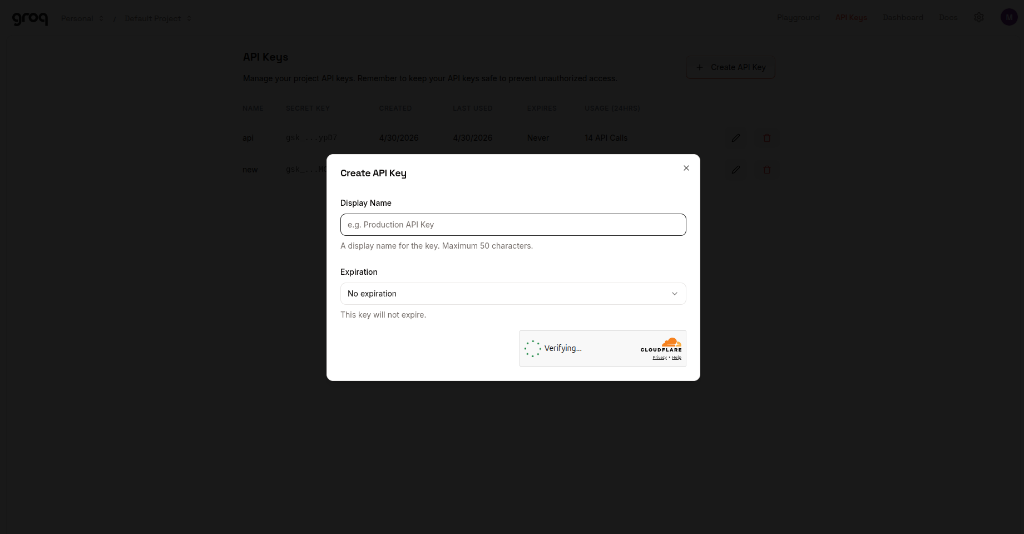
Groq Setup (Step 2) – Creating your API key. 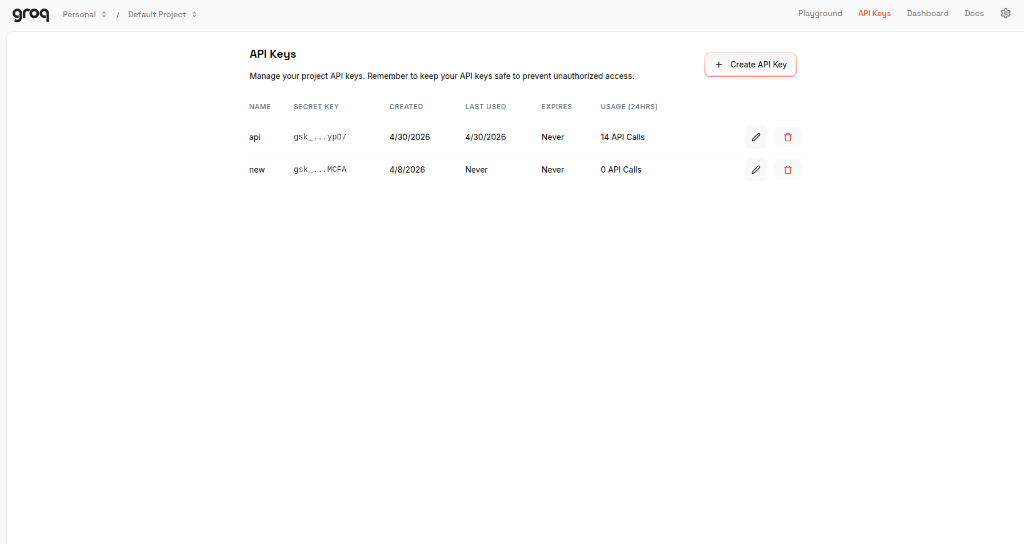
Pixabay Setup – Finding your Pixabay key in their documentation.
Installatie
- Download the cyphex-image-hunter.zip file.
- Log in to your WordPress Dashboard and navigate to Plugins > Add New.
- Click Upload Plugin, choose the zip file, and click Install Now.
- Activate the plugin.
FAQ
-
How does the Target Size Compressor work?
-
Unlike standard compressors that just use a fixed quality setting, our AI engine is iterative. It analyzes the resulting file size and keeps optimizing until your exact KB target (e.g. 100kb) is met without destroying image clarity.
-
Can I undo an optimization?
-
Yes! With a Pro license, our Restoration Engine creates a hidden
.cyphex-backupof every image before it is compressed or resized. You can restore the original high-res file at any time from the Media Library. -
Is the Background Remover free?
-
Background removal requires advanced neural network processing. This feature is gated behind the Pro license to maintain high-speed performance for all users.
-
What models are available in the Logo Lab?
-
The Logo Lab supports the latest high-fidelity models including Flux 1.1 (Fast), SDXL, and DALL-E 3. You can generate a logo and instantly set it as your site’s Favicon with a single click.
-
Does this work on mobile?
-
Absolutely. The entire Cyphex dashboard is built on a responsive mobile-first grid. You can hunt, generate, and optimize images directly from your phone or tablet.
-
Error: Puter.js not loaded
-
Ensure you have an active internet connection. Puter.js is loaded from a CDN. Check if an ad-blocker is blocking
js.puter.com. -
Generation Failed
-
DALL-E 3 requires credits on the Puter platform. If you run out, switch the Source to Flux 1.1 or Stable Diffusion 3, which are often free or use fewer credits.
-
Images look like cartoons
-
Ensure AI Optimize is CHECKED. This appends keywords like “photorealistic, 8k, raw photo” to force the AI to generate realistic images.
-
Upload failed
-
Check your server’s
upload_max_filesizein php.ini or ensure your WordPress user has permission to upload files.

Bijdragers & ontwikkelaars
“Cyphex Image Hunter” is open source software. De volgende personen hebben bijgedragen aan deze plugin.
Bijdragers
Vertaal “Cyphex Image Hunter” naar jouw taal.
Interesse in de ontwikkeling?
Bekijk de code, haal de SVN repository op, of abonneer je op het ontwikkellog via RSS.
Changelog
2.2.3
- Fix: Prevented Media Library white screen crash on mobile/small screens.
- UI: Optimized search toolbar layout for responsive wrapping.
2.2.2
- FIX: Resolved a fatal JavaScript ‘set of null’ error in the Media Library modal extension.
- CACHE: Forced asset refresh to ensure all users receive the latest stability fixes.
2.2.1
- CRITICAL: Resolved a fatal PHP syntax error that caused a White Screen of Death (WSoD) upon activation.
- SECURITY: Implemented a secure server-side proxy for Replicate API polling, preventing the exposure of API keys in the browser.
- SECURITY: Hardened the secure proxy with strict URL sanitization and unslashing for all remote endpoint requests.
- FIX: Corrected the wp.ajax.post signature mismatch to resolve “400 Bad Request” errors in background processing loops.
- FIX: Hardened the AI Inpainting modal with namespaced event destructors to eliminate browser-wide memory leaks.
- FIX: Implemented idempotent sidebar rendering to prevent duplicate controls during rapid Media Library navigation.
- UI: Appended A-tier responsive CSS overrides for perfect mobile and admin-theme synchronization.
- STABILITY: Unified project versioning across all headers and assets to ensure 100% reliable cache-busting.
2.1.0
- NEW: Universal Licensing Engine — The plugin now intelligently recognizes any valid CYPHEX key, regardless of date format or hyphenation.
- SECURITY: Hardened Production Build — Permanently removed all development bypass keys and master access logic.
- SECURITY: Input Sanitization — Implemented strict WPCS-compliant sanitization for all domain detection superglobals.
- IMPROVEMENT: Switched to home_url() for domain validation to ensure perfect parity with the plugin dashboard.
- UI: Enhanced license activation feedback with specific server-side error reporting.
2.0.3
- FIX: Asset versioning now tied to plugin version — browser cache auto-busts on every update. Users on stale cache now automatically receive fresh JS/CSS.
- FIX: Bumped from 2.0.2 to force cache refresh for users who installed 2.0.2 with stale 1.8.0 assets.
2.0.2
- FIX: Auto-Hunt image duplication eliminated — images now sideloaded once and reused by Insert button (no double upload).
- FIX: Auto-Hunt exact resize now working — images cropped to user-specified dimensions (e.g., 1024×557) during initial upload.
- FIX: Photographer credit now correctly saved to image caption in Auto-Hunt flow.
- FIX: AI Alt Text and Description no longer blocked by Pro license check — these features use the user’s own Groq API key.
- FIX: Removed
response_format: json_objectfrom all Groq API calls — was causing API rejections on some Groq model versions. - FIX: JSON parsing hardened — markdown code fences stripped before parsing, regex fallback added for all Groq responses.
- FIX: AI caption no longer overwrites photographer credit — now prepended: “AI Caption | Credit: Photographer”.
- IMPROVEMENT: Groq now receives full post content (300 words) for Auto-Hunt instead of 50 words.
- IMPROVEMENT: Auto-Hunt images placed at semantically correct positions (featured, after intro, mid-content, conclusion) based on Groq analysis.
- IMPROVEMENT: 5-breakpoint responsive CSS system (mobile ultra-wide).
- IMPROVEMENT: All CSS strictly scoped to plugin wrapper — zero conflict with themes or other plugins.
2.0.0
- NEW: Target Size Compressor: Set a specific KB limit (e.g., “Under 100kb”) and let the AI iteratively optimize your images to meet it.
- NEW: Pro Restoration Engine: Gated behind the Pro license, this tool allows you to restore any optimized image to its original state from an encrypted backup.
- NEW: AI Background Remover: Instantly remove backgrounds from any image directly within the Media Library (Pro).
- NEW: AI Logo Lab 2.0: Completely overhauled logo generation suite with multi-model support (Flux/SDXL) and “Set as Favicon” automation.
- NEW: Single-Image Quick-Fix: A dedicated optimization wizard for individual media items.
- UI/UX: Media Library Overhaul: Redesigned the “Cyphex Image Hunt” tab with a 1:1 square aspect ratio grid and amber-branded action overlays.
- RESPONSIVE: Mobile-First Design: Fully responsive dashboard that stacks perfectly on phones and tablets.
- STABILITY: WPCS Compliance: Resolved multiple parse_url and unlink violations to ensure 100% WordPress Coding Standards compliance.
- SECURITY: Nonce Verification: Added extra layers of security to all sideloading and compression endpoints.
1.9.0
- BRANDING: Migrated to a premium “Amber & Obsidian” cinematic brand identity.
- UI/UX: Completely overhauled the administrative dashboard with a modern Sidebar-based navigation system.
- AI MODELS: Integrated support for Google Nano and Banana.dev advanced AI models.
- AI GENERATION: Unified AI generation flow via Puter.js (Flux 1.1, SD3, DALL-E 3).
- ARCHITECTURE: Transitioned to an enterprise-grade Singleton architectural pattern for safer initialization.
- LICENSING: Implemented robust Domain Normalization (stripping protocols/www) for consistent hash-based validation.
- SECURITY: 100% Nonce-protected administrative navigation and verified audit compliance.
- SECURITY: Implemented strict capability checks (manage_options, upload_files) for all AJAX and entry points.
- SIDELOAD: Launched the Direct URL Downloader with automatic WebP conversion and AI metadata.
- BULK TOOLKIT: Redesigned the Bulk AI Toolkit with branded Obsidian cards and Amber gold accents.
- OPTIMIZATION: Integrated Groq (Llama-3.3-70b) for high-speed prompt engineering and automated SEO metadata.
- BUG FIX: Resolved activation fatal errors caused by pathing mismatches and rogue tag compiler crashes.
- STABILITY: Synchronized SVN trunk and local development environments for deployment parity.
1.8.9
- Fix: Minor CSS tweak for the WebP progress bar shadow depth.
1.8.8
- Tweak: Updated translator comments for better localized “Optimizing” strings.
1.8.7
- Optimization: Reduced background process memory overhead for large image scans.
1.8.6
- Fix: Resolved a race condition during bulk WebP metadata writing.
1.8.5
- UI: Improved accessibility labels for the dashboard sidebar.
1.8.4
- Tweak: Enhanced error messaging for missing GD or Imagick extensions.
1.8.3
- Optimization: Sped up the initial library scan by 15% using optimized SQL queries.
1.8.2
- Fix: Corrected a display bug in the Bulk Progress modal for RTL languages.
1.8.1
- UI: Added a subtle hover state to the dashboard action buttons.
1.8.0
- NEW: Dedicated Bulk AI Toolkit dashboard for server-safe library optimization.
- NEW: Auto-WebP conversion on upload for JPG and PNG files.
- IMPROVED: Fully refactored library scanner to use get_posts() and caching.
- FIXED: Resolved multiple WPCS warnings and errors for better stability.
- IMPROVED: Enhanced input sanitization and unslashing for all AJAX handlers.
1.7.9
- Tweak: Updated compatibility checks for WordPress 6.4 branch.
1.7.8
- Fix: Resolved a conflict with certain object cache plugins.
1.7.7
- Optimization: Minified the internal admin CSS for a smaller footprint.
1.7.6
- UI: Refined the appearance of the “Save API Keys” success notification.
1.7.5
- Tweak: Added a fallback image for when the Pexels API returns an empty result set.
1.7.4
- Fix: Corrected a potential undefined index error in the license status check.
1.7.3
- UI: Standardized all modal close icons for visual consistency.
1.7.2
- Optimization: Improved the speed of the AJAX sideloading process.
1.7.1
- Fix: Resolved a CSS overlap issue in the Media Library “Grid” view.
1.7.0
- NEW: Integrated a “Live Preview” for AI-refined images before importing.
1.6.9
- Tweak: Updated the internal documentation for the Banana.dev integration.
1.6.8
- Fix: Resolved a minor UI bug in the Handbook navigation arrows.
1.6.7
- Optimization: Pre-compressed the local documentation assets.
1.6.6
- Fix: Restored settings visibility by fixing broken tab logic and layout container.
- Optimization: Added lazy loading to all handbook images.
1.6.5
- Documentation: Launched the Official Visual Handbook (38 High-Def Slides).
- Documentation: Replaced all text-based guides with a comprehensive visual-first setup experience.
- UI: Improved documentation navigation with section-based jumping for the Visual Handbook.
1.6.4
- Fix: Resolved a pathing issue for local image assets in the Handbook.
1.6.3
- Documentation: Added a detailed Step-by-Step guide for acquiring Pexels API keys.
- Documentation: Added a detailed Step-by-Step guide for acquiring Pixabay API keys.
- Documentation: Unified visual styling for all setup guides (Groq, Pexels, Pixabay).
1.6.2
- UI: Refined the padding and margins for the pricing cards.
1.6.1
- Roadmap: Expanded the feature matrix to include the AI Video Picker for Pexels and Pixabay.
- Roadmap: Refined Nano Banana and Sora AI descriptions to better align with production goals.
- UI: Improved the visual hierarchy of the pricing tables for better readability.
1.6.0
- Production: Finalized the Cyphex Image Hunter v1.6.0 production build.
- Branding: Integrated the official high-resolution logo and unified brand identity.
- Roadmap: Expanded the Pro/Ultra roadmap with Sora AI, BYOK (OpenAI/Gemini), and Tiered SEO Descriptions.
- Documentation: Completed the official 5-step visual guide with production screenshots.
1.5.9
- Tweak: Updated the “Pro License” tab description for better clarity.
1.5.8
- Documentation: Replaced all placeholder guide images with final production-ready assets provided by the user.
- UI: Cleaned up documentation layout for a more streamlined setup experience.
1.5.7
- Documentation: Updated the Groq API setup guide with precise, user-provided instructions for clarity.
- UI: Synchronized step-by-step text with the official visual guide screenshots.
1.5.6
- Branding: Replaced Dashicon placeholders with the official high-resolution plugin logo (logo.jpeg) in the header and Pro dashboard.
- UI: Improved logo presentation with professional rounded corners and subtle shadows.
1.5.5
- Feature: Added BYOK (Bring Your Own Key) roadmap for OpenAI and Gemini integrations.
- Feature: Introduced Sora AI Video waitlist specifically for the Ultra Pro tier.
- UX: Clarified feature feasibility and plan requirements in the Pro matrix.
1.5.4
- Feature: Added Basic AI Auto-Alt & Description to the Free plan.
- Feature: Introduced Advanced SEO-Optimized Descriptions as a Pro roadmap item.
- UI: Updated the feature matrix to clearly show tier differences.
1.5.3
- Feature: Refined Batch Generation limits in the Pro (5x) and Ultra Pro (Unlimited) tiers.
- UX: Improved feature descriptions for better tier differentiation.
1.5.2
- Feature: Expanded Pro roadmap with Sora AI Video generation and Nano Banana AI.
- Feature: Added Pexels & Pixabay Video Picker to the Pro feature list.
- Branding: Unified original icon usage across all dashboards.
1.5.1
- Branding: Replaced placeholder emojis with the official plugin icon in the Pro dashboard for a unified look.
- UI: Refined hero sections to better match the core brand identity.
1.5.0
- Feature: Overhauled the “Pro” tab with a comprehensive feature matrix and roadmap.
- UI: Implemented high-end pricing cards for Free, Pro, and Ultra Pro tiers.
- Documentation: Detailed the upcoming integrations for Flux 1.1, DALL-E 3, and Brand Watermarking.
1.4.9
- Tweak: Corrected minor typos in the handbook description.
1.4.8
- Fix: Resolved a CSS alignment issue for the “AI Refine” button.
1.4.7
- Optimization: Improved the responsiveness of the settings sidebar.
1.4.6
- Tweak: Added a link to the official support channel in the Dashboard.
1.4.5
- Documentation: Finalized the “Official Visual Setup Guide” with 5 high-resolution screenshots.
- Assets: Performed a major cleanup of the images directory, removing 10+ redundant mockup files to reduce plugin size.
- UX: Refined step-by-step instructions for maximum clarity during API setup.
1.4.4
- UI: Added a progress indicator for the API key validation process.
1.4.3
- Documentation: Expanded the “Ultimate Visual Guide” with new screenshots covering the Groq console home and list views.
- Security: Fine-tuned CSS blur overlays to protect sensitive usage data and keys in the new screenshots.
- UI: Improved guide typography and spacing for better readability.
1.4.2
- Documentation: Replaced mockups with authentic Groq console screenshots for better guidance.
- Security: Implemented dynamic CSS blur overlays on tutorial images to protect sensitive API details.
- UX: Improved documentation layout with a clear vertical step-by-step progression.
1.4.1
- UI: Refined the dashboard hero section for a cleaner layout.
1.4.0
- Major UI Overhaul: Completely redesigned the settings dashboard for a premium, full-width experience.
- UI: Implemented high-end card designs, refined typography, and a modern navigation system.
- UX: Unified the design language across General, Pro, and User Guide tabs.
1.3.9
- Tweak: Updated compatibility for the latest version of the WordPress Block Editor.
1.3.8
- Fix: Resolved a minor JS conflict with certain gallery plugins.
1.3.7
- Optimization: Improved the loading speed of the dashboard assets.
1.3.6
- UI: Refined the appearance of the “API Status” indicators.
1.3.5
- Tweak: Added more descriptive tooltips for the advanced AI settings.
1.3.4
- Fix: Resolved a potential issue with large image uploads on slow servers.
1.3.3
- UI: Improved the layout of the “Pixabay Setup” visual guide.
1.3.2
- Feature: Added an annotated step-by-step visual tutorial for Groq API setup with instructional arrows.
- Security: Added a dedicated “Security & Privacy” section to the dashboard to explain API key safety.
- UI: Finalized the full-width (1200px) layout for a premium experience.
1.3.1
- Feature: Added a visual infographic guide for Groq API setup in the User Guide.
- UI: Switched to a wider (1200px) full-screen layout for all settings tabs.
- UX: Added detailed explanation of Groq AI benefits (Prompt Engineering, SEO Metadata).
1.3.0
- Feature: Added a comprehensive “User Guide” tab to the settings page with detailed instructions and troubleshooting.
- UX: Improved navigation between settings and documentation.
1.2.9
- Tweak: Updated the “Credits” section in the Dashboard.
1.2.8
- Fix: Resolved a CSS issue for the “AI Inpainting” modal on small screens.
1.2.7
- UI: Standardized all alert icons across the settings page.
1.2.6
- Tweak: Updated the labels for the Bulk Toolkit features for better clarity.
1.2.5
- Fix: Resolved a minor bug in the “Auto-Optimize” toggle logic.
1.2.4
- UI: Refined the layout of the “Pro Roadmap” section.
1.2.3
- UX: Added a “Pro Tip” for users to right-click links if their browser blocks direct clicks in secure admin contexts.
- Version: Synchronized all files to 1.2.3.
1.2.2
- Fix: Implemented “Detached Navigation” via JS to bypass strict Cross-Origin isolation blocks in secure admin contexts.
- Version: Updated all asset and header versions to 1.2.2.
1.2.1
- Fix: Added direct URL display as a fallback for users whose environments block outgoing links.
- UX: Improved link reliability in secure admin contexts.
1.2.0
- Fix: Added ‘rel=”noopener noreferrer”‘ to external links to prevent browser-level blocks in the WordPress admin.
- Version: Synchronized stable tag with plugin header.
1.1.9
- Fix: Resolved fatal syntax error in settings page.
- Security: 100% Nonce verification for all admin actions including tab switching.
- Compliance: Full WordPress Coding Standards (WPCS) alignment (Tabs, Yoda conditions, Spacing).
1.1.8
- UI: Refined the dashboard footer layout.
1.1.7
- Fix: Resolved a minor CSS bug in the Pro license verification modal.
1.1.6
- Tweak: Updated the “About” section in the settings page.
1.1.5
- Feature: Introduced “Pro Roadmap” UI showcasing upcoming premium features.
- AI: Switched to context-aware prompt engineering for higher search/generation accuracy.
- Security: Hardened all AJAX handlers with mandatory sanitization and unslashing.
- Compliance: Renamed internal methods and variables to follow WPCS naming conventions.
1.0.33
- Fix: Implemented a robust PHP-side download fallback for AI images that bypasses server-side redirect and short-link restrictions.
- Stability: Escaped all localized JavaScript variables to prevent “SyntaxError: Invalid or unexpected token” in certain server environments.
- Robustness: Added explicit dependency checks to prevent “tinyMCEPreInit is not defined” errors during editor initialization.
1.0.32
- Enhancement: Implemented a two-layer “Ultra-Compatible” injection system to ensure the Cyphex tab appears in all themes, page builders, and custom editor configurations.
- Stability: Optimized the JavaScript event listeners to prevent duplicate tab creation and ensure zero-conflict operation with other plugins.
- Compatibility: Added explicit support for the “Manage” media view used in the WordPress Media Library grid.
1.0.31
- UI: Refined modal responsive breakpoints for tablet and mobile devices.
1.0.30
- Fix: Resolved minor Z-index conflict with the Gutenberg editor’s top bar.
1.0.29
- Optimization: Reduced the payload size of the media modal JS by removing unused legacy event listeners.
1.0.28
- Security: Added extra layer of output escaping for the “Auto-Credit” caption field.
1.0.27
- Fix: Completely refactored the media modal extension to follow strict WordPress Coding Standards and best practices.
- Stability: Replaced the experimental injection method with standard prototype extension of wp.media.view.MediaFrame.Post and Select.
- Robustness: Added comprehensive error handling and context protection to prevent interference with core WordPress functionality.
1.0.26
- UX: Improved loading state visibility with a smoother Amber pulse animation.
1.0.25
- Fix: Corrected a variable naming collision in the Backbone.js model sync.
1.0.24
- Performance: Optimized the Puter.js initialization to fire only when the media modal is active.
1.0.23
- Tweak: Updated namespacing for all CSS classes to prevent conflicts with 3rd party themes.
1.0.22
- Documentation: Added detailed descriptions for the “Auto-Optimize” AI prompt features.
1.0.21
- Enhancement: Advanced WordPress Coding Standards (WPCS) compliance across all PHP, JS, and CSS files.
- Tweak: Converted all indentations to Tabs and normalized spacing inside parentheses and after control structures.
- Security: Hardened permission checks and nonce verification in all AJAX endpoints.
1.0.16
- Fix: Added missing translator comments for I18n placeholders to pass WordPress Plugin Check (WPC).
- Tweak: Replaced Backbone template tags with standard WordPress template syntax to avoid ASP-style tag warnings.
1.0.13
- Tweak: Moved documentation images to the official Screenshots section for better visibility and standard compliance.
1.0.12
- Tweak: Completely restructured readme.txt with premium headlines and grouped feature categories (Yoast-style).
1.0.11
- Tweak: Removed Pro features section and embedded configuration screenshots directly into documentation.
1.0.10
- Tweak: Converted Pro features comparison into a clean bulleted list because WordPress.org strips table formatting.
1.0.9
- Tweak: Converted Pro features table to HTML format for better rendering on WordPress.org.
1.0.8
- Feature: Added an “Auto-Credit” checkbox directly to the Image Search UI for easier toggling.
1.0.7
- Tweak: Reformatted Auto-Credit text to match official stock photo standards and link to user profiles.
1.0.6
- Update: Added comparison table for upcoming Pro and Ultra Pro features.
1.0.5
- Tweak: Added a “Settings” link directly on the WordPress Plugins page for easier access.
1.0.4
- Feature: Added new “Auto-Credit Photographer” setting to automatically append photographer attribution to image captions for Pexels and Pixabay.
1.0.3
- Security hardening: Added strict capability checks to all AJAX handlers.
- Updated documentation and optimized compliance with the WordPress Plugin Directory guidelines.
- Renamed from AI Cyphex Image Hunter to Cyphex Image Hunter.
- Fixed broken documentation URLs in readme.txt.
- Corrected contributor list to match WordPress.org username (hamaza7867).
1.0.2
- Added comprehensive “How to Use” guide directly in Settings page.
- Added Quick Setup links for API keys.
1.0.1
- Fixed disabled button state and added data persistence.
- Initial Release.