
Beschrijving
WordPress User Registration Forms Plugin
Create custom WordPress Registration Forms, allow user registration, accept payments, track submissions, manage users, analyze stats, assign user roles, automate processes, send bulk emails and much more. If you need to build a custom WordPress Registration Forms process, look no further!
Take total control of user registrations on your site, with powerful building, configuring, publishing, managing, analyzing and automation toolkit.
So, what exactly is RegistrationMagic?
RegistrationMagic is a powerful WordPress user registration plugin and WordPress Registration form builder which gives you TOTAL CONTROL of user registrations on your website. You can create different WordPress Registration Forms for your users with different pre-defined form fields using an intuitive drag-and-drop form builder. Choose from ready-to-use forms library to quickly create your forms with a few simple clicks! You can also set up payments for paid user registrations and build any type of WordPress payment form. A Front-End user registration area allows your users to login, reset password, check payment transaction history, download their form submissions, etc. This is the only WordPress Registration Form plugin you will ever need!
The new drag-and-drop form builder allows you to create rich custom layouts for your registration forms using standard row and column structure. You can split each row in upto four columns, and in different ratios, to create any type of form layouts. Fields can be dragged and dropped from one column to another easily. You can also add custom descriptions and headings to form rows.
Get started with RegistrationMagic using our Starter Guide.
RegistrationMagic tracks all incoming form submissions and activities, which can be monitored from individual form dashboard, allowing you to make informed decisions about your form tweaks. You can also accept attachments (single or multiple), and view or download them from a single area inside the dashboard. Advanced filters allow you to track form submissions for a specific form within a time period.
There is also a full-fledged User Management module integrated with RegistrationMagic. It goes a step ahead of default WordPress User manager by connecting user registration and payment activities with individual user accounts. User Manager is the central hub for RegistrationMagic’s user management system, which provides important information about each user within individual user pages. User management also offers enhanced options like suspending and re-activating users.
RegistrationMagic not only allows you to create new user roles but integrate them with your login and registration system easily. You can even create paid user roles using in-built manager!
Full integration with WordPress’ default user-meta system means you can hook your form fields with existing user-meta keys, or create new ones right from the comfort of your registration form dashboard. Therefore, not only all registration form submissions are visible inside WordPress User pages as table, you can also go ahead and map individual form fields to user profile fields (or create new ones from scratch)! This also opens a world of opportunity for integrations with other plugins using WP user-meta.
The in-built user login management system is robust and secure, featuring advance configuration options for both first timers and pro users. No need to install separate login management plugins! The login data feeds into to RegistrationMagic User Manager and Security system offering you centralized view of registration forms, login activity and user specific data, all in a beautiful graphical view. There’s more information about the login system below.
Learn more about RegistrationMagic features here.
Not happy with default WordPress registration page? You can define and replace default WordPress registration page with your own custom-built form. RegistrationMagic provides you with more control and flexibility over your WordPress registration page. It redefined the user experience by combining specialized roles of both login and registration plugin.
Running a WooCommerce store? WooCommerce user registration is another area where RegistrationMagic comes in handy. We understand limited registration options in WooCommerce can bog you down. RegistrationMagic can help you improve WooCommerce user registration experience by allowing you to add custom fields to checkout registration form. User Manager can display WooCommerce revenue, addresses and downloads information. You can also add WooCommerce Billing and Shipping field to your standard registration forms.
With RegistrationMagic you can build anything from simple to complex registration approval system. Powerful Custom Status feature offers an option to create multi-step registration approval process. Automations can be used for automated registration approval mechanism. These features allow you to use RegistrationMagic for industry specific registration systems, for example, a WordPress event registration form. If you are registering with limited seats, the Limits feature can help you build WordPress event registration form, which has both a booking time window and option to limit the number of bookings. You can also generate token numbers for every booking for these event registration forms.
Another example would be to use it as WordPress course registration plugin.
Custom Status Guide: The Custom Status system allows combining multiple actions in a single click. (Just like your very own macros!) This enables you to move submissions through a vetting process. Every action can prompt user to fulfill certain requirements. With advance Inbox filters and saved searches, It’s a cinch to sort and mark submissions. Failed registration attempts can be routed through different registration setup.
That being said, RegistrationMagic is an equally powerful contact form system. Intelligent contact forms are one of its many unique features built on real world case scenarios. Since registration and contact forms are neatly displayed inside a single All Forms section, you get a single place to manage all your user submissions and workflows.
Frontend
Customer journey on your site starts with the sign-up process. There are multiple configuration settings in RegistrationMagic to curate sign-up experience for your users. These include different types of limits along with granular access controls, offering them to select user roles, display and hide signup form fields using preset conditions, etc. You also have complete control over redirections after sign-up, sending users email updates and even add automation to take care of recurring tasks. Signup form can be styled using the Visual Design Editor in the form dashboard allowing you to match it with your theme and branding.
RegistrationMagic provides shortcode for its own member area to manage accounts, payments, messages and more! The integrated member area is beautifully rendered with individual tabs for different types of information for the users. You can even display Member area in an overlay using RegistrationMagic’s MagicPopup system!
The user area also has many productivity features. For example, users can check status of their submissions, download filled forms as PDFs, find all emails sent by you, etc. all from a single user area published using a single shortcode. In fact, the user area is built in such a way that it fits inside any WordPress theme you are using, by automatically picking theme’s accent colors. One thing less to worry about!
The Login System
Read our WordPress User Login Guide: With the release of RegistrationMagic 4, Login Logout system has been substantially revamped. While login has always been an integral part of RegistrationMagic, it wasn’t as feature rich as the registration part. But now, with its own central management area, The Login Form Dashboard, it is much more capable and scalable system. You can now edit both Username and Password fields including custom errors and labels. You get a multi-level login validation process that uses reCAPTCHA, IP Filters (Premium) and Two-Factor Authentication (Premium). As with other forms, you can tweak visual elements of the login form. We have included four new custom email templates attached to login events. We have further introduced a new, multipurpose Login Logout button Widget. It renders Login Logout buttons based on user login state, displays login form as a pop-up or page, and important information about the current user on cursor hovering. We have moved all external integration services specific to login under a single section and added Login Analytics with user login timeline under it. Login Timeline also features advance filtering. A new Login tab now appears on user pages inside User Manager, with a chronological list of login events specific to the user.
New privacy options allow you to delete personal user data collected through forms. RegistrationMagic also integrates with WordPress default Export and Erase Personal User Data system. Additionally, You can add privacy policy field to your contact and registration forms, with checkbox asking user to accept it before form submission.
In short, RegistrationMagic is the missing user registration system for WordPress and a powerful addition to any WordPress admin’s arsenal. From building any type of WordPress signup form, it can serve as industry specific solution like WordPress event registration and WordPress course registration plugin. It combines the role of both a powerful login and a registration plugin.
And that’s not all! RegistrationMagic is in active development with new features being rolled out every fortnight. Keep an eye on the changelog! If you feel anything is missing, just request our team and you may see it in the very next release.
Payment Forms
A lot of professional and business users require collecting information along with payments. RegistrationMagic is tailor made for such users by acting as a powerful WordPress payment form system. With RegistrationMagic you can build PayPal forms, Stripe forms, registration forms with payment and more! PayPal integration is baked-in inside the standard version, so you can use it as your default WordPress payment plugin. With advanced pricing options in Premium version, we bet you will find it hard to discover a more robust payment solution!
GDPR and Privacy Laws
RegistrationMagic forms data and submission records work with WordPress’ Export Personal Data and Erase Personal Data tools, allowing you to offer greater privacy control to your users and compliance with your local privacy laws. An in-built option also allows you to erase all plugin data from the database, if required, with a single click. Moreover, you can add link to your Privacy Policy page in your forms as a custom field.
Admin Menu Access Controls
Admin menu access control allows you to reorder RegistrationMagic WordPress admin menu and delegate access to specific menu pages to specific user roles on your website. This comes handy when you are working with teams and wish to distribute registration data among different users on your website. Admin menu access is available in the Global Settings area starting version 5.2.1.0.
Forms Manager
- Unified User Registration Forms Manager.
- Unlimited Online User Registration Forms.
- Form Cards with at-the-glance information.
- Quick and simple drag and drop form builder.
- Built in User Login form.
- Submission counter on form card.
- Default form selector.
- Short-code system for forms.
- Submissions Dashboard Widget.
- Submissions under User profiles.
- Sort form cards alphabetically or chronologically.
- Duplicate forms.
- HTML Embed code for forms (Premium).
- Terms and Condition Checkbox.
- Custom WordPress user registration URL.
- Default register page.
Overview Dashboard
New overview feature introduces powerful bird’s eye view of all registration related user activities on your website through charts and tables widgets on a single page. These include:
- Form submission comparison bar graphs.
- Trending forms.
- Latest submissions timeline.
- User registrations line graph.
- User logins line graph.
- Submission counters.
- Latest forms.
- Latest logins timeline.
- Quick access to global settings.
General Settings
- 2 Form Styles with 3 layout options.
- Ability to define accepted attachment extensions (Premium).
- Allow multiple attachments in a form.
- Show form expiry countdown above the form.
- Define and replace default WordPress user registration page.
- Set redirection after user logs in.
- Submission Form PDF and print header logo (Premium).
- Custom Text on Submissions PDF and print (Premium).
- Display RegistrationMagic Floating Button, Popup Menu and Sliding Panels.
- Define accent color of RegistrationMagic Button, Popup Menu and Sliding Panels.
Security
- Google reCaptcha Support (User Registration form login captcha to control user registration spam).
- Form Submission Limit on a device.
- Custom Password restriction (Premium).
- Banned IP Addresses from accessing form (Premium).
- Banned Email Addresses from Accessing form (Premium).
- Blacklist and Reserve Usernames (Premium).
User Accounts
- Auto Generate Password.
- Send Username and password to user by email.
- WordPress user Registration Auto-Approval (Premium).
Email Notifications
- Send notification to the user for front-end user registration notes (Premium).
- Set recipients list.
- SMTP Relay option.
- From Name and Email.
External Integration
- Social login register using Facebook, LinkedIn, Microsoft, Twitter, Instagram and Google Accounts (User registration form with front-end login).
- Integrate with MailChimp (MailChimp Custom Fields and MailChimp User registration Form).
- Integrate with MailPoet (MailPoet Custom Fields, and MailPoet User registration Form).
- Integrate with WooCommerce (WooCommerce Custom Fields, WooCommerce user registration Form * WooCommerce Vendor Registration & WooCommerce Floating Cart).
- Integrate with DropBox.
- Integrate with NewsLetter Plugin (NewsLetter Custom Fields & NewsLetter User Registration Form).
- Integrate with Google Maps API key. (Premium)
Payments
- PayPal Integration. Full support for WordPress PayPal form creation.
- Stripe Integration (Premium).
- Authorize.net Integration (Premium).
- PayPal custom checkout page.
- Currency definition.
- Currency position.
Visual form editor
- Define border, border-width, border-color, border-radius, background-color, background Image and padding for the form.
- Define border, border-width, border-color, border-radius, background-color, background Image and padding for the input fields.
- Define border, border-width, border-color, border-radius, background-color, background Image padding, font color and label for the submit button.
Accounts
- Create WordPress User with each submission.
- Select a WordPress user role to assign to users automatically (Premium).
- Allow the user to select from predefined roles (Premium).
- Automatically login user after submission.
Post Submission
- Custom Success Message with Mail Merge.
- Show a unique token number with every submission (Premium).
- Redirect after submissions to a page or URL.
- Submit Submission data to an external URL (Premium).
Auto Responder
- Custom Email Subject and Body with mail merge fails.
Limits
- Limit the user submissions based on number, date or both.
- Define the number of submissions allowed.
- Set a deadline for form submission.
- Custom message to the user after submission is complete.
MailChimp Registration
- Select a list to Map.
- Map MailChimp Email, First Name and Last Name fields to your user registration form fields.
- Map MailChimp advanced custom fields with your user registration form fields (Premium).
- Show an opt-in box with custom text.
Access Control
- Enable date based access. Define age or specific time between dates.
- Passphrase based access. Define secret question and passphrase.
- User Role based Access. Define roles that will have access to the form.
- Custom Denial Message.
Registration form CUSTOM FIELDS
- All common field types supported.
- …
Schermafbeeldingen

WooCommerce Cart Integration with RegistrationMagic's Magic Popup. 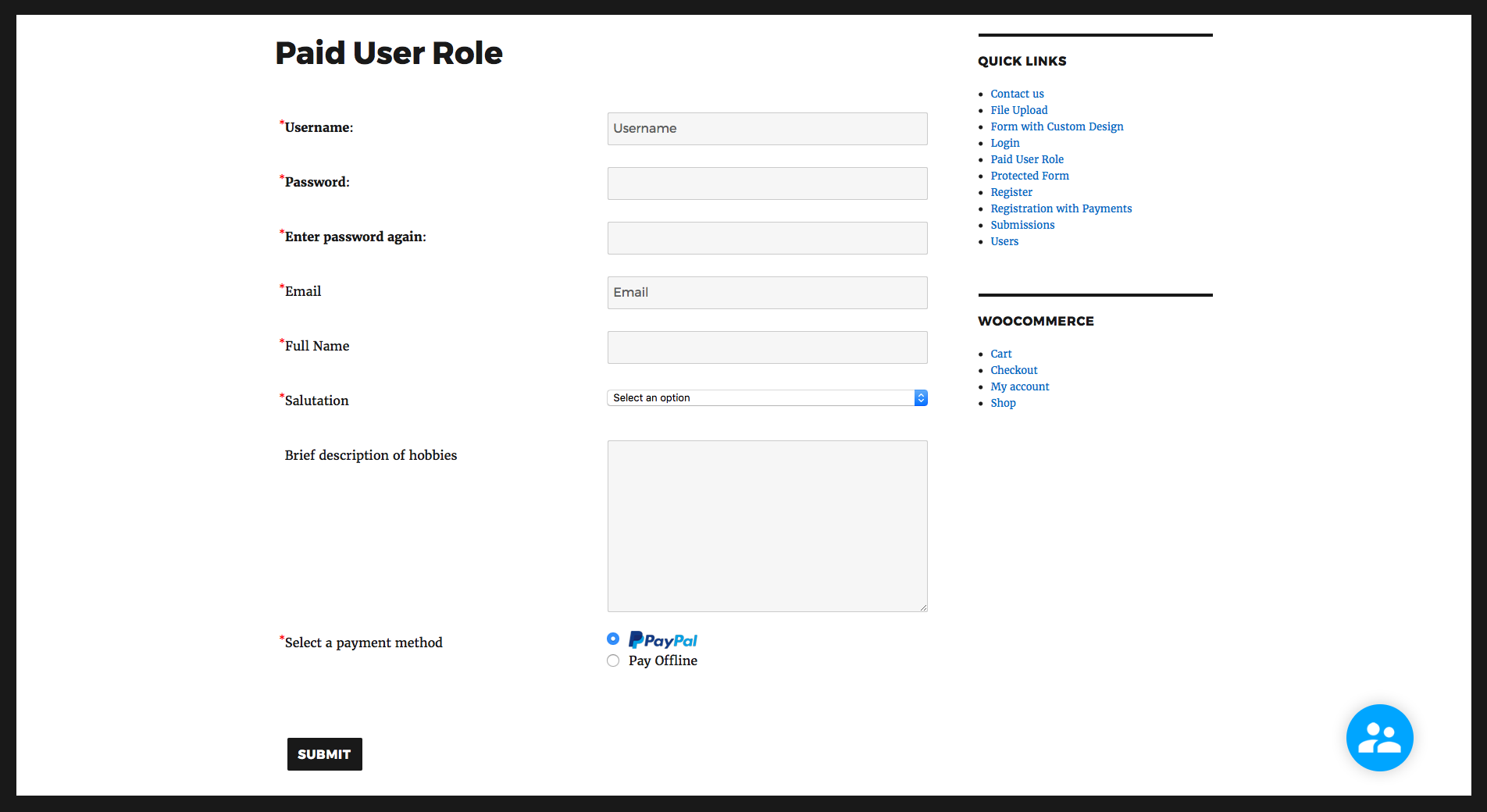
A simple user registration form with payment option. 
Login page using RegistrationMagic. 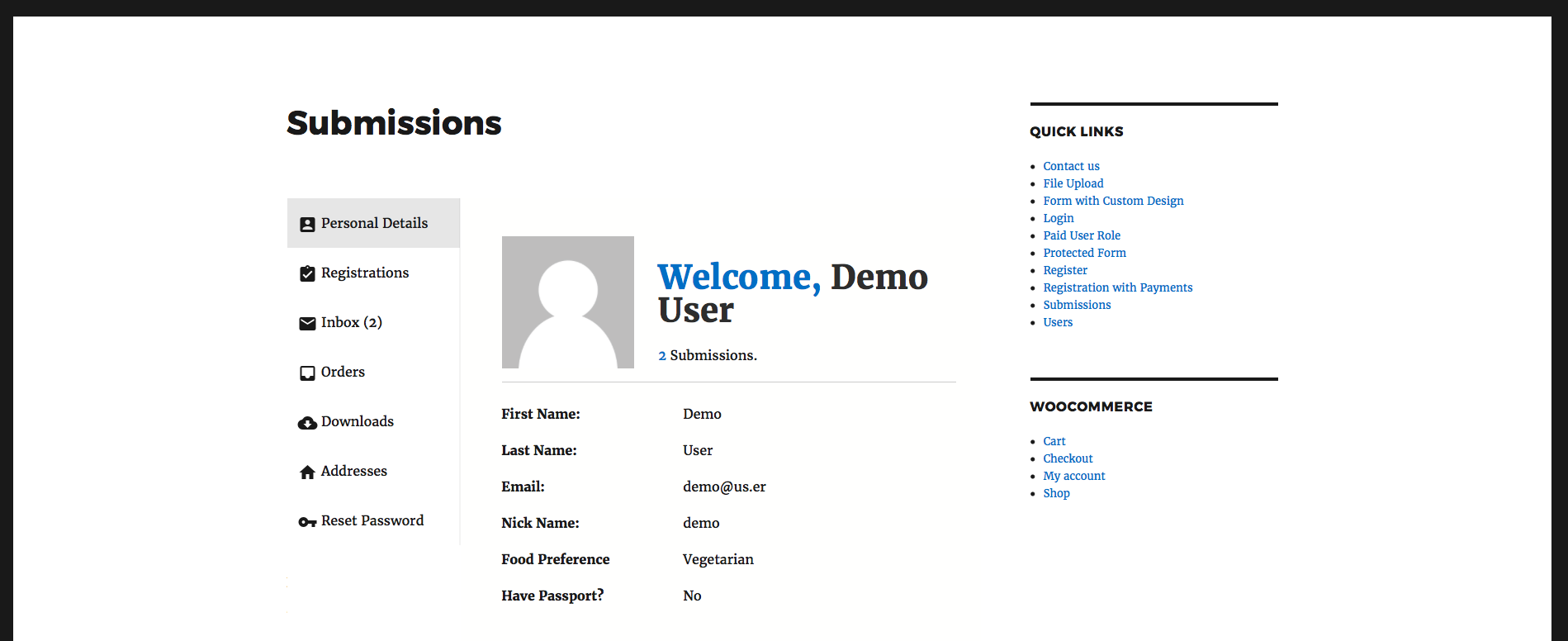
RegistrationMagic's User Account area with WooCommerce integrated. 
A multi-page user registration form styled using RegistrationMagic's visual form editor. 
Forms Manager with options to sort, delete and edit forms. 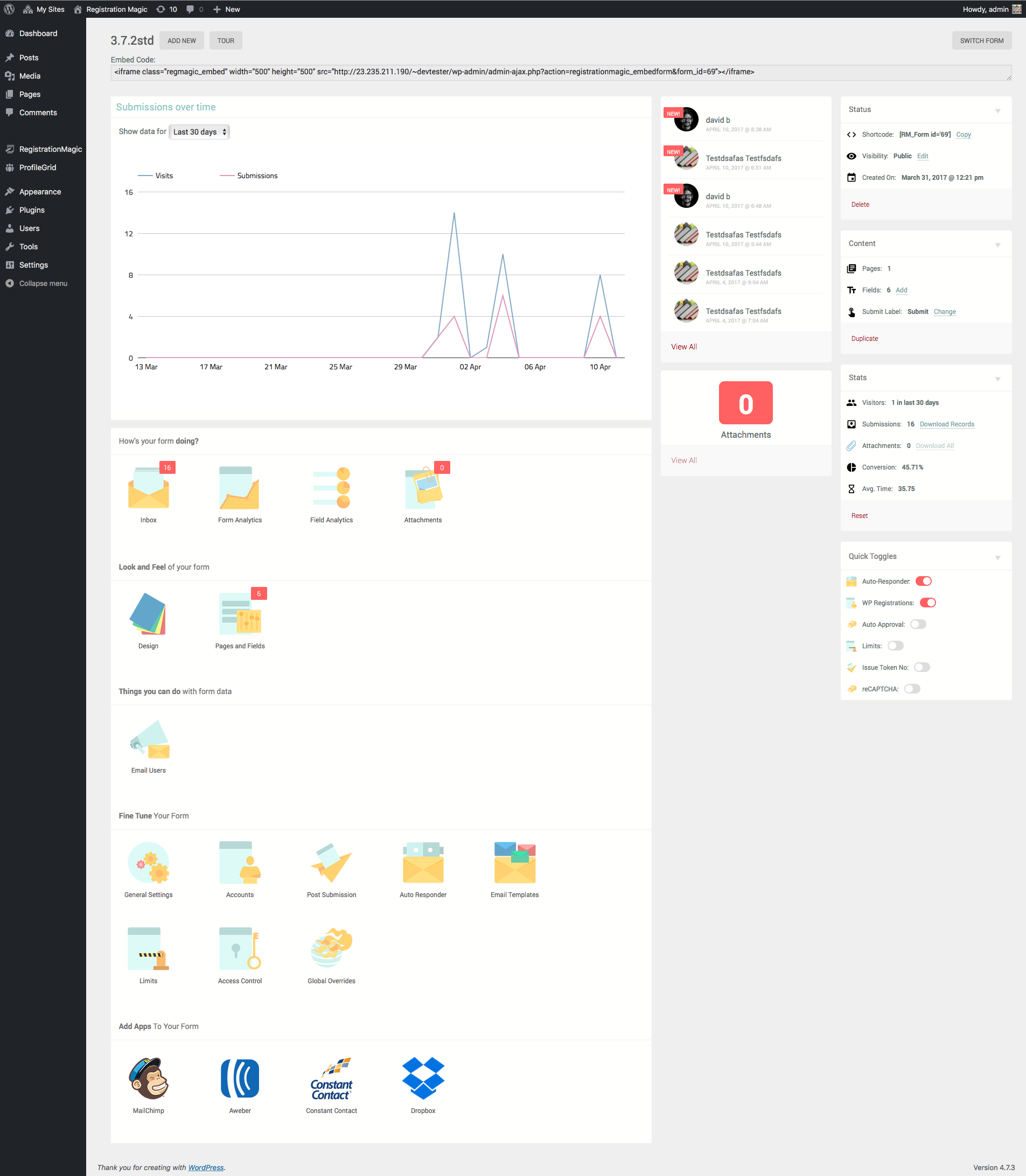
Individual Form Configuration. 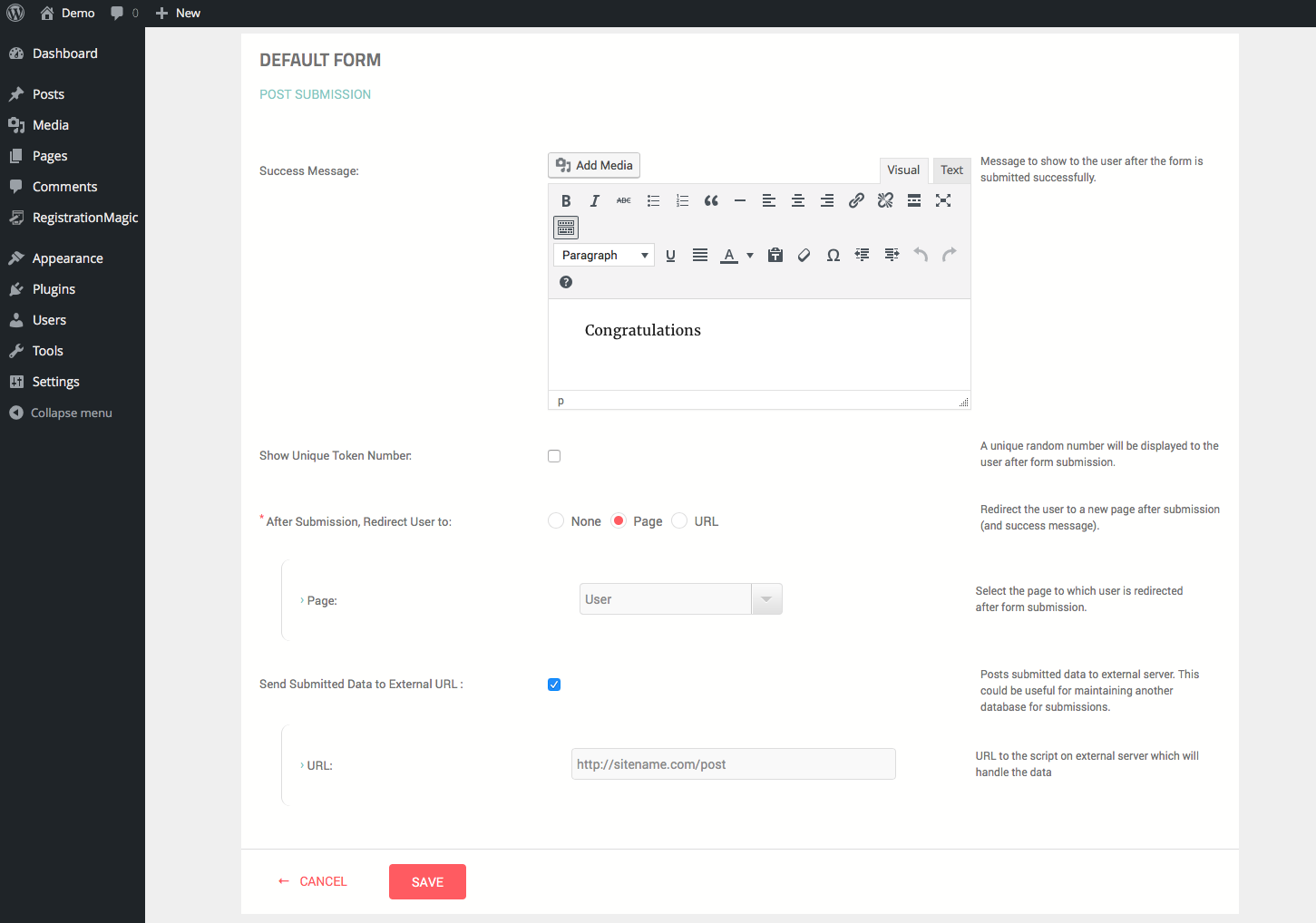
One of the form configuration panels. 
Form custom fields manager. 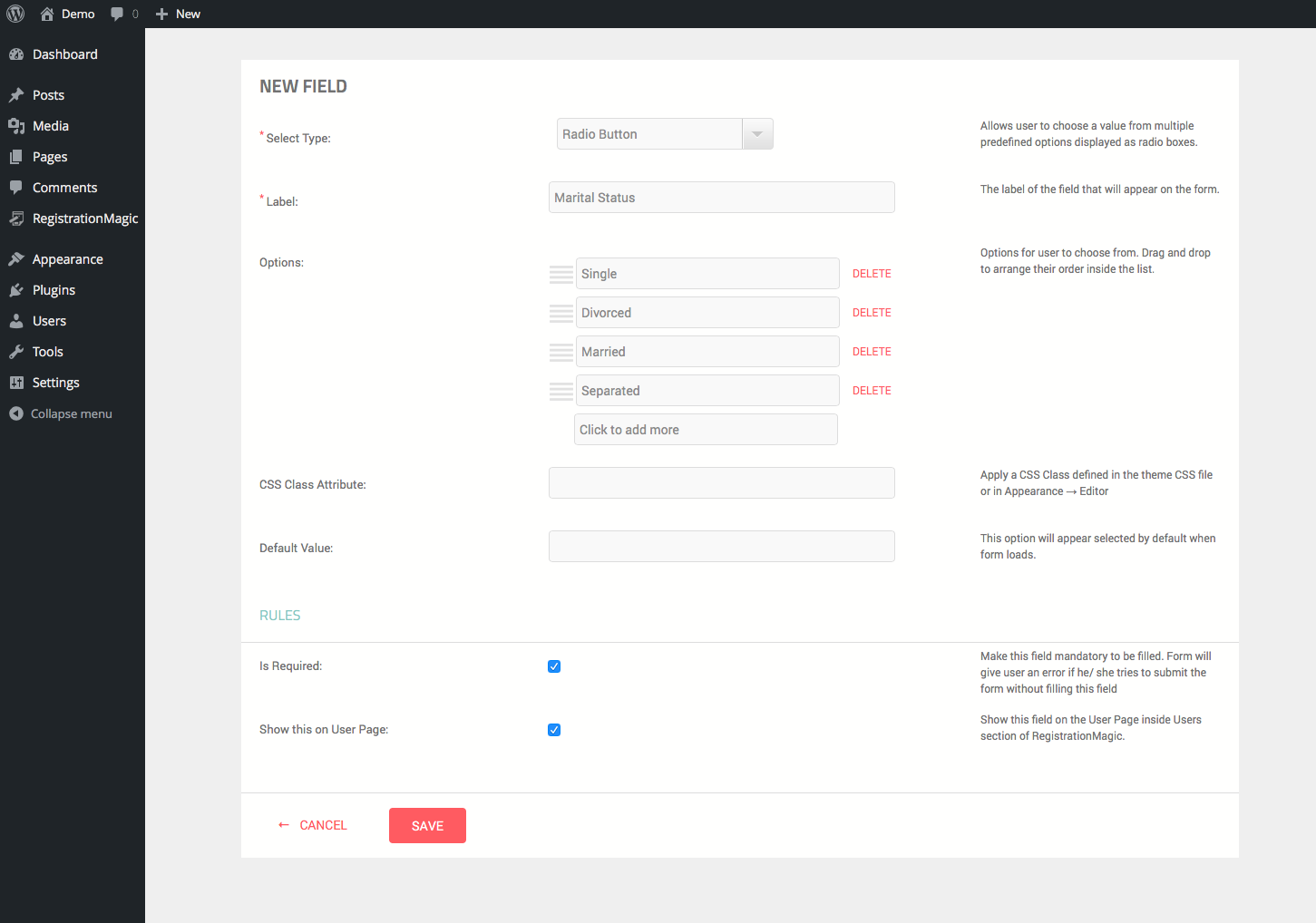
Custom field settings. Here's an example of radio box. 
Submissions Manager. Data hidden to preserve privacy. 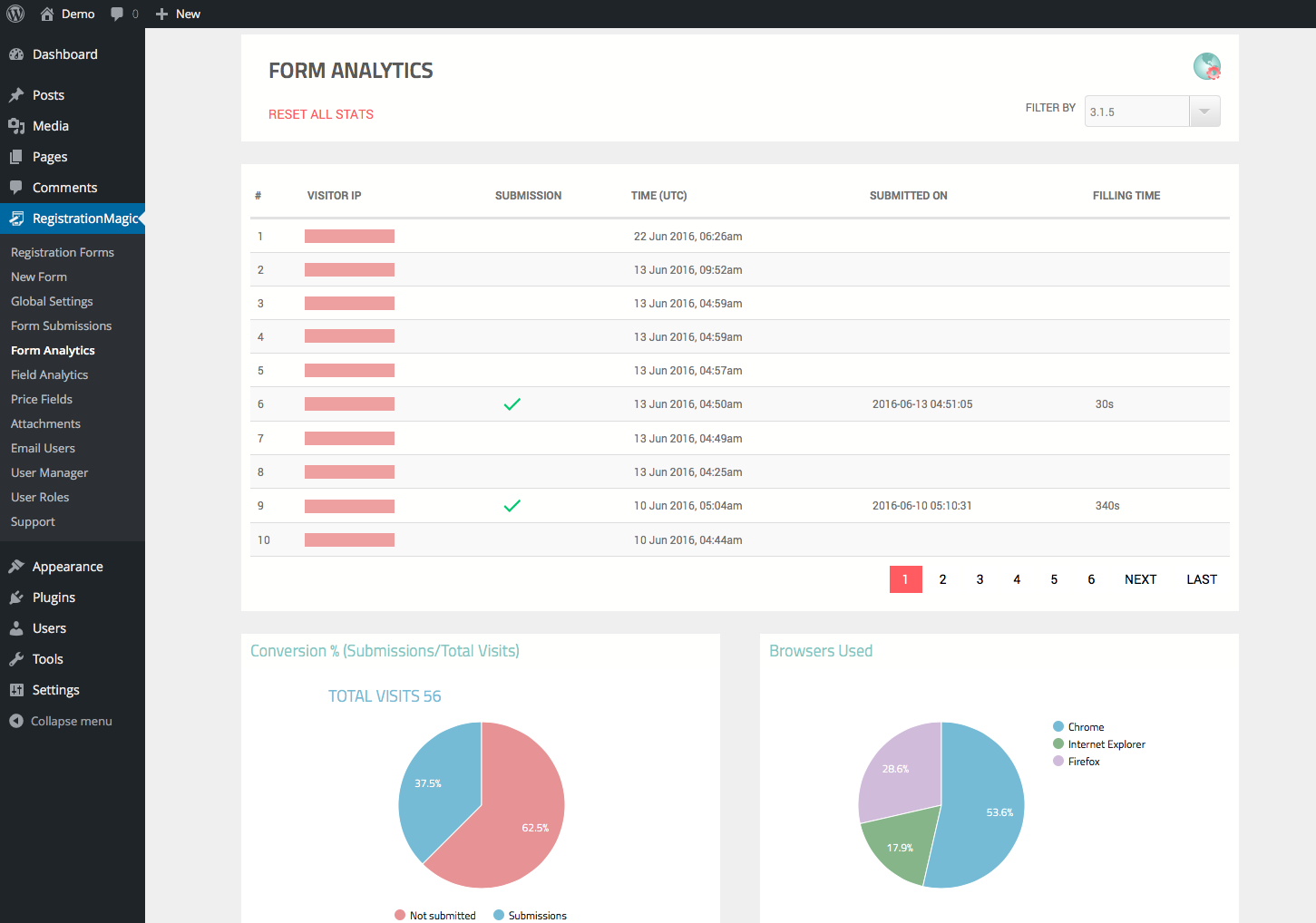
Form Analytics. IPs hidden for privacy. 
Field Analytics. 
Pricing Manager. 
Attachments Manager. 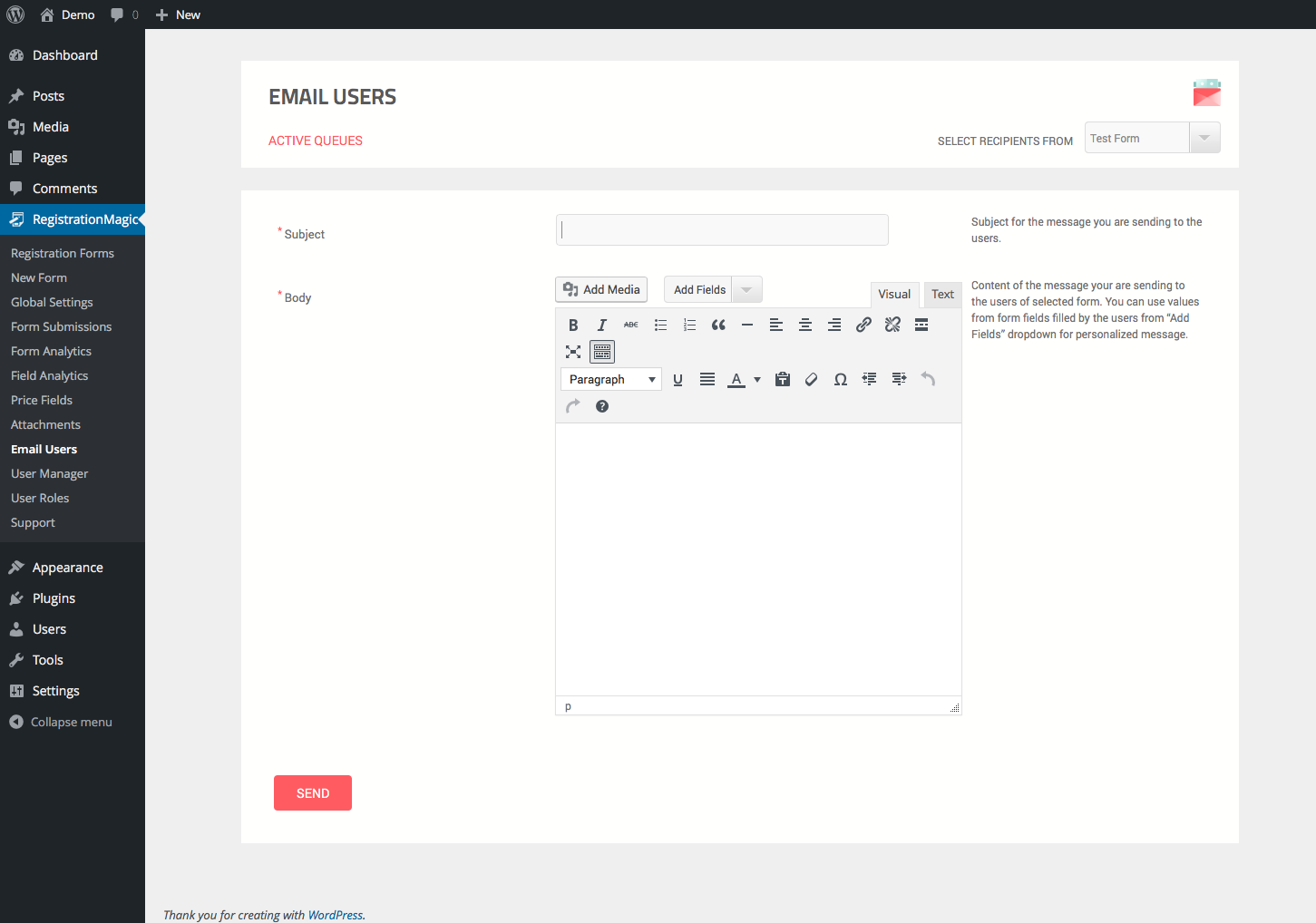
Email Broadcaster. 
Users Manager. 
User Roles Manager. 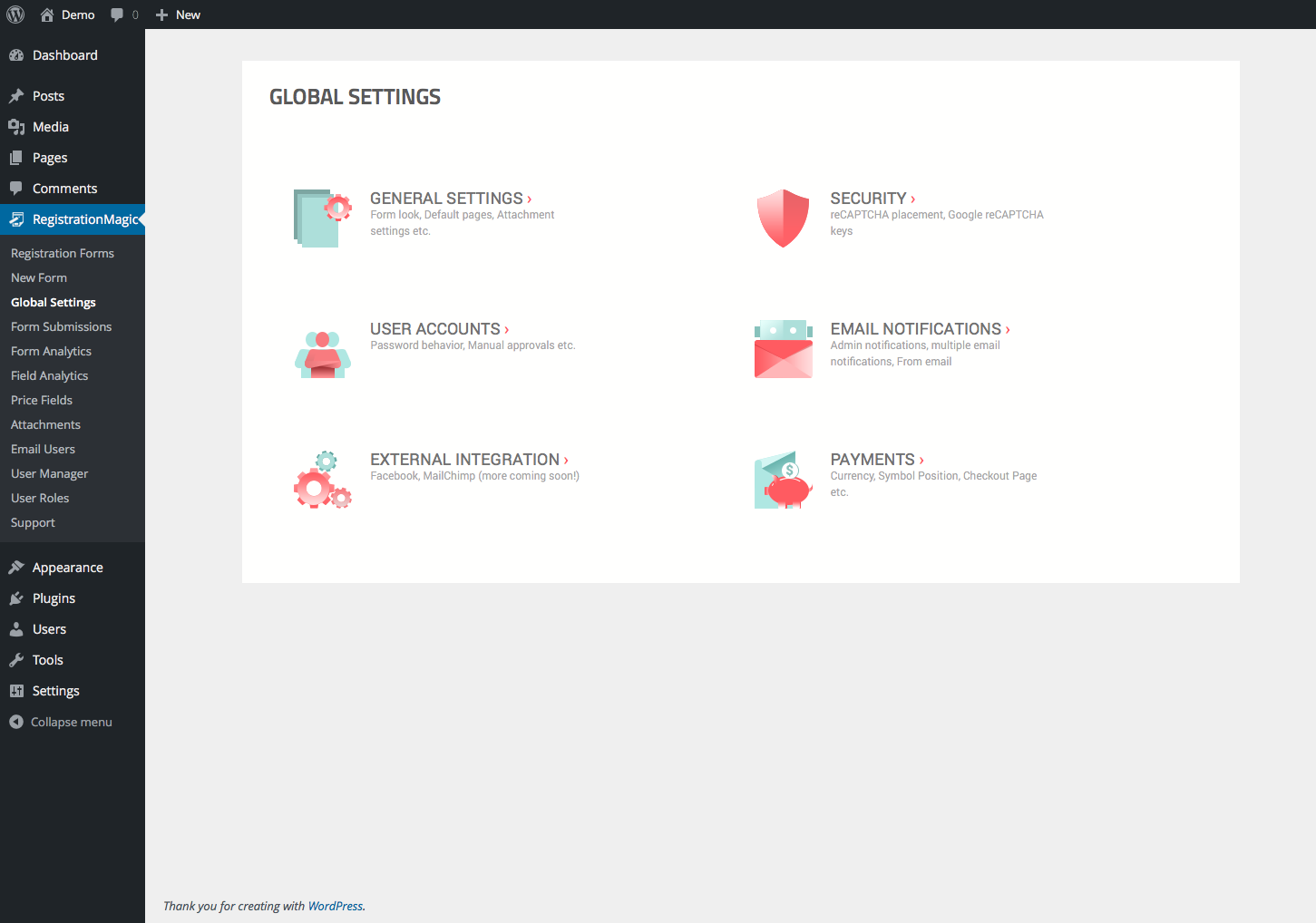
Global Settings.
Blokken
Deze plugin voorziet 4 blokken.
- Registration Form
- Submissions
- Login
- Users
Installatie
-
Download the plugin
-
Go to your Dashboard and locate Plugins tab. Click on Upload Plugin and specify the path of downloaded plugin in the text box.
-
Click on Activate Plugin
Detailed instructions can be found here:
Installation
FAQ
-
Q: I am seeing following error message when visiting the form: “Submission limit reached for this form, please try back after 24 hours”
-
Ans: This is an anti-spam measure built into RegistrationMagic. A form can be submitted only certain number of times from a given device within a period of 24 hours. You can define the limit from Global Settings → Security. Change the value of Form Submission Limit for a Device as required. Set the limit to zero in order to disable the feature altogether, i.e. allow unlimited submissions from a device.
Note that in RegistrationMagic Premium, a global override is also available for this setting in Form Settings → Global Overrides.
-
Q: “Access Denied” error when trying to view form?
-
Ans: Please make sure that you haven’t accidentally blocked your own IP address! Confirm it from Global Settings → Security → Banned IP addresses from accessing the form.
Also make sure that you are using latest version of RegistrationMagic, as this issue may arise from IPv6 connections, which were addressed in latest versions.
-
Ans: Most of the time this happens due to a javascript error from a third-party plugin or theme. You will need to check browser console and see if there are any errors pointing to a file outside of RegistrationMagic repository. If you are able to trace it to a plugin, try disabling it and reload the form.
Another reason can be minification of JS files and inline scripts. Disable these if you are using a plugin for minification and try again.
-
Q: Form reloads on submitting and all fields are emptied!
-
Ans: This may happen if you are using a caching plugin. RegistrationMagic form is a dynamic entity and many features such as analytics may not work properly if the form is served from a cached copy. You will need to exclude the form page from caching inside your cache plugin’s configuration. After, that Purge the cache and try again.
-
Ans: You can easily do it from Form Settings → Design. Once inside, click on the animating circle on the submit button. A panel will show up where you can change the button label along with color and numerous other attributes.
-
Q: I want to translate some text, how can I do it?
-
Ans: RegistrationMagic uses standard WordPress po/mo files for maintaining translations. You can use any po editor to translate. We recommend Loco Translate, since it is a free WordPress plugin and works directly from admin dashboard. Click here to get it
As a nice little trick you can even modify texts using this, for example label of username and password fields.
-
Q: Can I create early bird user registration forms with it?
-
Ans: RegistrationMagic allows you to set limits to your forms and render a different form once the limit has reached. Limit can be based on number of form submissions or a set date. To create early bird form system, you need to create two different forms – One for Early Bird user registration and the other one for regular user registration. Obviously, you can set different prices for them. After that, set limit on the early bird form by going to Form Card → Settings → Limits. Turn on ‘Auto Expires’, then define its limits. Below the limits, there’s an option ‘Post Expiry Action’. Select Display another form. A new drop down will appear below it. Choose your regular user registration form. Now go ahead and publish your early bird form and RegistrationMagic will take care of the rest 🙂
In fact you can daisy chain multiple forms like this to create a system of forms! It opens up a host of new possibilities.
-
Q: Can an already registered user resubmit a user registration form?
-
Ans: RegistrationMagic allows resubmission of user registration forms. Therefore it is possible for users on your site to register multiple times if you offer different user registration options.
-
Q: Can I create WordPress registration form with payment field?
-
Ans: Yes, you can create user registration WordPress form with payment option, which allows user registration only after payment has been received successfully. If payment is unsuccessful, user account will not be activated.
-
Q: Can I use PayPal with RegistrationMagic?
-
Ans: Yes, RegistrationMagic is a powerful WordPress PayPal payment plugin which allows adding multiple payment fields with configurable options in your forms.
-
Q: Can I use Stripe with RegistrationMagic?
-
Ans: Yes, Stripe integration is available in RegistrationMagic. Using pricing fields, you can create stripe checkout WordPress pages.
-
Q: Can I use RegistrationMagic for registering users for events?
-
Ans: RegistrationMagic offers general purpose user registration systems with multiple tools. It allows you to create virtually any type of user registration process. Therefore, it is possible to use RegistrationMagic for registering users for an event.
If you want more specialized event registration options like event bookings, be sure to try out our other plugin EventPrime. It integrates with RegistrationMagic to display RegistrationMagic’s user registration forms when users book tickets for an event.
-
Ans: RegistrationMagic integrates with two of the most popular newsletter plugins on WordPress – MailPoet and Newsletter. You can use anyone of them to subscribe users when they register through a RegistrationMagic form. Note, this functionality is limited to Premium version of RegistrationMagic.
-
Q: How can RegistrationMagic enhance my WooCommerce online shop?
-
Ans: RegistrationMagic combines with WooCommerce to add awesome new features to your ecommerce site. You can use a RegistrationMagic form as default user registration form when users register for your shop. It also displays during guest checkout process. Apart from this, if you have MagicPopup turned on, you can show cart inside one of its panels. MagicPopup updates cart contents in realtime. Please see the first screenshot below for a visual.
Note, this functionality is limited to Premium version of RegistrationMagic.
Beoordelingen


Bijdragers & ontwikkelaars
“RegistrationMagic – Custom Registration Forms, User Registration, Payment, and User Login” is open source software. De volgende personen hebben bijgedragen aan deze plugin.
Bijdragers

“RegistrationMagic – Custom Registration Forms, User Registration, Payment, and User Login” is vertaald in 2 talen. Dank voor de vertalers voor hun bijdragen.
Interesse in ontwikkeling?
Bekijk de code, haal de SVN repository op, of abonneer je op het ontwikkellog via RSS.
Changelog
5.3.2.2: April 16, 2024
- Fixed: Conflict with Avada Builder.
5.3.2.1: April 4, 2024
- Security updates.
5.3.2.0: March 23, 2024
- New: URL field type
- New: Option to change position of confirm password field.
- Security updates.
- Multiple bug fixes and UI improvements.
5.3.1.0: March 11, 2024
- New: Conditions on Product fields.
- Security updates.
- Multiple bug fixes and UI improvements.
5.3.0.0: March 1, 2024
- New: Updated All Forms view.
- Security updates.
- Multiple bug fixes and workflow improvements.
5.2.6.0: February 16, 2024
- Security improvements.
5.2.5.9: January 30, 2024
- Minor bug fixes.
5.2.5.8: January 27, 2024
- Minor UI Changes
5.2.5.7: January 20, 2024
- Performance related optimizations
- Multiple bug fixes and workflow improvements.
5.2.5.6: January 12, 2024
- UI Updates.
- Minor bug fixes.
5.2.5.5: December 30, 2023
- Fixed license activation issue.
5.2.5.4: December 29, 2023
- Fixed license activation issue.
5.2.5.3: December 21, 2023
- Added conditions support for Image Upload field. (Premium Only)
- Added currency support for Omani Riyal.
- Multiple bug fixes and workflow improvements.
5.2.5.2: December 12, 2023
- Added option to delete username field.
- Multiple bug fixes and workflow improvements.
5.2.5.1: December 5, 2023
- Added conditions feature to the File Upload field. (Premium Only)
- Improved compatibility with PHP 8.2.
- Security improvements.
- Minor bug fixes.
5.2.5.0
- Minor bug fixes.
5.2.4.9
- Minor UI changes and bug fixes.
5.2.4.8
- Minor UI changes and workflow improvements.
- Fixed minor bugs.
5.2.4.7
- Bug fixes.
5.2.4.6
- Added compatibility with WordPress 6.4.
- Minor UI changes and workflow improvements.
- Fixed minor bugs.
- Security improvements.
5.2.4.5
- Minor UI changes.
- Fixed minor bugs.
5.2.4.4
- Fixed issue with website field URL validation.
- Added option to rename Tax to any custom text.
- Added currency support for Indonesian Rupiah.
- Added localization for Stripe payment form. (Premium only)
- Minor UI and workflow changes.
5.2.4.3
- Minor UI changes.
5.2.4.2
- Security improvements.
- Fixed minor bugs.
5.2.4.1
- Fixed payment issue with paid user roles. (Premium Only)
- Updated Website field validation pattern.
- Made minor UI changes.
- Fixed minor functionality bugs.
5.2.4.0
- Introducing new design for User Manager in the admin dashboard.
- Introducing RegistrationMagic Gutenberg blocks.
- Fixed minor UI issues.
- Fixed minor bugs.
5.2.3.1
- Fixed Read & Unread links on backend Inbox page.
- Added new date range filter on backend Inbox page.
- Fixed issue with Invoice email not working properly. (Premium Only)
- Fixed field order issue on WooCommerce checkout form integration. (Premium Only)
- WooCommerce integrated form submission details will now appear on the frontend WooCommerce account page. (Premium Only)
- Security improvements.
- Fixed minor UI issues.
- Fixed minor bugs.
5.2.3.0
- Introducing new design for Inbox in the admin dashboard.
- Fixed user role pricing not appearing in the total price widget. (Premium Only)
- Fixed various minor bugs.
- Workflow improvements.
5.2.2.6
- Fixed bugs with user validation on form submission.
- Added password visibility icon on login form.
- Added option to edit user roles.
- Added new option to display custom status on frontend profile.
- Fixed bugs with Newsletter integration functionality. (Premium Only)
- Fixed various minor bugs.
- Workflow improvements.
5.2.2.5
- Added visibility conditions for Address fields.
- Fixed minor bugs.
- Workflow improvements.
5.2.2.4
- Workflow improvements.
5.2.2.3
- Usability Improvements.
- Added Documentation and relevant links.
- Tested with WordPress version 6.3.
5.2.2.2
- New: Custom Status labels launched to standard users (v5.2.2.0).
- Added: Pre-built custom statuses, products, and automation tasks for new forms (v5.2.2.1).
- Fixed: Backend UI for better visibility.
5.2.2.1
- Fixed: Multiple UI and functionality issues.
5.2.2.0
- Fixed: Minor UI and functionality issues.
5.2.1.9
- Fixed: Minor UI and functionality issues.
5.2.1.8
- Updated: Ordering of the default backend menu.
- Fixed: Minor UI and functionality issues.
5.2.1.7
- New: Added option to hide/show payment gateway selector on form.
- Fixed: Bugs in role based access to backend menus.
- Fixed: Multiple UI and functionality issues.
5.2.1.6
- Fixed: Minor UI and functionality issues.
5.2.1.5
- Fixed: Mobile field not accepting new valid mobile number patterns.
5.2.1.4
- Fixed: Minor UI and functionality issues.
5.2.1.3
- Security improvements.
5.2.1.2
- Fixed: Minor UI and functionality issues.
5.2.1.1
- Security improvements.
5.2.1.0
- New: Introducing new menu rearrangement feature, including menu renaming and role based access.
- Fixed: Minor UI and functionality issues.
5.2.0.5
- Fixed: Minor UI issues.
5.2.0.4
- Fixed: Minor UI and functionality issues.
5.2.0.3
- Fixed: Minor UI and functionality issues.
5.2.0.2
- New: Option added to set character limit for Username and Password on Login Form.
- Fixed: Minor UI and functionality issues.
5.2.0.1
- Fixed: Minor UI and functionality issues.
5.2.0.0
- Error resolved.
5.1.9.9
- New: Option to add default value for Textarea field.
- Updated: Admin menu reorganized.
- Fixed: Minor UI and functionality issues.
5.1.9.8
- Fixed: Submission data formatting in submission notification email.
5.1.9.7
- New: Added filter options on backend Payments page to allow search for specific payments.
- Fixed: Minor UI and functionality issues.
5.1.9.6
- New: Automation option added to change user role. (Premium Only)
- Updated: Submission dates now appear translated according to site language.
- Fixed: Login & Logout redirection issue.
- Fixed: Multi-page form traversal issue with Privacy Policy field. (Premium Only)
- Fixed: Minor UI and functionality issues.
5.1.9.5
- Updated: Text formatting can now be used for Privacy Policy field content.
- Updated: The placeholder {{SUBMISSION_DATA}} is now supported in post submission email to user.
- New: Option added to set minimum number of characters for a field.
- Fixed: Minor UI and functionality issues.
5.1.9.4
- Multiple issue fixes.
5.1.9.3
- Security improvements.
5.1.9.2
- Fixed: Minor UI and functionality issues.
5.1.9.1
- New: Added option to display more than 10 submissions in Inbox.
- New: Added option to allow search in Dropdown field.
- Fixed: Minor UI and functionality issues.
5.1.9.0
- Updated: Usability improvements for Payment System and status updates.
- Fixed: Minor UI and functionality issues.
5.1.8.9
- Fixed: Minor UI and functionality issues.
5.1.8.8
- Fixed: Minor UI and functionality issues.
5.1.8.7
- New: Added option to set default value for text and number fields.
- Updated: WooCommerce address fields will now automatically have the store’s country & state values selected.
- Fixed: Minor UI and functionality issues.
5.1.8.6
- Updated: Security enhancements.
- Fixed: Minor UI and functionality issues.
5.1.8.5
- Fixed: Minor UI and functionality issues.
5.1.8.4
- New: Added feature to disable ProfileGrid User Profile page on RegistrationMagic User Profile page.
- New: Added feature to set min/max quantities for products. (Premium Only)
- New: Added feature to select default payment option. (Premium Only)
- Updated: New PayPal API integration.
- Fixed: Multiple UI and functionality issues.
5.1.8.3
- New: Select all checkbox to select all users on the User Manager backend with one click.
- Updated: Inbox backend will now display submissions from the latest active form.
- Fixed: Multiple UI and functionality issues.
5.1.8.2
- Fixed: Compatibility issues with WordPress 6.1.
5.1.8.1
- New: Added option to hide/show RegistrationMagic account link on WooCommerce account page. (Premium Only)
- New: Login form will now display if a form’s access is limited to specific user roles. (Premium Only)
- Fixed: Multiple UI and functionality issues.
5.1.8.0
- Added: Support for more data-type context options in field conditions.
- New: Feature added to make any form field as an admin only field. (Premium Only)
- New: Form template for Job Application.
- Fixed: Multiple UI and functionality issues.
5.1.7.8
- Updated: PHP 8 compatibility.
- Fixed: Multiple UI and functionality issues.
5.1.7.6
- Fixed: Multiple UI and functionality issues.
5.1.7.5
- New: Added option to set tax payment with form submission payments.
- Updated: Design improvements to the drag & drop form builder.
- Updated: Form builder now displays row heading and description.
- Fixed: Multiple UI and functionality issues.
5.1.7.2
- Minor UI fixes.
5.1.7.1
- Issue Fixes
5.1.7.0
- New: Feature added to duplicate form rows!
- New: Ability to schedule emails with selected report as attachment! (Premium Only)
- New: ProfileGrid Avatar field that uploads image to user profile page along with form submission. (Premium Only)
- Fixed: Multiple UI and functionality issues.
5.1.6.9
- Minor UI fixes.
5.1.6.8
- Fixed: Multiple UI and functionality issues.
5.1.6.7
- New: Now you can drag and drop fields between different columns or swap positions with other fields! Just drag any field above an empty column area to move, or above an existing field to swap positions.
- Fixed: Multiple UI and functionality issues.
5.1.6.6
- Minor UI fixes.
5.1.6.5
- Fixed: Multiple UI and functionality issues.
5.1.6.4
- Added: New ‘Default’ theme option in Global Settings.
- Added: Hide/show icon on the password field.
- Updated: User activation email for admin will now go to all admins defined in the Global Settings. (Premium Only)
- Fixed: Multiple UI and functionality issues.
5.1.6.3
- New: Now you can schedule Automation tasks to run after fixed intervals!
- Fixed: Multiple UI and functionality issues.
5.1.6.2
- Minor UI fixes.
5.1.6.1
- Added: New option to set file size limit for file upload field. (Premium Only)
- Fixed: Multiple UI and functionality issues.
5.1.6.0
- New: Introducing Reports! Reports allow you to generate and download spreadsheet-friendly data collected from your forms.
- Fixed: Multiple UI and functionality issues.
5.1.5.8
- Fixed: Multiple UI and functionality issues.
5.1.5.7
- Added: Two new Overview widgets.
- Added: Welcome popup in the Overview dashboard for new users.
- Fixed: Multiple minor UI and functionality issues.
5.1.5.6
- Added: More form templates!
- Fixed: UI issues and functionality issues.
5.1.5.5
- Fixed: Limited Product loading issue in the backend.
- Fixed: Icons and redirection in form wizard.
- Fixed: UI issues.
5.1.5.0
- New: Overview screen which provides bird’s eye view of all activities.
- New: Form creation wizard for easier form creation process with important options.
- New: Introducing form page reordering system in new form builder. (Premium Only)
- Fixed: UI issues.
5.1.2.4
- Fixed: Minor UI issues.
5.1.2.3
- Fixed: Issue with Field Deletion in Duplicated Forms.
- Removed: Placeholder Option from Mobile Field. (Premium Only)
- Minor UI Improvements.
5.1.2.2
- Added: Option to Set Custom Prefix for Form File Uploads. (Premium Only)
- Minor UI Improvements.
5.1.2.1
- Added: More Form Templates!
- Updated: Template Selection Modal UI & UX.
- Fixed: Email as Username Issue. (Premium Only)
- Fixed: Page Reordering Issue in Legacy Builder. (Premium Only)
- Minor UI Improvements.
5.1.2.0
- New Feature: Custom User Area Tabs.
- Added: Tour functionality for Form Templates.
- Updated: Stripe checkout page design. (Premium Only)
- Minor bug fixes and functionality improvements.
5.1.1.1
- Minor bug fixes.
5.1.1.0
- New: Introducing form templates! Now you can quickly create new ready-to-use forms with few simple clicks. More templates on the way.
- Multiple UI changes and bug fixes.
5.1.0.0
- New: Drag and Drop form builder system!
- Info: Forms built using version 5.0.2.4 and below will continue to work using old builder.
- Info: New forms will support new row and column based builder.
5.0.2.4
- Added: Currency option for Romanian Leu.
5.0.2.3
- Minor CSS improvements.
5.0.2.2
- Fixed: Chart loading conflict with Google Site Kit.
- Fixed: Loading issue with ‘RM_Users’ shortcode.
- Fixed: User activation by admin approval through email. (Premium Only)
- Added: Mark selected submission(s) as unread from Inbox. (Premium Only)
- Updated: Security workflow for task automation.
- Updated: Stripe checkout process. (Premium Only)
- Other minor bug fixes.
5.0.2.1
- Fixed: Issue with login form and user profile not loading in some cases when Premium is activated.
- Other minor bug fixes.
5.0.2.0
- Improved handling of AJAX requests.
- Minor bug fixes.
5.0.1.9
- Security fixes.
5.0.1.8
- Improved security.
5.0.1.7
- Fixed: Issue with an icon not appearing in login timeline.
5.0.1.6
- Fixed: Error messages appearing after submitting forms with payments.
- Updated: Social login process for enhanced security.
- Updated: User input sanitization for Automation Tasks.
- Added: Permanent removal option for admin notice of WooCommerce & RegistrationMagic integration. (Premium Only)
5.0.1.5
- Fixed: Issue with form rendering on the frontend.
5.0.1.4
- Fixed: An issue where an empty field may return warning while sending admin alert email.
5.0.1.3
- Minor UI, workflow & security updates.
5.0.1.2
- Improved code security.
- Multiple minor UI/UX changes.
5.0.1.1
- Fixed: Loading issue while publishing form using HTML code.
- Added: Total Amount option to form auto-responder email.
- Added: Ukrainian language to the Language field. (Premium Only)
- Updated old jQuery code to new format.
- Multiple UI changes and issue fixes.
5.0.1.0
- Minor UI changes and issue fixes.
5.0.0.9
- Fixed: Form submission conflict issue with TranslatePress plugin.
- Multiple UI issue fixes and changes.
5.0.0.8
- Fixed: User login issue after account activation by email. (Premium Only)
- Minor UI fixes.
5.0.0.7
- Fixed: Conflict with ‘User Switching’ plugin when switching to another user.
- Fixed: WP Toolbar conflict with ‘Elementor Website Builder’ plugin.
- Minor UI & functionality changes.
5.0.0.5
- Fixed: Form functionality issues.
5.0.0.4
- Fixed: User activation issue with PayPal payments.
- Updated: Better cache handling for form previews.
- Fixed: Minor UI issues.
5.0.0.3
- Fixed: Tour Functionality in the RegistrationMagic Admin Panel.
- Fixed: Meta key issue with Date Fields.
- Fixed: Color Options in Form Design Panel.
- Fixed: Stripe Payment Issue. (Premium Only)
- Fixed: Minor UI Issues.
5.0.0.2
- UI Changes.
5.0.0.1
- Minor Issue Fixes.
5.0.0.0
- Improved: Code framework.
4.6.4.1
- New Feature: Added Phone Field for MailChimp Field Mapping.
- New Feature: Added MailChimp Double Opt-in Option.
- New Feature: Added Time Option to Form Date Limit Setting.
- New Feature: Added IP and Browser Details to Submissions Export CSV. (Premium Only)
- New Feature: Added HTML Formatting to Custom Status Emails. (Premium Only)
- Fixed: New User Activation Link Expiry Issue. (Premium Only)
- Fixed: Password Field Special Characters Validation Issue.
- Other Minor Fixes.
4.6.4.0
- CSS fixes
4.6.3.9
- New Feature: Added option in Global Settings -> General Settings to hide/show WP toolbar for admin users.
- New Feature: Added option to send password reset link within the new user registration email for newly registered users.
- Fixed: Stripe payment amount round-off issue. (Premium Only)
- Fixed: Minor UI issues.
4.6.3.8
- Updated: Hide toolbar feature will now hide the toolbar for admins as well.
- Fixed: Minor user input issues.
4.6.3.7
- Fixed: Issue with saving option changes in backend on certain website configurations.
- Fixed: Minor payments related issues.
- Updated: Form submission time will now appear in the timezone of the website.
- New Feature: Added option to change payment status of multiple submissions to ‘Complete’ based on selection. (Premium Only)
4.6.3.6
- New Feature: Email confirmation field. Enabled from primary email field settings.
4.6.3.5
- Fixed: Form submit button issue with field validation error.
- Fixed: Duplicate element IDs on login view.
- Fixed: Multiple minor UI issues.
- Updated: Multiple UI helptexts.
- Updated: Stripe payment processor for SCA readiness. (Premium Only)
4.6.3.0
- Fixed: Hide user avatar functionality on frontend logged in view.
- Fixed: Offline payment email HTML formatting. (Premium Only)
4.6.2.9
- Fixed: Admin tool panel links.
4.6.2.8
- Fixed: Minor UI issues.
4.6.2.7
- Fixed: ‘Delete’ link on user details page to delete the user.
- Fixed: Minor CSS issues on frontend.
4.6.2.6
- Added additional filtration of input on view files
- Minor design issue fixes
4.6.2.5
- Fixed issue with form field custom class with field conditions applied
- Minor design updates
4.6.2.4
- Minor design updates
4.6.2.3
- Editing WooCommerce Billing and Shipping Address from Form Submission will now update them in User Meta as well.
- Added Croatian Kuna currency option.
- Added Kansas State flag.
- Minor design fixes.
- Added option to change payment status manually if it is in Pending state. (Premium Only)
4.6.2.2
- Removed plugin feedback form
- Fixed Error with Newsletter Integration on Form Submission (Premium Only)
4.6.2.1
- Fixed Issue with Health Check Troubleshoot Feature
4.6.2.0
- Minor Fixes
4.6.1.9
- Fixed Delete Issue with Username and Password Fields
- Added Option in T&C Field to Show Checkbox Above or Below T&C Text
- Fixed Issue with Stripe Payment Description (Premium Only)
4.6.1.8
- Fixed Email Issue with Post SMTP Plugin
- Fixed Issue with Instagram Login (Premium Only)
- Fixed Issue in Export Submission CSV with Time Filter (Premium Only)
4.6.1.7
- Minor CSS fixes
4.6.1.6
- Fixed Auto-login Issues
- Fixed Common Login Redirection Issues
4.6.1.5
- Improved Session Handling
- Magic Popup Button UI Improvements
4.6.1.4
- Fixed Redirection Issues
4.6.1.3
- Fixed RegistrationMagic Login on Modals and Popups
- Fixed Logout Redirection
- Fixed Multipage Submission Editing (Premium Only)
- Fixed Temporary IP Ban In Case of Repeated Failed Login Attempts (Premium Only)
4.6.1.2
- Fixed File Upload Field Issues
- Fixed Radio and Checkbox Field Required Option Issues
4.6.1.1
- Added option to customize error message for Invalid Submission Access
- Minor UI changes
4.6.0.9
- Fixed Map Field Focus Issue (Premium Only)
- Added Form ID, Submission ID, Form Name, Date and Time of Submission in Submission PDF (Premium Only)
- Fixed Submission PDF Logo Issue (Premium Only)
- Fixed User Account Activation Issue with User Role Choice (Premium Only)
- Fixed Conditional Field Issue with Previous Value
- Fixed Error Message Design Issues
- Security Enhancements
4.6.0.8
- Fixed WePay Transaction Log Issues (Premium Only)
- Fixed Text Formatting Issues in User Activation and User Verification Emails (Premium Only)
- Fixed Issue with ‘Less Than’ Conditional Logic on Form Fields
- Fixed Issue with Same Field OR Conditions on Form Fields
- Added Assignment of New User Meta for Address Field and Display it on User Profile
- Fixed PHP 7.4 Compatibility Issues
4.6.0.7
- Fixed Translation Issue with Inbox Property Filters (Premium Only)
- Fixed Provisional Login with Activation Link (Premium Only)
- Fixed Lost Password Link on Login Form & Widgets
- Fixed Login Form Design Issues
4.6.0.6
- Fixed Newsletter Integration Issues (Premium Only)
- Fixed Authorize.net Integration Issues (Premium Only)
- Fixed User Meta Issues with Number and Date Fields (Premium Only)
- Minor Design Changes & Bug Fixes
4.6.0.5
- Compatibility fixes.
- Fixed an issue where html was formatted as plain text in display fields.
- Fixed an outgoing email formatting issue.
- Fixed URLs for auto-created login and submission pages.
4.6.0.4
- Added additional access checks.
4.6.0.3
- Multiple security fixes
4.6.0.1
- Users Page Verification #1310
- Help Text Verification in Conditions Page[Advance Conditions] #766
4.6.0.0
- Multiple bug fixes and improvements.
4.5.9.3
- Design changes to match WordPress 5.3 dashboard design update.
4.5.9.2
- CSS Fix
4.5.9.1
- Translation Improvements.
- Minor bug with Mobile field.
- Premium plugin update notification fix. (Premium Only)
4.5.9.0
- Admin toolbar visibility fixes.
- Kosovo Added in country dropdown Menu.
- Translation related fixes.
- Edit Submission button label fixes.
- Custom Hook added to modify file name and path uploaded in Dropbox. (Premium Only)
- PDF fixes in User Manager (Premium only).
4.5.8.3
- Translation improvement.
- Conditional fields fix for special characters.
- Submission filter improvement in Dashboard. (Premium only)
- UI Improvements.
4.5.8.2
- Password recovery page option fix.
4.5.8.1
- Now inherits User Display Name from first name and last name fields.
- Added option to hide MagicPopup styling settings for Admins.
- Improved Multipage form navigation (Premium only)
- Improved Dashboard User Manager filtering.
- Password Reset email notification save issue (Standard only).
4.5.8.0
- New frontend password recovery features.
- Formatting issue with comma-separated field values.
- CSS classes added to modify the appearance of RM Submissions tabs.
- Previous button removed from the first page of the form. (Premium Only)
- Translation improvement to handle special characters.
4.5.7.5
- Hook improvements to attach new elements in Front Submissions page.
- Reset stats in dashboard fixed.(Premium Only)
- Submission ID included in Stripe payment information. (Premium Only)
- Fixed Authorize.net after submission message issue. (Premium Only)
- Fixed Login with Instagram bug. (Premium Only)
4.5.7.4
- We made it easier for you to add form field data to User Meta through Field Options.
4.5.7.3
- Admin UI improvements.
- Fixed password JS loading issue.
- reCaptcha language from WordPress locale setting.
- Updated TCPDF library for better support in different PHP versions. (Premium Only)
- Billing address included in authoriz.net payment. (Premium Only)
- {{SEND_VERIFICATION_LINK}} issue resolved for email template. (Premium Only)
- Improved error handling for Stripe payments. (Premium Only)
4.5.7.2
- UI Improvements in admin area
- Changes to sample form
- New eSignature field added!
4.5.7.1
- Countries list updated.
- PDF Improvements.
4.5.7.0
- Added relevant links to related settings within the plugin making workflow simpler.
- Relabeled ‘Email Notifications’ icon in Global Settings.
- Minor usability fixes.
4.5.6.5
- Strong Custom Authentication integrated with Stripe. (Premium Only)
- Fixed a user activation bug.
- Minor string improvements.
4.5.6.4
- User deletion popup added.
- Admin’s email address in Email Template added.
- Security fix in role selection from the registration form. (Premium Only)
- Fixed page refresh issue experienced by some users during first login attempt.
4.5.6.3
- Fixed form dashboard popup issue.
- Fixed links on support pages.
- Minor CSS fixes.
4.5.6.2
- Multi UI improvements.
- Improved Graphs in Form Dashboard.
4.5.6.1
- Usability improvements.
- Default Page option saving issue in User Account. (Standard only)
- “Next” button translation included for multi-page forms. (Premium Only)
- Fixed conditional field validation bug on WooCommerce My Account page. (Premium Only)
4.5.6.0
- Frontend theme compatibility fixes.
- Improved LinkedIn compatibility (Premium Only).
4.5.5.0
- Edit submission hook added.
- Merge code/ Placeholder added for Site URL in New User email.
- Submission Unique ID column added in Profile Grid’s profile view (Premium Only).
- Dropbox integration improved (Premium Only).
- Merge Codes/ Placeholders added for Unique Token and Submission ID in custom status emails (Premium Only).
4.5.4.1
- Fixed support links
4.5.4.0
- Fixed time-out issue when trying to edit files via wp-admin/theme-editor.php
- Username and Password fields added in auto responder email body.
- Added Filter to disable sending of New User/Password.
- Fixed JS error while using reCaptcha.
- Fixed an issue with login form and application form in the same page reported by user anjanphukan here.
- Unique ID column added in My Accounts section. (Premium only)
- Added Email domain based restriction. (Premium Only)
- Improved ProfileGrid integration.
- JS improvement to handle form reloading when browser back button is used.
4.5.2.2
- PayPal IPN improvements.
4.5.2.1
- UI Fixes
4.5.2.0
- PHP warning handled in Address field.
- Login failure handling with WooCommerce login page.
- Fixed Bulk email bug.
- Fixed Price widgets bugs.
- UI Improvements.
- IE 11 compatibility fixes.
- Added reCAPTCHA 3 support.
4.5.1.2
- fixed an issue with submit button label editing
- MailPoet 3 Integration (Premium Only)
4.5.1.1
- Fixed: Form preview bug when ProfileGrid is active.
- Fixed: Product multi select issue.
- UI Improvements.
4.5.1.0
- Usability improvements
4.5.0.0
- Backward compatibility fixes for earlier versions of PHP (5.3, 5.4, 5.5).
- Label updates
4.4.0.2
- We have made form creation process simpler.
- Custom fields are now more efficiently organized.
- Other usability fixes.
4.4.0.1
- Translation improvements.
- UI Improvements.
4.4.0.0
- New: Introducing a brand new dashboard color theme! Offers more contrast and is closer to default WP dashboard design language.
- Fixed: PHP warnings and notices.
- Fixed: Cancel button redirection from Global Setting options.
- Fixed: Plugin’s WooCommerce My Account page template removed for better translation support. (Premium Only).
4.3.2.6
- Improved help texts.
- Map field issue in Multipage forms (Premium).
- Login/Logout redirection filters added.
- Role based redirection issue.
4.3.2.5
- CSS Improvements.
- Material icon issue fixed.
- Front end js code bug fixed.
- WordPress 5.0 compatibility.
4.3.2.4
- Constant contact integration discontinued. (Premium only)
- Help page changes.
4.3.2.3
- Improved: Login error message handling.
- Improved: CSS Optimization.
- Improved: Outlook SMTP compatibility.
- Improved: Submission verification page appearance.
- Improved: Helptexts.
- Improved: provisional account activation. (Premium Only)
4.3.2.2
- Link fixes
- Password strength JS variables fix
4.3.2.1
- Fixed: Submission countdown widget for fresh installation.
- Fixed: Conditional field Radio button.
- Fixed: Conditional field with ‘contains’ operator.
- Improved: Token number visible after form submission. (Premium Only)
- Fixed: reCaptcha visible on WooCommerce checkout and MyAccount page.
- Fixed: Form fields won’t be visible within My Account if guest checkout is enabled. (Premium Only)
- Compatibility fixes and other improvements.
4.3.2.0
- Reduced plugin size with Image optimization.
- CSS fixes and optimizations
- SVG replacement for front-end icon font.
- Fixed: Conflict with User Submitted Post plugin.
- Fixed: Duplicate cron issue.
- New: Aweber Integration.
4.3.1.2
- Fixed: Autoresponder Helptext
4.3.1.1
- UI String Improvements
4.3.1.0
- Fix for login and logout default redirection issue.
- Fix for RichText field formatting on front-end.
- “Add form option” in editor will be available only for admin.
- Sync default user role with WordPress.
- Added “Privacy Policy” string for translation.
4.3.0.2
- Fixed: Multiple site activation warnings
- Asset size reduced
4.3.0.1
- Fixed: Client side form validation issue
4.3.0.0
This new release brings much requested WooCommerce fields to standard version and adds multiple user privacy controls for compliance with local privacy laws.
* New: Add WooCommerce Billing Field to your forms
* New: Add WooCommerce Shipping Field to your forms
* New: Add WooCommerce Billing Phone Number Field to your forms
* New: Privacy Policy Field
* New: Link Privacy Policy field with your privacy policy page
* New: Privacy section in Global Settings
* New: Option to delete all recorded personal user data
* Added: Full integration with WordPress Export Personal Data
* Added: Full integration with WordPress Export Personal Data
* Other small fixes and improvements
4.2.1.0
- Improved: PHP 7 compatibility
- Added: Custom Hooks for submission completion, User sign in, Sign in failure
- Added: Portuguese language files
- Fixed: WP Fastest cache conflict
- Fixed: Twitter integration issues (Premium only)
- Fixed: Instagram integration issues (Premium only)
- Fixed: Constant Contact fatal error (Premium only)
4.1.2.0
- Fixed: PHP Syntax issue
- Fixed: Security issue related to username
- Fixed: Sample form issues
4.1.2.0
- Improved:Language files.
- Improved: Access control disabled in Submission Edit Mode.(Premium Only)
- Improved: Login dashboard intro pop up visibility.
- Fixed: Confirm Password verification.
- Fixed: PHP warning in Global Setting’s security page.
- Fixed: Import form fields.
4.1.0.0
- Fixed: Product creation issue.
- Fixed: Username and Password field bug.
- Fixed: Field design issues.
- Improved: Translations.
- Added: Dashboard SSL warning for insecure Facebook login integration.
4.0.1.0
- Improved: Login Dashboard help-texts.
- Fixed: Few Login bugs
- Fixed: Edit submission while editing password protected form.
- Fixed: Limit restriction removed while editing submission.
- Fixed: Admin user excluded from automation.
- Fixed: Facebook login.
4.0.0.0
- Improved: Login System has been …